Quick answer
Omarchy is an opinionated, Arch-based Linux distribution built around Hyprland and Quickshell. Its goal is to give you a polished, keyboard-first, highly customizable desktop immediately instead of asking you to assemble an Arch environment piece by piece.
It is not simply a theme pasted over Arch. Omarchy has its own ISO installer, package repository, Arch mirror, update channels, migrations, recovery workflow, desktop shell, configuration conventions, plugin system and agent integrations. At the same time, it remains recognizably Arch underneath: pacman, Arch packages, the AUR when you choose to use it, rolling-release foundations and a system you can inspect and modify deeply.
Omarchy is most compelling for developers, Linux enthusiasts and power users who like tiling window managers, keyboard-driven workflows and the idea of using AI agents to help configure or troubleshoot the operating system. It is much less compelling if you want a conventional Windows-like desktop, need maximum compatibility with specialized commercial software, depend on a particular X11-only workflow, or simply do not want to learn a new way of using a computer.
The shortest useful verdict: Omarchy is unusually easy to get into for an Arch-based system, but it is not designed to feel familiar. It reduces setup work; it does not eliminate the Linux learning curve.
Omarchy at a glance
| Item | Current position |
|---|---|
| Latest stable release reviewed | Omarchy 4.0.4 |
| Release family | Omarchy 4 / Quattro |
| Base | Arch Linux |
| Window manager / compositor | Hyprland |
| Desktop shell | Quickshell-based omarchy-shell |
| Package foundation | pacman + Omarchy Package Repository + Omarchy Arch Mirror |
| Optional community packages | AUR |
| Default terminal | Foot |
| Other integrated terminals | Alacritty, Ghostty, Kitty |
| Default browser | Chromium |
| Default editor | Neovim |
| Update channels | stable, RC, edge, dev |
| Stable Arch mirror policy | roughly one month behind current Arch |
| Recovery | automatic system snapshot before Omarchy updates |
| Disk encryption | default and strongly emphasized by the project |
| Firewall | enabled by default |
| SSH | off by default until enabled |
| AI / agent support | first-class system integration |
| License | MIT |
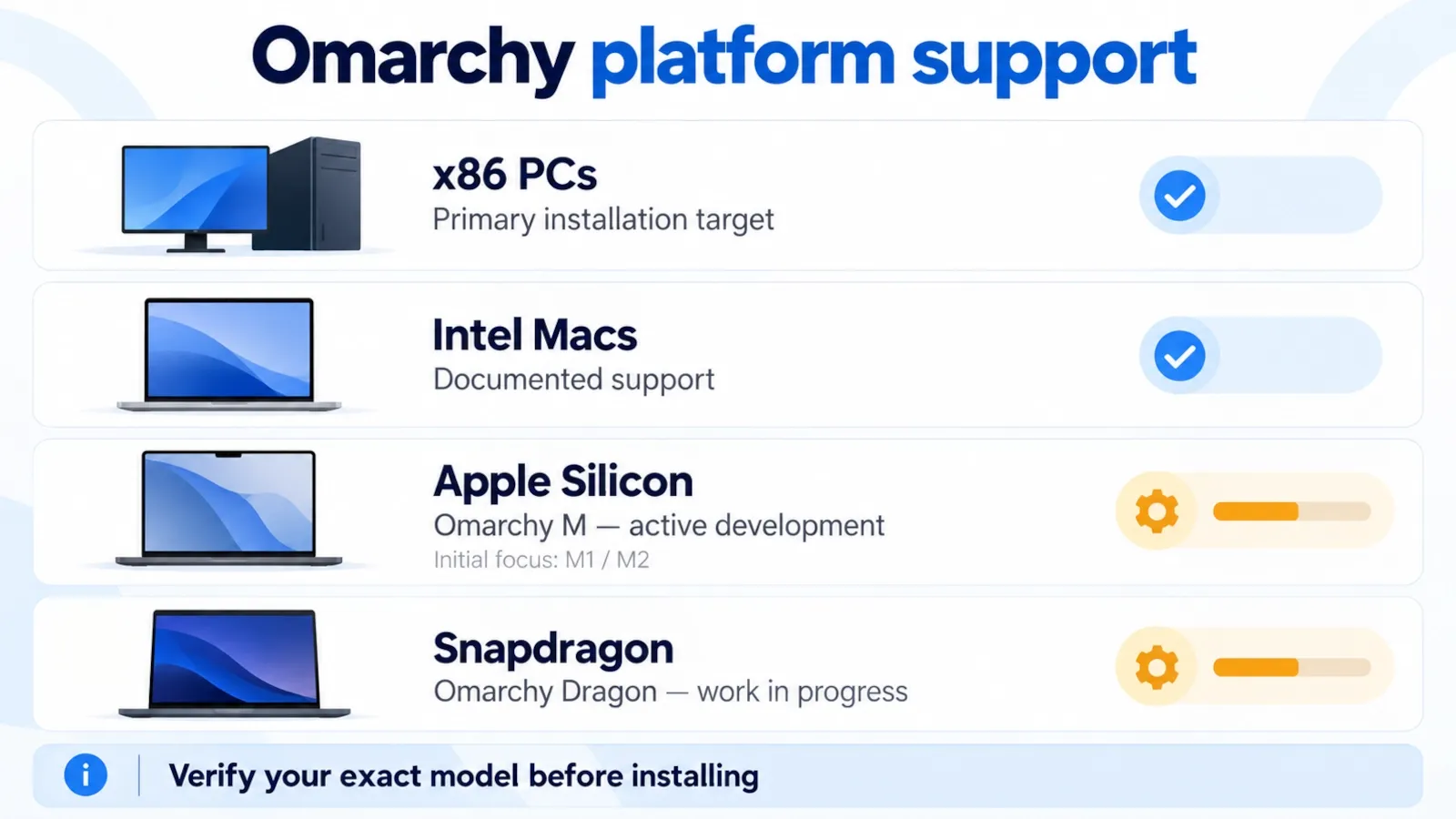
| Primary installation target | x86 PCs; Intel Mac support is documented |
| Apple Silicon | Omarchy M is active work, focused first on M1/M2 |
| Snapdragon | Omarchy Dragon is active work in progress |
The important word here is opinionated. Omarchy chooses a lot for you: the desktop model, shortcuts, terminal tools, visual language, preinstalled applications and workflow conventions. Its value comes from how those choices work together.
When to use this guide
Use this guide if you are trying to answer one of the questions people most commonly have about Omarchy: what it actually is, whether it is a “real distro” or just Arch with dotfiles, how difficult it is for a newcomer, whether it is stable enough for daily work, how gaming and NVIDIA support fit in, what the AI features really do, and whether it is worth replacing Windows, macOS, Ubuntu, Fedora, CachyOS or plain Arch with it.
This article is intentionally broader than a conventional distro review. A review can tell you whether one reviewer enjoyed a week with a system. A reference guide should tell you what the system is, how it is built, what trade-offs it makes, where it is strong, where it is weak and what kind of user should choose it.
If you only need installation commands, this page is more detailed than necessary. If you are deciding whether Omarchy belongs on your main computer, this is the right place to start.
Before you start
A few points matter before judging Omarchy fairly.
- Omarchy changes quickly. This guide was reviewed against the stable 4.0.4 generation on October 8, 2026. Commands, bundled tools and hardware support can change between releases.
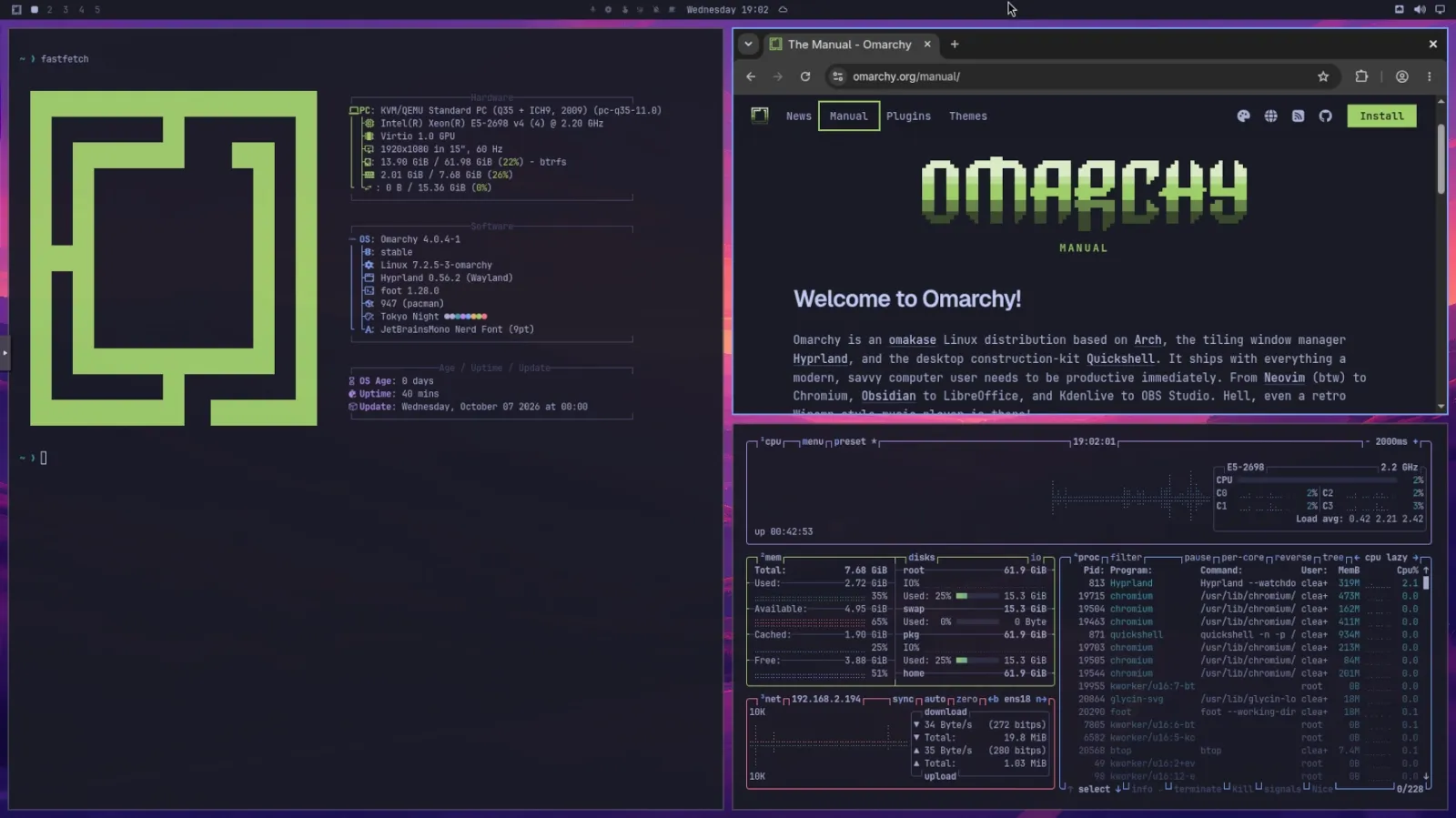
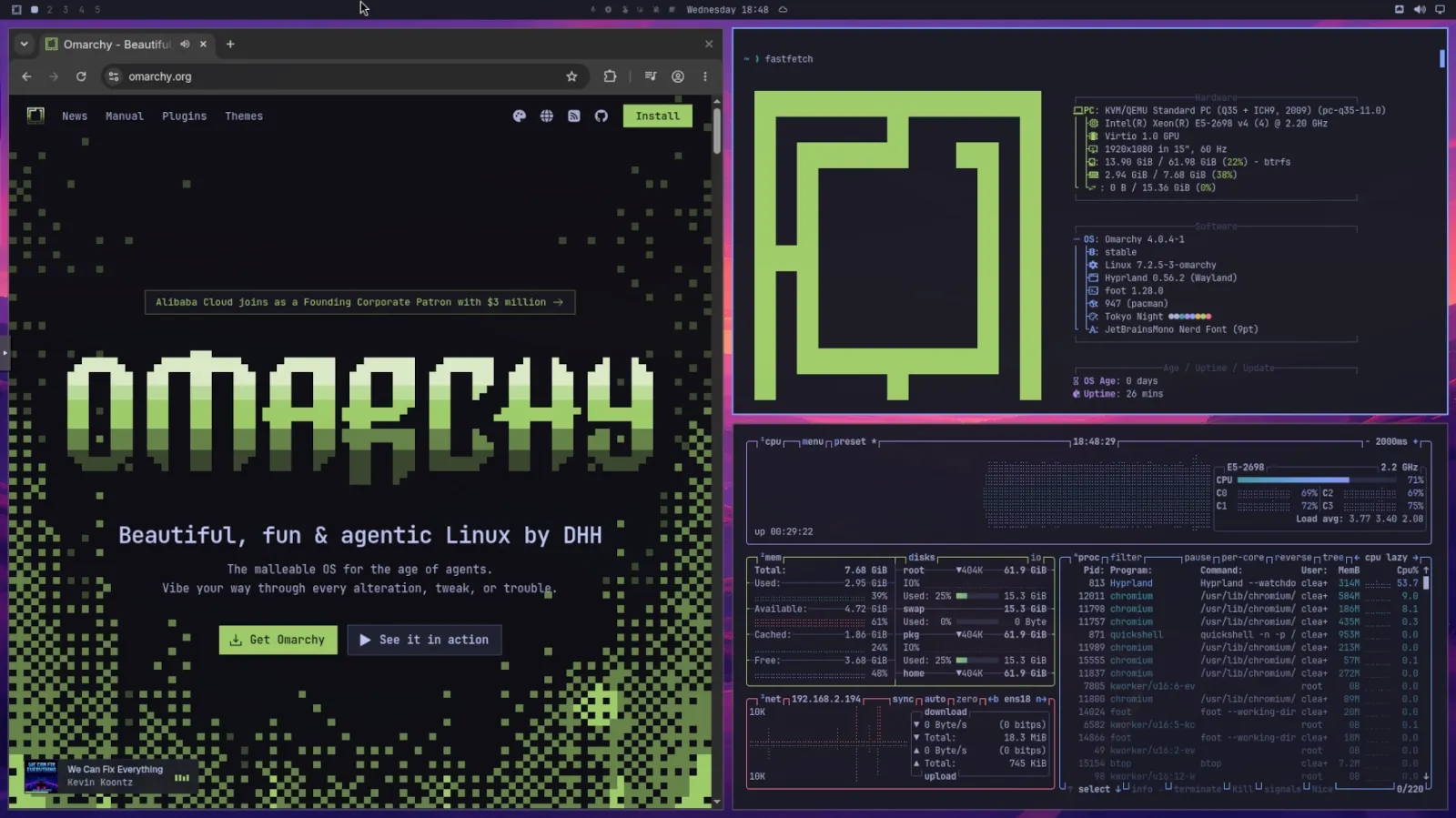
- ClearHowGuide installed and used Omarchy in a Proxmox VE (KVM/QEMU) virtual machine and captured original screenshots of the desktop and selected workflows. This hands-on review is not a bare-metal hardware test or performance benchmark. Technical features and broader compatibility claims were also checked against official documentation, release notes and third-party demonstrations.
- The project is deliberately not trying to imitate Windows or macOS. Judging it only by how familiar it feels in the first ten minutes misses the design goal.
- The base is still Linux and Arch. Omarchy reduces setup friction, but hardware quirks, application compatibility, Wayland behavior and package-management decisions still exist.
- Do not install it over an existing system until you have a verified backup. The full-disk installation option erases the selected disk.
What is Omarchy?
Omarchy is a Linux distribution created by David Heinemeier Hansson, best known as DHH, the creator of Ruby on Rails and co-founder of 37signals. The official manual calls it an “omakase Linux distribution”: the idea is similar to a chef’s-choice meal. Instead of presenting hundreds of decisions before you can start, Omarchy makes a coherent set of choices on your behalf and gives you a complete desktop.
That does not mean you are locked into those choices. Quite the opposite: one of the project’s core ideas is that the supplied configuration is a strong starting point that you can change at almost every layer.
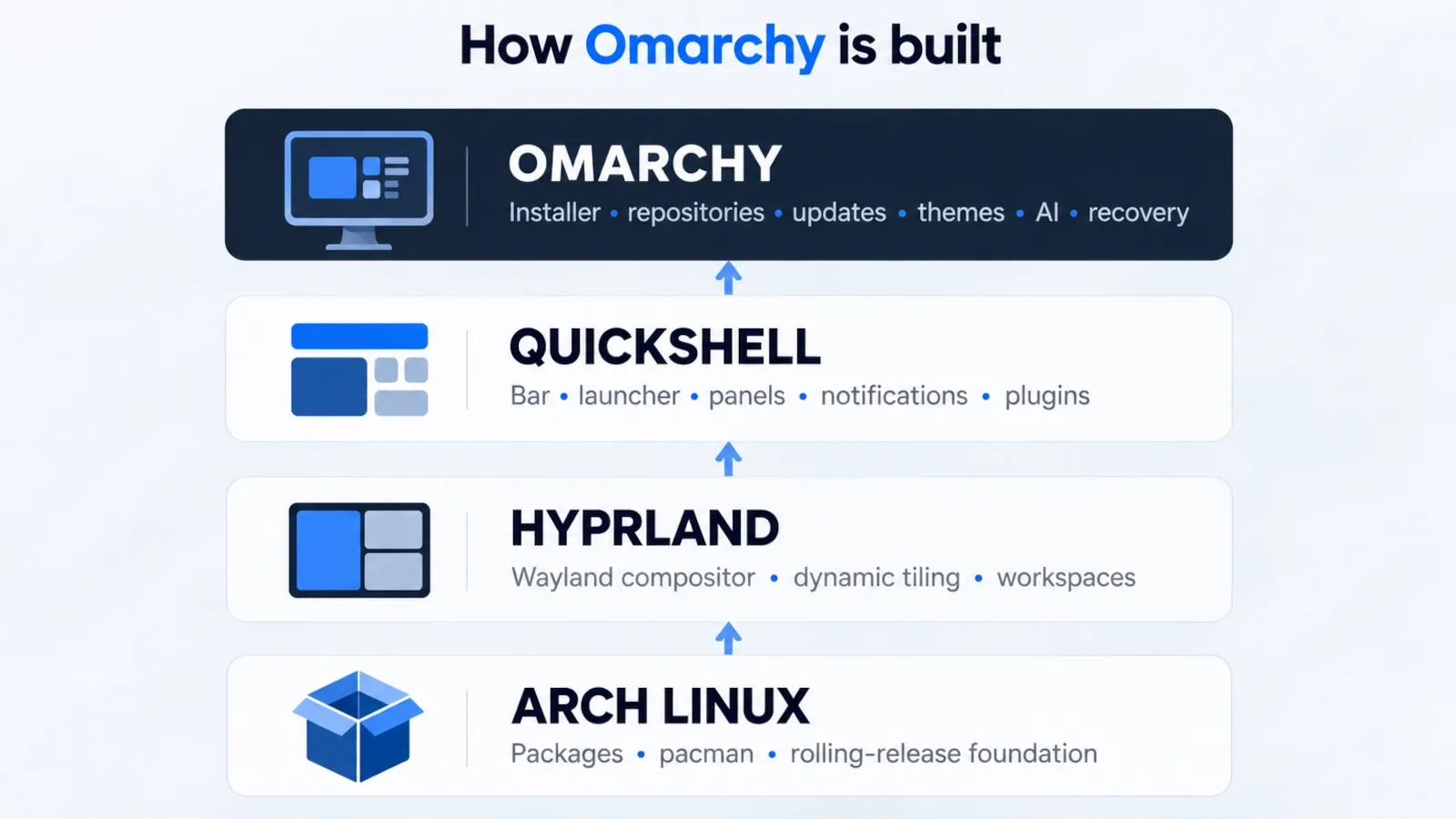
The current desktop is built from three major pieces:
- Arch Linux supplies the operating-system base, package ecosystem and rolling-release foundation.
- Hyprland supplies the Wayland compositor and tiling window-management model.
- Quickshell supplies the programmable desktop shell used for the bar, launcher, menus, panels, notifications, lock screen and plugin architecture.
Omarchy then adds the pieces that turn those components into a cohesive system: its installer, packages, update logic, migrations, themes, shortcuts, default applications, recovery tools, developer tooling, AI skills and a consistent visual system.
That distinction is important. You can reproduce many individual Omarchy features on another Linux distribution. What you do not get automatically is the integration work that makes all of those pieces behave like one product.
Who created Omarchy, and what problem is it trying to solve?
DHH’s stated motivation is almost the reverse of traditional Arch culture. Plain Arch starts with a minimal base and expects the user to decide what desktop, terminal, editor, browser, shell tools and workflow to assemble. That freedom is one of Arch’s strengths, but it also means time spent installing, configuring, testing and maintaining a personal setup.
Omarchy asks a different question: what if an experienced computer enthusiast made those choices once, polished them aggressively, and handed you the finished starting point?
That is why the project can simultaneously be based on Arch and push against the most DIY part of Arch culture. It uses the flexible foundation but tries to remove the repetitive setup work.
The result is not neutral. Omarchy strongly prefers:
- keyboard control over mouse-first interaction;
- tiling windows over a traditional overlapping desktop;
- terminal-friendly tools over hiding the command line;
- integrated themes over application-by-application styling;
- fast navigation through shortcuts and fuzzy search;
- user-editable configuration instead of sealed system behavior;
- AI agents as system participants rather than separate chat windows.
If those preferences sound appealing, Omarchy can feel focused. If they sound intrusive, it can feel like somebody else’s desktop philosophy imposed on your machine. Both reactions are reasonable.
Why did Omarchy suddenly become so popular?
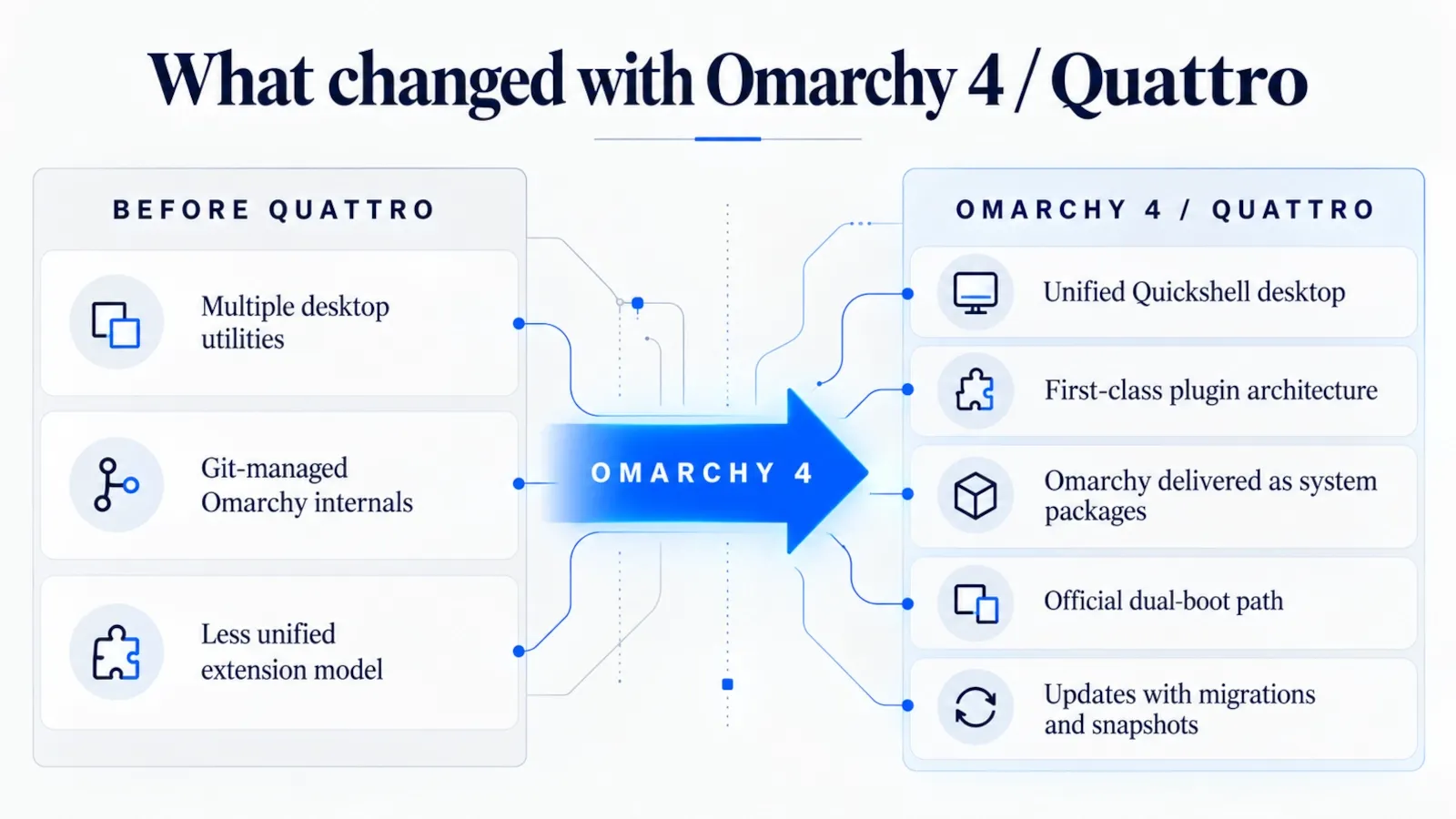
Omarchy existed before Quattro, but Omarchy 4.0, released on August 14, 2026, changed the project substantially. The Quattro release moved the entire desktop shell into Quickshell and introduced a more unified plugin architecture. The bar, launcher, menus, notifications, on-screen displays, control panels, lock screen and authorization dialog became parts of a single long-running shell rather than a collection of separate desktop utilities.
The release also moved more of Omarchy itself into system packages, improved the separation between project-owned files and user modifications, added a supported dual-boot path, reduced ISO size, sped up installation and expanded the plugin model.
The project then reported more than 200,000 Quattro ISO downloads in its first 18 days. That figure is a first-party download count rather than an independent desktop-market-share measurement, so it should not be treated as proof that Omarchy has overtaken established Linux distributions. It does, however, show unusually strong momentum for a young desktop distribution.
Several factors explain the attention:
- It makes a polished Hyprland desktop accessible without weeks of manual “ricing”.
- Its visual identity is distinctive enough to spread well through screenshots and videos.
- The keyboard-first workflow is easy to demonstrate and feels meaningfully different from mainstream desktops.
- Quattro’s plugin system gives the community a clear extension point.
- AI agents are integrated into configuration and troubleshooting in a way that few Linux distributions currently attempt.
- The project is developing quickly and publicly, so every major release creates new material to discuss.
The strongest reason, however, is simpler: Omarchy has a clear point of view. Many Linux distributions compete on packages, release models or ease of installation. Omarchy competes on the experience of using the computer.
Is Omarchy just Arch Linux with dotfiles?
No — but the criticism is not completely baseless either.
Omarchy absolutely depends on Arch Linux and a large amount of configuration. If you stripped away the Omarchy-specific packages, shell, repositories, installer and integrations, you would still recognize the underlying Arch + Hyprland environment. Many individual behaviors are implemented through configuration files that an experienced Linux user could recreate elsewhere.
Calling it “just dotfiles”, however, is too reductive in the Quattro era.
Omarchy now has:
- a dedicated ISO and supported installation flow;
- its own package repository;
- its own Arch mirror;
- stable, RC, edge and dev update channels;
- versioned releases and migrations;
- a Quickshell-based desktop shell;
- first-party and third-party shell plugins;
- system-wide theming conventions;
- configuration ownership rules separating
/usr/share/omarchyfrom user files under~/.config; - automated system snapshots around updates;
- a custom CLI for common system operations;
- AI-agent skills and crash diagnosis;
- an increasingly formal security and QA process.
A useful way to think about it is this:
Arch is the foundation. Hyprland is the window-management model. Quickshell is the desktop construction kit. Omarchy is the integrated product assembled from those pieces.
That does not make Omarchy more “real” than a carefully maintained set of personal dotfiles. It simply means the scope is now broader than a dotfile repository.
How Omarchy works under the hood
Arch Linux provides the base
Because Omarchy is Arch-based, it inherits Arch’s package ecosystem, pacman tooling, rolling-release model and access to the AUR when the user chooses to use it.
The important difference is that Omarchy does not simply point every user directly at the newest Arch package state and leave them to manage the consequences. The project maintains its own package repository and Arch mirror as part of its release process.
Hyprland provides the desktop movement model
Hyprland is a Wayland compositor with dynamic tiling. Windows are automatically arranged instead of being placed manually on top of each other. Workspaces, focus changes, moving windows and layout operations are primarily driven by keyboard shortcuts.
This is one of the biggest behavioral differences for users coming from Windows, GNOME, KDE or macOS. A tiling environment can feel disorienting at first because it removes habits people have used for decades: dragging windows around, searching for a close button, resizing with the mouse and keeping a dock permanently visible.
Omarchy does not hide that difference. It leans into it.
Quickshell provides the visible shell
Quattro replaced a collection of separate desktop components with a single Quickshell-based omarchy-shell. The bar, panels, menus, notifications, overlays, lock screen and many background services are implemented as plugins within that shell.
This is not merely cosmetic. It gives Omarchy a consistent visual language and makes desktop components easier to replace or extend. First-party plugins live with Omarchy itself; user and third-party plugins live in the user configuration area.
Omarchy packages, migrations and user configuration sit on top
Omarchy’s own code is installed as system packages. Updates can therefore move the system between known states and run migrations when configuration or behavior changes.
At the same time, user customization belongs under ~/.config. The project explicitly advises users not to edit files under /usr/share/omarchy directly because package updates will overwrite them. This separation is one of the most important improvements over a less structured “clone these dotfiles and hope” approach.
What changed with Omarchy 4 / Quattro?
Quattro is the release that made Omarchy much easier to describe as a complete desktop product rather than a curated Arch setup.
The most important changes are:
- The entire desktop shell moved to Quickshell. The bar, launcher, menus, notifications, OSDs, control panels, lock screen and policy authorization UI became one coherent shell.
- A plugin architecture became central to the desktop. The same shell that renders core UI can load additional community functionality.
- Omarchy internals moved from a Git-managed model toward regular system packages. That creates a cleaner boundary between release-managed files and user configuration.
- Dual-boot installation became an official path when unallocated space is available.
- Installation became faster and the ISO became smaller.
- Hyprland configuration moved to Lua for the current generation.
- The update model became more product-like. Omarchy can ship migrations alongside packages and create recovery snapshots before system updates.
Release 4.0.4 later made the project’s own linux-omarchy kernel the default. The project describes it as tuned for desktop responsiveness, multitasking, Btrfs operations, power management and selected gaming/hardware fixes.
For anyone reading an older Omarchy review, this matters: a 3.x review can describe a visibly and structurally different desktop from current Quattro.
What using Omarchy actually feels like
The first thing a Windows or macOS user notices is not Arch. It is the absence of the familiar desktop workflow.
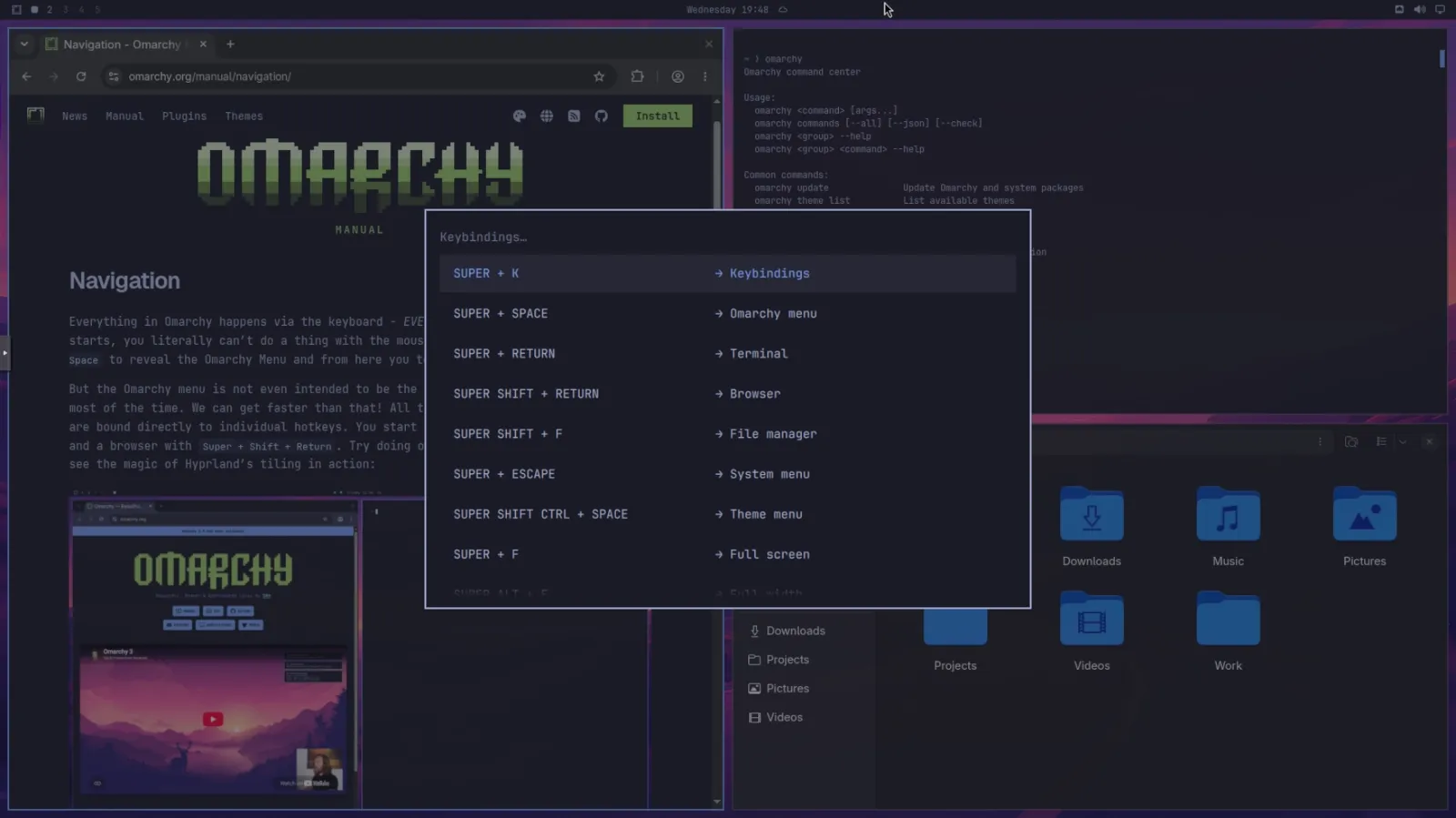
Omarchy is designed to be keyboard-first. The mouse still works, but the fastest path through the system is usually a shortcut.
Typical examples include:
Super + Spacefor the Omarchy command/menu interface;Super + Returnfor a terminal;Super + Wto close the focused window;- workspace shortcuts based on the Super key and numbers;
- keyboard-driven movement between tiled windows;
- a searchable keybinding reference;
- clipboard history and system actions that are reachable without opening settings applications.
The benefit is speed after the shortcuts become muscle memory. The cost is an initial period in which simple actions can feel harder than they “should” because you have not learned the system’s vocabulary yet.
That leads to one of the best ways to describe Omarchy for newcomers:
Omarchy is beginner-friendly to install, but not necessarily beginner-familiar to use.
Those are different things.
The main Omarchy features that matter
It is easy to turn Omarchy into a giant list of shortcuts. That misses the bigger picture. The features make more sense when grouped by what they are trying to accomplish.
1. Desktop, tiling and workspaces
Hyprland automatically arranges windows and makes workspaces a central part of navigation. You can move focus, send windows between workspaces, group windows, temporarily stash a window and switch between tiled and alternative layouts without building your workflow around manual window placement.
This is one of the clearest productivity gains for people who spend most of the day in a browser, editor and terminal. It is also one of the clearest reasons some users will reject Omarchy immediately.
2. Keyboard-first system control
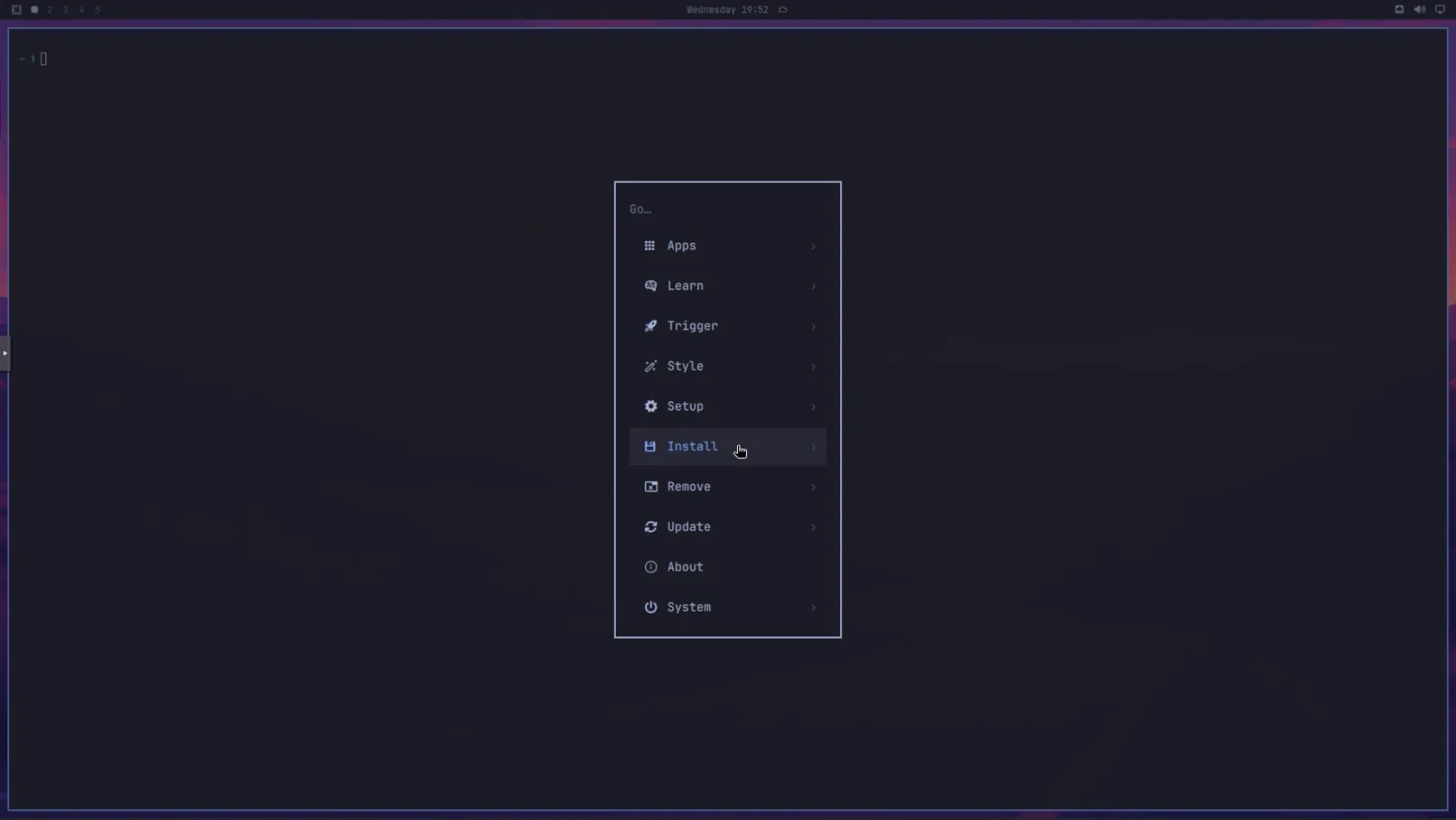
The Omarchy menu exposes installation, removal, configuration, updates, security controls, themes, networking and other system functions through fuzzy search. The project also ships a dedicated omarchy CLI that exposes the same underlying operations for terminal users and AI agents.
The result is unusual: a system can be highly keyboard-driven without requiring the user to memorize every underlying Linux command on day one.
3. Application management
Omarchy can install regular Arch packages through its menu and can also expose AUR packages separately. Popular applications, editors, browsers and gaming tools have dedicated installation entries.
The important security distinction is that the AUR is not vetted by the Arch team. Omarchy’s manual explicitly warns users about this. The base system relies on official Arch repositories and Omarchy’s own packages by default, while AUR usage is an explicit extension.
Omarchy also supports web apps and terminal applications as first-class launchable items, which fits the project’s preference for treating browsers, TUIs and native GUIs as equal parts of the desktop.
4. Developer tooling
Development is one of Omarchy’s strongest use cases.
Neovim is the default editor, but the official menu supports VS Code, Cursor, Zed, Sublime Text, Helix, Vim and Emacs. Development-environment installers cover major language runtimes and frameworks, and mise is used heavily for tool/version management.
The environment also integrates Docker-related workflows, Tmux, Lazygit and modern CLI utilities such as fzf, zoxide, ripgrep, eza, fd, bat and tldr.
For an experienced developer, none of those tools is revolutionary on its own. The attraction is that they are already selected, integrated and taught as part of one workflow.
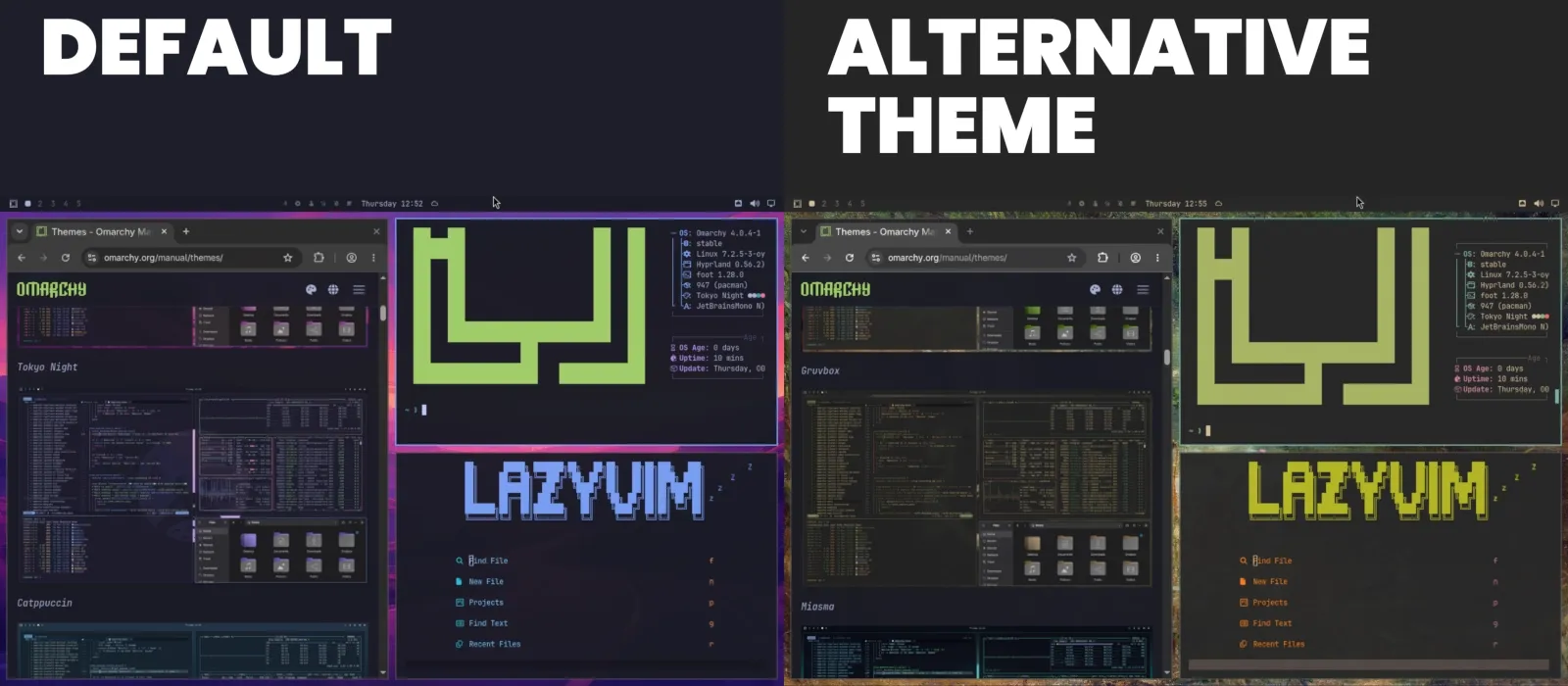
5. System-wide theming
Themes are not just wallpaper packs. Omarchy uses a shared color definition to restyle the shell, terminal, editor and supported applications together.
The current system ships many built-in themes and can apply colors across components such as Foot, alternative terminals, btop, Chromium, Hyprland, Neovim, Helix, VS Code and the Quickshell UI.
This is a major part of the project’s appeal because it makes deep customization feel immediate. It also demonstrates why Quickshell matters: the desktop shell can react as one visual system instead of a collection of unrelated widgets.
6. Plugins
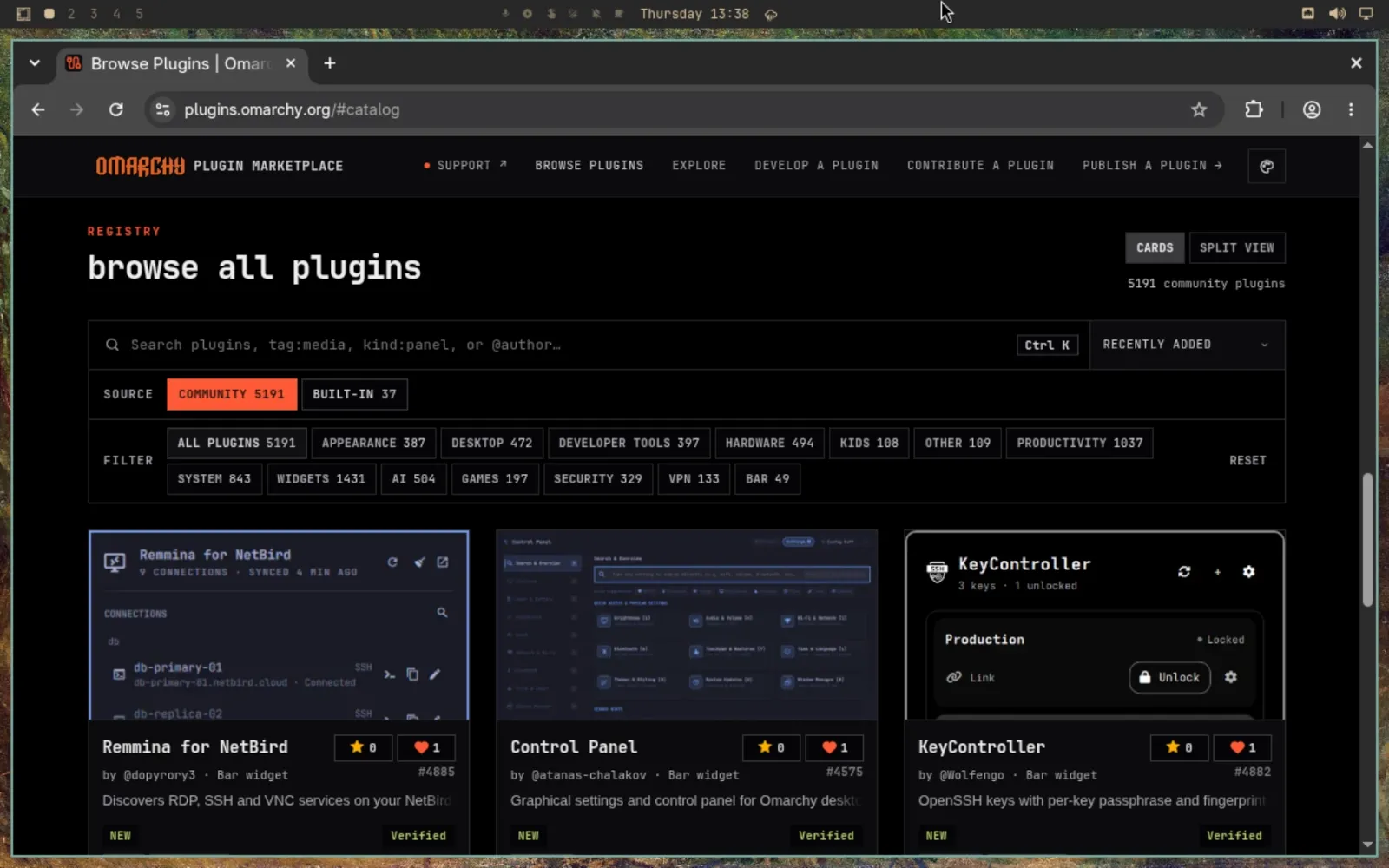
The Quattro plugin architecture lets the shell load third-party functionality without modifying Omarchy’s core source.
That creates a fast-moving ecosystem, but it also creates a security boundary users must understand. The community marketplace performs checks, but its own security notice says those checks are not a security audit or guarantee. Third-party plugin source, permissions, dependencies and install behavior should be reviewed before use.
A plugin is code. Treat it like code, not like a harmless wallpaper.
7. Integrated utilities
Omarchy includes or integrates a large number of practical desktop functions: screenshots, screen recording, OCR/text extraction, local sharing, network controls, power profiles, terminal helpers, media conversion and other small tools.
This is where the project can feel unusually complete. Many Linux users eventually build a similar collection for themselves. Omarchy’s proposition is that a carefully chosen collection should already be there.
What “AI-first” or “agentic” actually means in Omarchy
The AI language around Omarchy can sound like marketing until you separate the concrete features from the slogans.
The system treats coding agents as first-class command-line tools. Current documentation includes launchers and integrations for multiple providers and agent harnesses rather than forcing one vendor. A user can choose a default agent and launch it from the desktop or terminal.
More importantly, Omarchy ships an Omarchy skill that teaches compatible agents how to work with the system’s own configuration model. That can include tasks such as editing Hyprland configuration, changing the shell, creating themes or helping build plugins and applications.
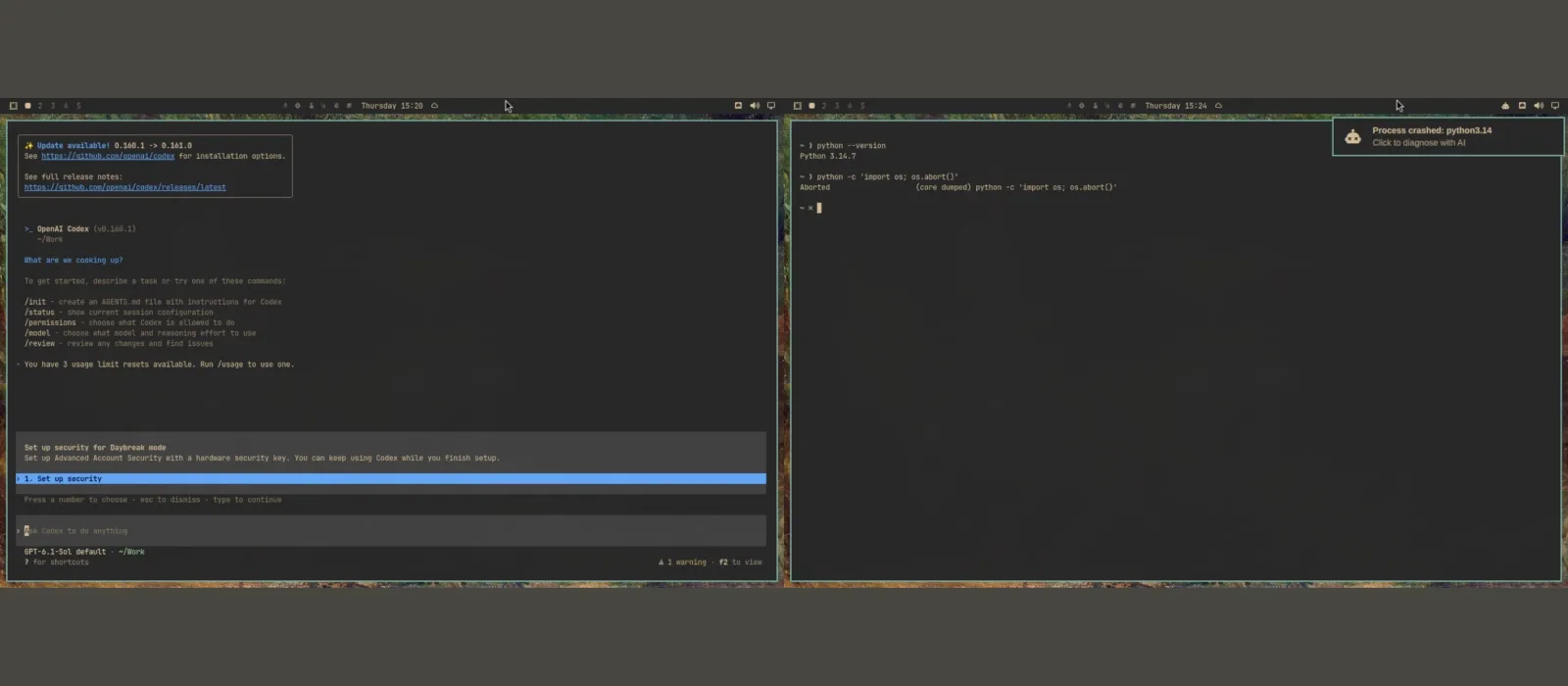
AI-assisted crash diagnosis
Omarchy monitors systemd-coredump for process crashes. When a process crashes, the system can present a notification that hands the crash information to the user’s default agent together with a diagnosis skill.
The goal is not magical self-healing. The agent examines available crash information, helps determine what failed, and can assist in deciding whether the problem should be reported upstream.
This is a meaningful improvement in approachability because traditional Linux crash investigation can require knowing where logs and core dumps live before you can even begin.
AI can also create problems
The same integration has an obvious risk: an agent that can edit your desktop can also edit it badly.
The official AI manual explicitly recommends treating the system-customization skill as experimental and suggests using plan mode first. Some Omarchy agent launch paths are configured to run in auto-approving or unattended modes. That is convenient, but it means the agent may make real changes rather than stopping before every action.
For personal experimentation that may be acceptable. On a work machine with sensitive repositories, credentials or production access, it demands much more discipline.
AI integration should therefore be considered a capability, not a safety guarantee.
How to try or install Omarchy safely
The full installation guide deserves its own article, but the main decision path is simple.
1. Decide whether you want to try it or install it
If you are only curious, use the project’s VM-based “Try Omarchy” option on supported Windows or Mac systems before touching disk partitions. This is the lowest-risk way to understand the interface and keyboard model.
If you want native performance, continue with the ISO installation.
2. Back up anything you care about
A full-disk install wipes the selected drive. Do not rely on a backup you have never tested. Make sure important files exist somewhere physically or logically separate from the disk you are about to repartition.
3. Download the current ISO and verify it
Use the current download published by Omarchy and verify the provided checksum/signature rather than downloading an ISO from an unofficial mirror or random video description.
At the time of this review, the current stable release is 4.0.4.
4. Create the bootable USB
The current getting-started guide recommends tools such as balenaEtcher on Windows/macOS and Caligula on Linux.
5. Prepare firmware settings
The official guide currently instructs users to disable Secure Boot and/or TPM as required for installation. Firmware interfaces differ by manufacturer, so record any changes you make and understand their consequences before changing security settings on a work-managed computer.
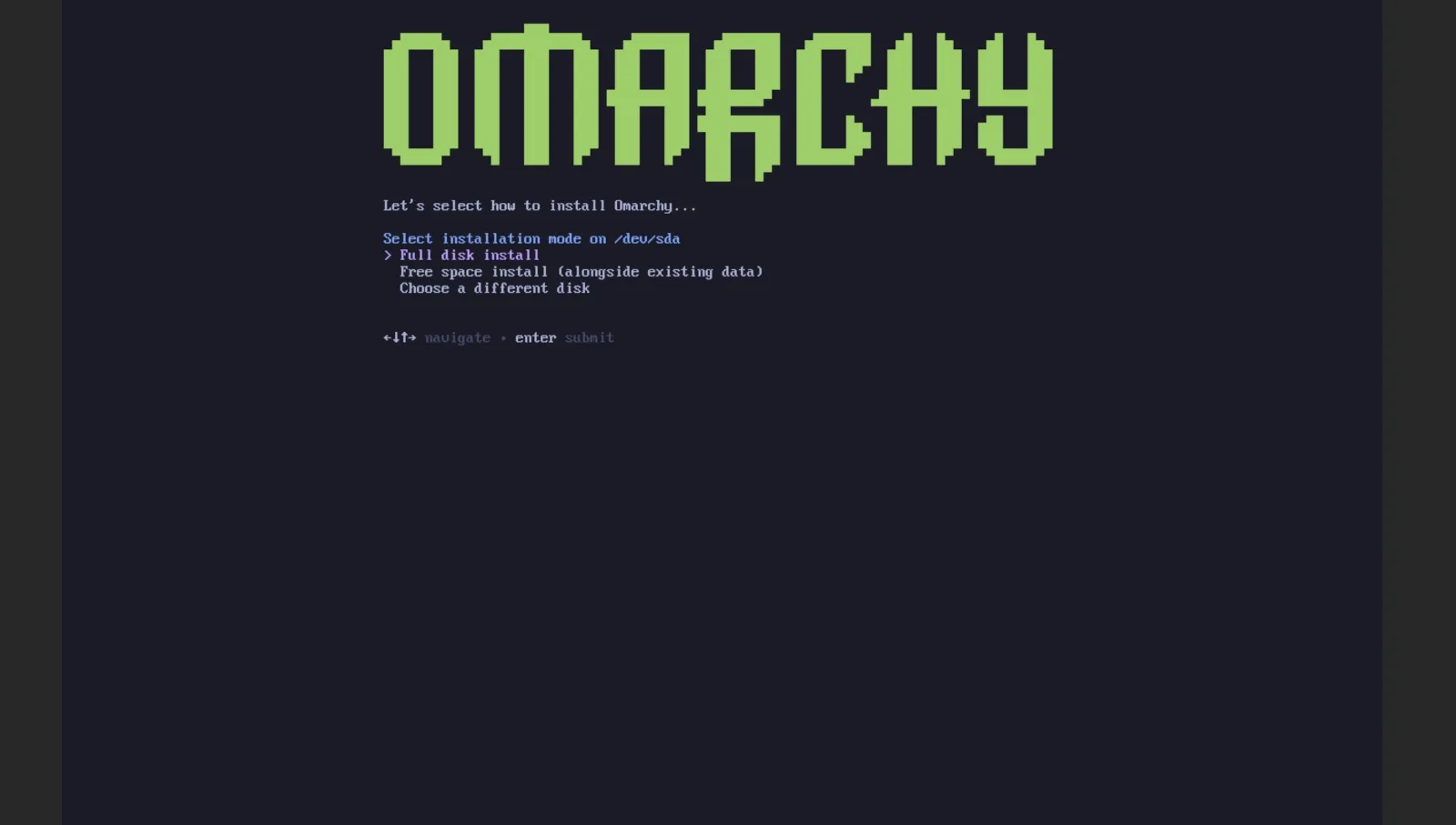
6. Choose full-disk or free-space installation carefully
- Full disk: Omarchy takes over the selected drive.
- Free space: Omarchy installs into unallocated space, enabling a dual-boot configuration.
For Windows dual boot, the current guide says BitLocker must be turned off before the free-space installation path. The project uses Limine as the bootloader and documents adding Windows Boot Manager after installation.
7. Learn the basic shortcuts before changing everything
The fastest way to make Omarchy frustrating is to install it and immediately replace its defaults before you understand why they exist.
Learn the menu, terminal shortcut, close-window shortcut, workspace navigation and the built-in keybinding reference first. Then decide which defaults genuinely do not suit you.
Hardware requirements and compatibility
ClearHowGuide’s hands-on environment was a Proxmox VE virtual machine. The RAM guidance and hardware-compatibility discussion below are editorial recommendations and source-based analysis, not benchmarks on physical PCs or laptops.
There is no single useful “minimum RAM” number
The project demonstrates Omarchy running on a 2011 ThinkPad X220 with 2 GB of RAM. That is a useful demonstration of how light the desktop can be, but it should not be mistaken for a recommendation that 2 GB is enough for a modern browsing, development, AI or gaming workload.
ClearHowGuide’s practical recommendation is:
- 4 GB: only for light experimentation or very modest workloads;
- 8 GB: a realistic starting point for general desktop use;
- 16 GB or more: preferable for development, many browser tabs, containers, local AI or heavier multitasking.
Those are practical editorial recommendations, not official Omarchy minimum specifications.
Storage depends far more on your workload than on the OS
The Quattro ISO is under 6 GB, but that does not tell you how much space you should allocate to an installed system. Development toolchains, Docker images, Steam libraries, local LLMs and a Windows VM can consume hundreds of gigabytes quickly.
For dual boot, the official guide uses a 50 GB partition as an example. Treat that as an installation example, not an ideal long-term size for every user.
NVIDIA support
The current Omarchy site states that graphics drivers and configuration, including NVIDIA on supported hardware, are handled during installation. That is encouraging, but “NVIDIA supported” does not mean every laptop GPU combination, dock, display path or game is guaranteed to behave perfectly.
If your livelihood depends on CUDA, GPU passthrough, a specific multi-GPU layout or a professional application, validate your exact hardware and workload before migrating your main machine.
Displays and scaling
Omarchy’s default visual assumptions target high-density displays. The manual provides specific configuration guidance for 4K, 1440p and 1080p displays, including fractional scaling where appropriate.
This matters because a desktop can appear “wrong” even when the GPU is working perfectly if the scaling assumptions do not match the monitor.
Laptops
DHH has publicly used systems such as Dell XPS and Framework laptops, but that should not be read as an exclusive hardware list. Omarchy can run on much older PCs as well.
For a laptop, the details that matter most are the same ones that matter for Linux generally: Wi-Fi chipset, suspend/resume, fingerprint reader, camera, audio, touchpad, display scaling, external monitors and GPU configuration.
What about ARM, Apple Silicon and Snapdragon?
This is one area where outdated summaries can become misleading quickly.
Intel Macs
Omarchy documents support for Intel Macs, with known limitations. Installing on older Intel Apple hardware can be an attractive way to extend the useful life of machines that no longer receive the newest macOS features.
Apple Silicon
Do not summarize the current state as simply “Omarchy supports ARM”. The project launched Omarchy M as a dedicated Apple Silicon effort in September 2026.
The first polished target is M1 and M2 hardware, including Pro and Max variants, with work covering the installer, GPU support, external displays, Touch ID, MLX and disk encryption. Newer Apple chips are being developed in parallel.
That is substantial progress, but it is still a moving platform effort. Check the current Omarchy M status before treating a Mac as equivalent to a mainstream x86 installation.
Snapdragon
Omarchy Dragon is the corresponding Snapdragon initiative. The project explicitly describes compatibility work as machine-by-machine and still in progress. Sleep, wake, video acceleration, firmware and GPU support all matter before a laptop can be considered dependable for daily use.
If you own a specific Snapdragon laptop, verify that exact model rather than relying on the word “ARM”.
Is Omarchy beginner friendly?
The best answer is: yes in some ways, no in others.
Why it can be easier than expected
- The installer is dramatically simpler than building a custom Arch desktop manually.
- A complete desktop and application set arrives immediately.
- Keybindings and learning resources are integrated into the interface.
- Common package, browser, editor and development installs are exposed through the menu.
- The system can use AI assistance for configuration and crash diagnosis.
- Recovery snapshots reduce the fear of some update failures.
Why it can still be difficult
- The desktop is tiling-first and keyboard-first.
- It does not behave like Windows or macOS.
- The terminal is part of normal use, not an emergency tool hidden from beginners.
- Wayland/Hyprland can expose compatibility differences in specialized workflows.
- Arch concepts still matter when something unusual happens.
- Powerful customization means you can also create your own problems.
A user who is curious and willing to learn may have a better first Arch-based experience on Omarchy than on plain Arch. A user who wants every action to resemble Windows may be happier with Linux Mint, Ubuntu or another conventional desktop environment.
How stable is Omarchy?
“Arch-based” and “stable” can sound contradictory if you assume Omarchy follows upstream Arch packages immediately. The update model is more nuanced.
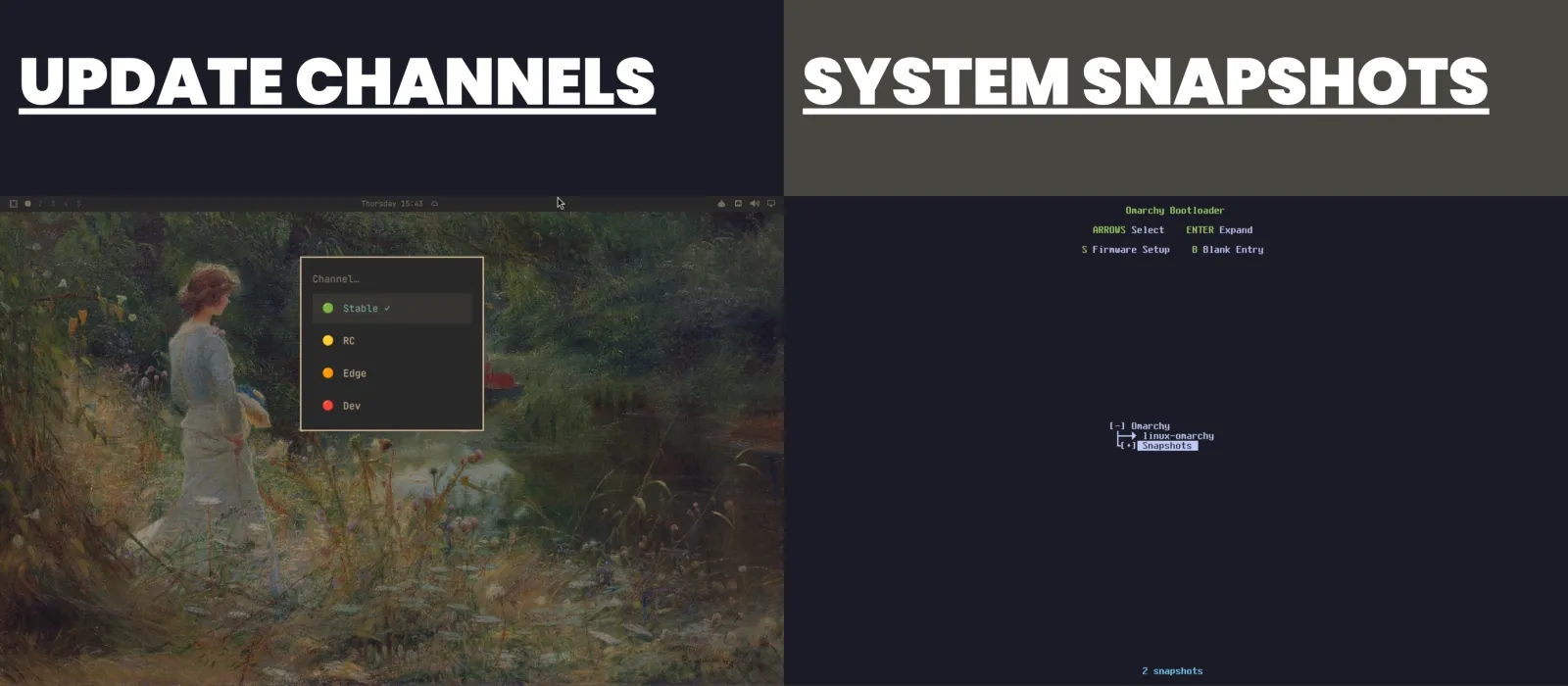
Omarchy has stable, RC, edge and dev channels. New installations start on stable. The stable Omarchy Arch mirror intentionally runs about one month behind the newest Arch package state so the project can catch compatibility changes before they reach stable users.
An Omarchy update does more than a normal pacman -Syu:
- it updates Omarchy packages;
- runs required migrations;
- updates system packages from the Omarchy mirror;
- updates AUR packages if you have installed any;
- creates a system snapshot before the update.
The manual explicitly discourages bypassing that process with a direct system-wide pacman -Syu or yay -Syu, because you would skip Omarchy’s snapshot, migrations and configuration work.
What the one-month delay means
The delay is a deliberate compatibility strategy, not the same thing as a fixed-release model. Omarchy is still a fast-moving rolling system. It simply inserts a curation window between upstream Arch and stable Omarchy.
That has a trade-off: stable Omarchy is not identical to the newest Arch package set at any given moment. Users who want the newest changes can choose faster channels, but doing so naturally increases exposure to change.
Recovery snapshots are useful but limited
Omarchy creates Btrfs snapshots automatically around updates. You can boot a prior snapshot and restore the root filesystem if an update breaks the system.
However, the snapshot system does not replace a personal backup. The official documentation notes that restoring the root snapshot does not restore /home. Deleted documents, corrupted personal files or a failed disk still require a separate backup strategy.
Is Omarchy secure?
Omarchy makes several strong security choices out of the box, but no desktop OS should be called “safe” without qualification.
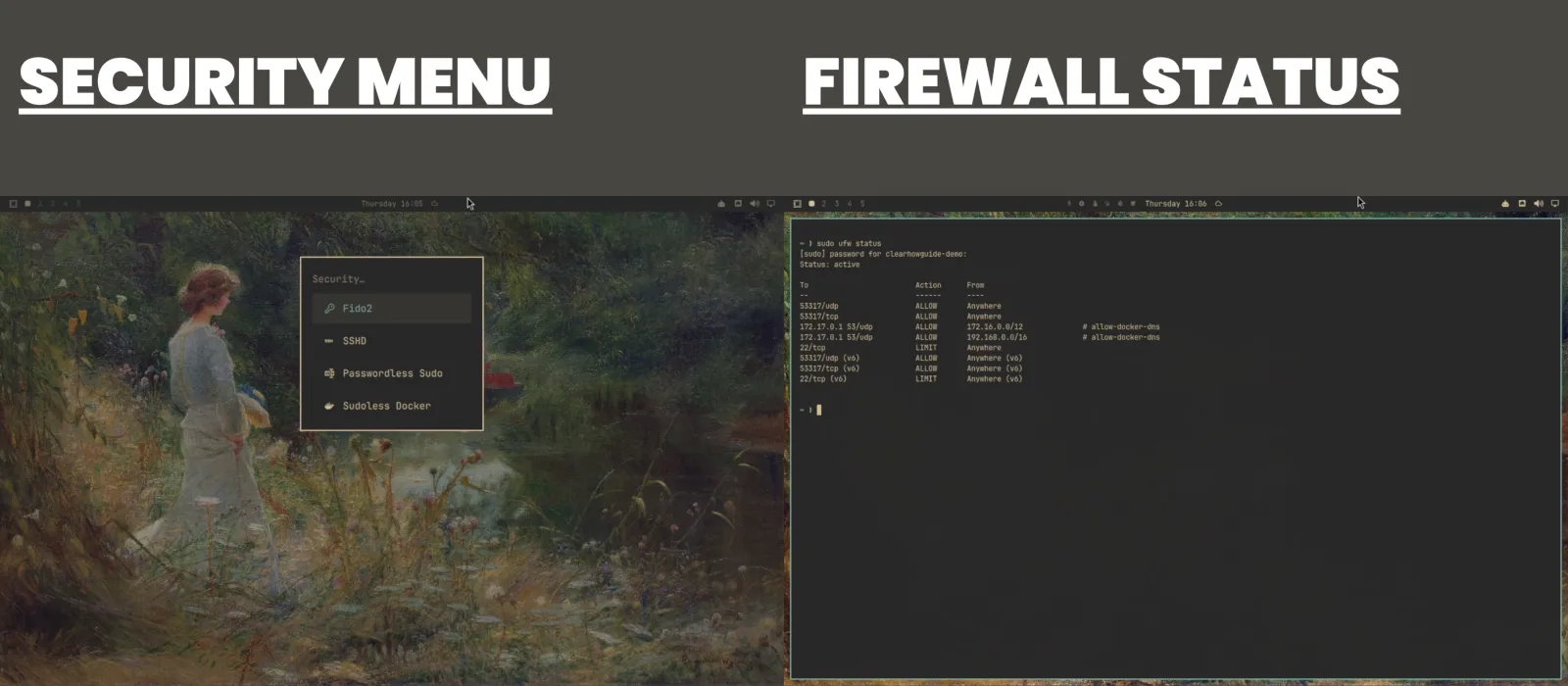
The project documents:
- LUKS disk encryption as the intended default;
- a firewall enabled by default;
- inbound traffic blocked by default except the LocalSend port;
- SSH disabled until the user explicitly enables it;
- Docker firewall handling intended to reduce accidental exposure;
- its own package repository and Arch mirror;
- a dedicated security team and, as of October 2026, an official HackerOne bug-bounty program.
There is one documentation nuance worth noting. The security page describes full-disk encryption as mandatory, while the dual-boot guide notes that an unencrypted install can be selected, although it is explicitly not recommended. The safest interpretation is that encryption is the intended and default configuration, and you should verify the exact options presented by your current installer rather than relying on an old screenshot or summary.
Security also depends on user behavior. Three areas deserve special attention.
AUR packages
The AUR is community-contributed and not vetted by the Arch team. Omarchy’s own manual warns users about this. Read the PKGBUILD and source information for sensitive software instead of installing blindly.
Third-party plugins
The Omarchy plugin marketplace performs checks, but its security notice explicitly says those checks are not a full audit or guarantee. Plugins can be powerful. Review source, dependencies and requested capabilities before installation.
AI agents
An agent with permission to run commands or modify configuration can make destructive changes, leak information to a cloud service or operate beyond what you intended if you give it too much authority.
Use plan/review modes where practical, understand which files an agent can access, and do not treat “the AI will fix it” as a replacement for backups, least privilege and change control.
Can you game on Omarchy?
Yes — with the same fundamental caveat that applies to Linux gaming generally: compatibility varies by game, anti-cheat system, launcher and hardware.
Omarchy provides installation paths for:
- Steam;
- RetroArch;
- Minecraft;
- Battle.net;
- Lutris;
- Heroic;
- Moonlight;
- NVIDIA GeForce NOW;
- Xbox Cloud Gaming.
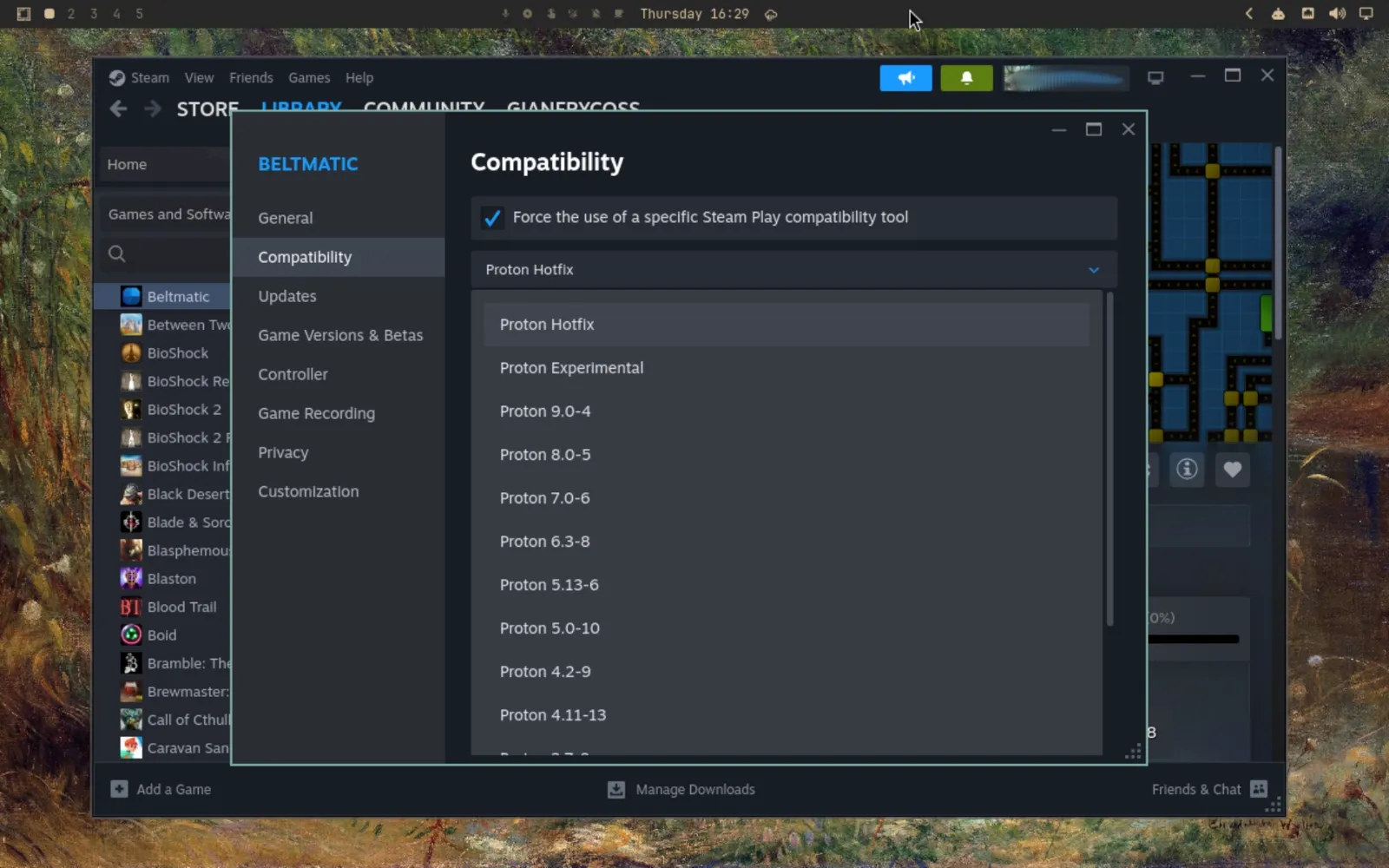
Steam relies heavily on Valve’s Proton compatibility layer for Windows games. Many modern titles work very well, but some games with unsupported kernel-level anti-cheat or publisher restrictions remain unavailable.
That is why “Can Omarchy play games?” and “Will my game work?” are different questions.
A useful migration check is to list the games you actually play and verify each one before removing Windows. Competitive shooters, niche launchers, VR and games with aggressive anti-cheat deserve particular scrutiny.
What the video demonstrations teach us
Real-world reviewer demonstrations are valuable here because they show the correct expectation. A game can crash, the AI diagnosis can help identify the problem, and a compatibility setting such as Proton can make the game work afterward. That is a promising workflow, but it is not the same as every game working automatically.
Omarchy can make Linux gaming setup easier. It cannot repeal the compatibility limits of Linux itself. The Steam/Proton screenshot documents configuration options, not measured gaming performance or proof of compatibility for a particular game.
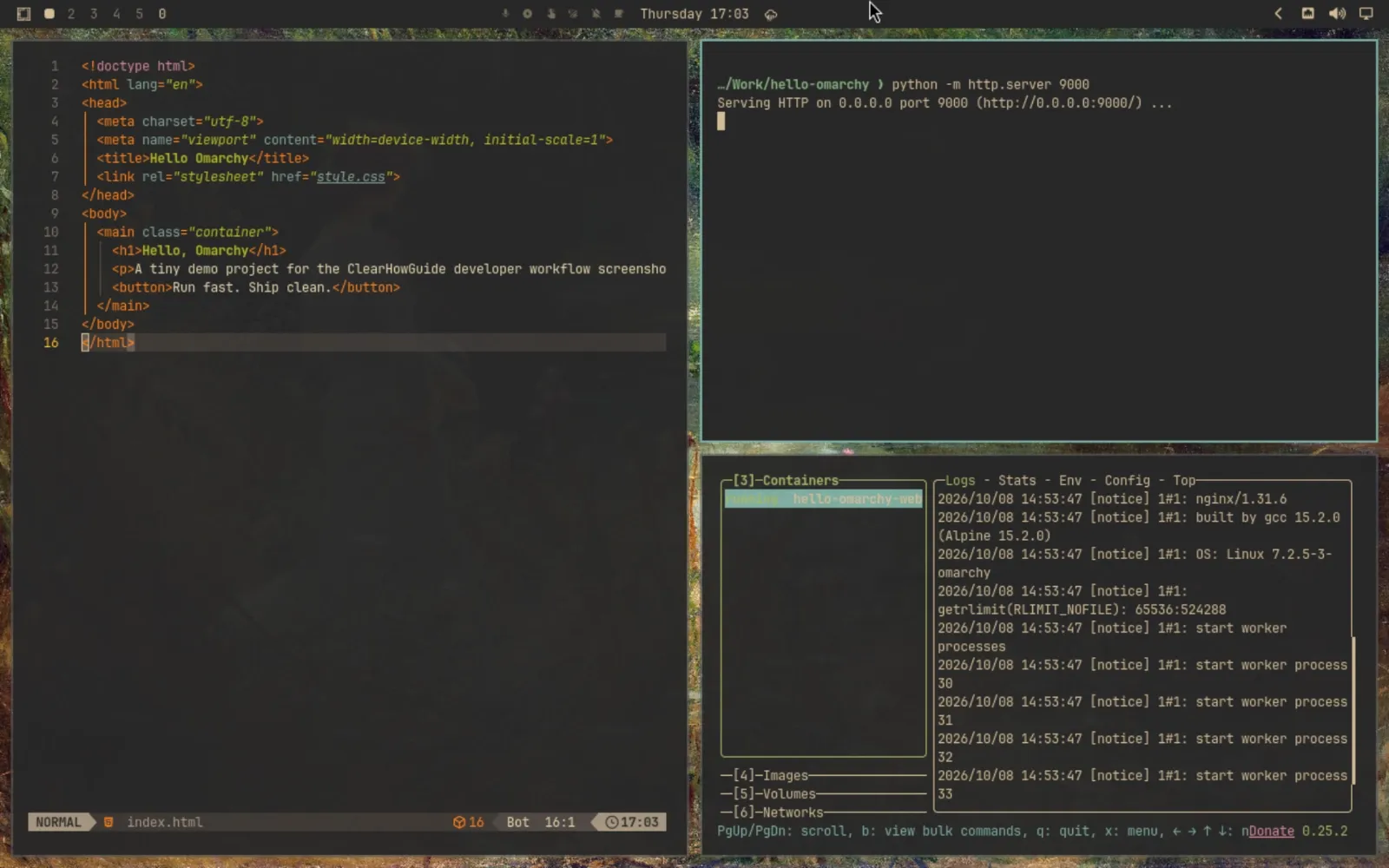
Is Omarchy good for developers?
This is arguably the clearest “yes” in the entire article.
The distribution is built around the kind of workflow many developers eventually construct manually:
- fast terminal access;
- tiling windows and workspaces;
- Neovim by default, with mainstream editors one menu away;
- Docker and development-environment tooling;
- modern CLI replacements and fuzzy search;
- Tmux and persistent terminal workflows;
- language/runtime management through mise;
- Git-oriented tools;
- integrated coding agents;
- the ability to make the desktop itself part of the development environment.
The catch is that developer-friendly does not mean every developer should use it.
A developer who requires an Adobe application, a Windows-only corporate VPN, a proprietary USB driver, Visual Studio rather than VS Code, a specific X11 workflow or validated enterprise software may be better served by Windows, macOS or a more conservative Linux setup.
For web development, terminal-heavy work, open-source stacks, containers and agent-assisted coding, Omarchy’s defaults are unusually well aligned.
Is Omarchy bloated?
“Bloat” is mostly a disagreement about defaults.
The project’s position is essentially: the included tools are there because its creator uses them and believes they make a complete system. Some independent reviewers see applications such as Basecamp, HEY, Obsidian, LibreOffice and other preinstalled choices as unnecessary for users who do not share that workflow.
Both views can be true.
Omarchy is not minimal in the Arch sense. It intentionally arrives with applications and utilities. But the project also makes many preinstalls easy to remove, and the package base is still transparent.
A better question than “Is it bloated?” is:
How much of the default environment would you immediately uninstall?
If the answer is “almost all of it”, the value proposition weakens. If the answer is “these are the same things I would have installed anyway”, Omarchy is saving you time.
Omarchy vs Arch Linux
| Area | Omarchy | Plain Arch Linux |
|---|---|---|
| Initial setup | Highly preconfigured | Minimal, user assembles system |
| Desktop | Hyprland + Quickshell opinionated environment | User chooses everything |
| Updates | Omarchy release flow, migrations, mirror and snapshots | Standard Arch model |
| Package freshness | Stable mirror intentionally delayed about one month | Current Arch repositories |
| Recovery | Snapshot integrated into Omarchy updates | User designs own strategy |
| Learning curve | Easier to reach a finished desktop; new workflow still requires learning | Harder initial setup; maximum control |
| Customization | Deep, but starts from Omarchy conventions | Essentially unlimited from a blanker base |
| Best for | Users who want an integrated Arch experience quickly | Users who want to design and understand every layer themselves |
Choose Omarchy when you value the integration more than the process of building the integration yourself.
Choose Arch when choosing, assembling and maintaining every component is part of why you want Arch in the first place.
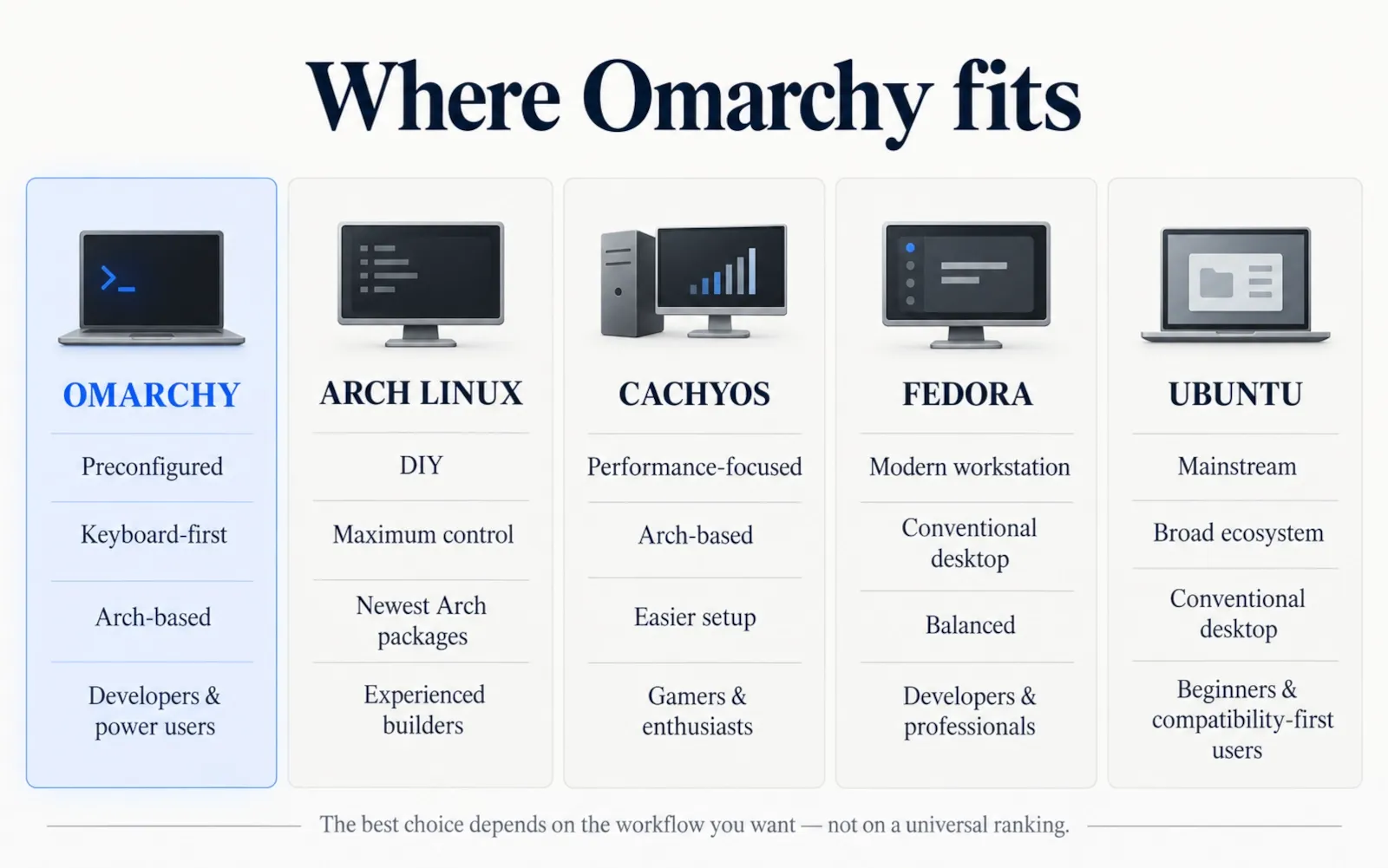
Omarchy vs CachyOS, Fedora, Manjaro and Ubuntu
These are not perfect one-to-one competitors, but they illustrate the decision space.
| Distribution | Main strength | Desktop philosophy | Best fit |
|---|---|---|---|
| Omarchy | Integrated keyboard-first Arch desktop with agentic tooling | Strongly opinionated | Developers, power users, Hyprland-curious users |
| Arch Linux | Maximum control and direct Arch experience | You build it | Experienced users who want DIY control |
| CachyOS | Performance-focused Arch derivative with easier setup | More conventional choice range | Gamers and performance-focused Arch users |
| Fedora | Modern upstream Linux with strong workstation balance | GNOME/KDE and conventional desktop options | Developers who want modern Linux with less desktop experimentation |
| Manjaro | Accessible Arch-family experience | Mainstream desktop choices | Users who want Arch-like ecosystem with GUI-oriented setup |
| Ubuntu | Huge ecosystem, support footprint and familiarity | Conventional desktop | Beginners, workstations and compatibility-first users |
Omarchy’s differentiator is not “it is Arch but easier”. Several distributions already make Arch easier. The differentiator is the specific integrated workflow: Hyprland, Quickshell, keyboard control, system-wide theming, developer tooling and agents as part of the desktop.
Omarchy pros and cons
Pros
- Fast path to a polished Arch-based desktop. You avoid assembling a Hyprland environment from scratch.
- Coherent visual system. Themes affect much more than the wallpaper.
- Excellent keyboard workflow. Once learned, navigation can be extremely fast.
- Strong developer defaults. Editors, terminals, containers, runtimes and shell tools fit naturally together.
- Quickshell plugin architecture. The desktop can be extended without forking the entire system.
- Thoughtful update workflow. Stable channel, migrations and pre-update snapshots are valuable additions to an Arch base.
- Agent integration is genuinely system-level. AI can assist with configuration, creation and crash diagnosis rather than living only in a browser tab.
- Easy removal of many opinionated preinstalls. The system gives you a starting point without making every choice permanent.
- Transparent Linux foundation. Files, packages and configuration remain inspectable.
- Active project development. Quattro has significant momentum and a growing team around core, security, shell and QA work.
Cons
- The workflow is opinionated. If you dislike tiling, keyboard control or terminal-heavy systems, much of the value disappears.
- It changes quickly. Fast development means documentation, plugins and behavior can shift between releases.
- Wayland/Hyprland is not ideal for every legacy or specialized workflow. Some X11-dependent tools remain easier elsewhere.
- The default application set can feel like bloat. You may spend time removing another person’s choices.
- Stable is still a rolling system. A curated delay and snapshots reduce risk; they do not turn Arch into Debian Stable.
- AI features introduce privilege and privacy questions. Auto-approving agents can make real changes.
- Third-party plugins and AUR packages expand the trust surface. Convenience should not replace review.
- Specialized Windows/macOS software can still block migration. A Windows VM helps with some applications, but it is not a GPU-accelerated gaming solution.
- ARM support is still platform-specific work. Apple Silicon and Snapdragon should not yet be treated as generic plug-and-play equivalents to mature x86 support.
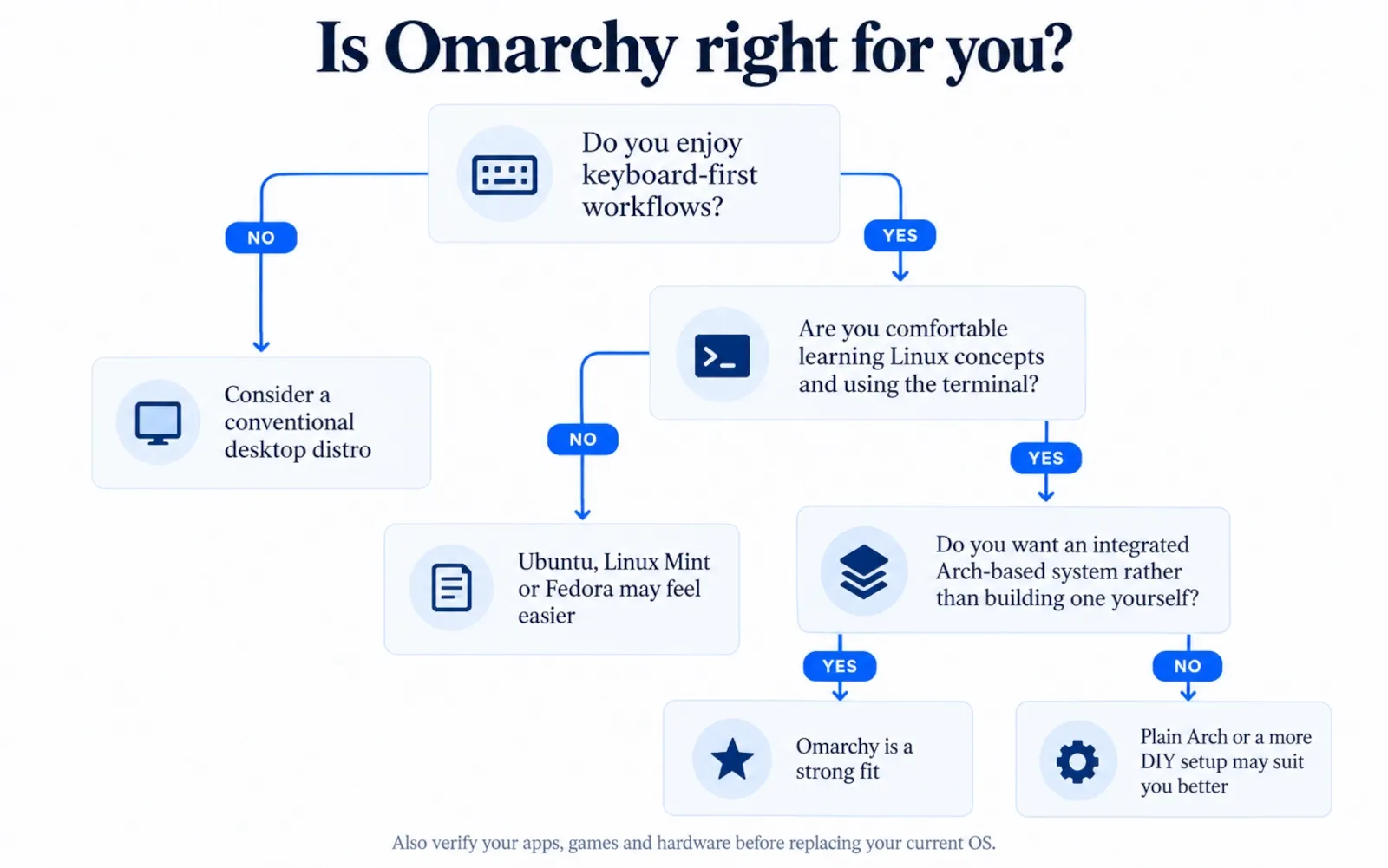
Who should use Omarchy?
Omarchy is especially well suited to users who match several of these traits:
- You are a developer or technical user who lives in a terminal, editor and browser.
- You have wanted to try Hyprland but did not want to build a complete environment yourself.
- You like keyboard shortcuts and workspaces more than mouse-driven window management.
- You enjoy customizing your system but prefer to start from a polished baseline.
- You use Claude Code, Codex, OpenCode or other coding agents and want them integrated with the operating system.
- You want Arch’s ecosystem without doing a traditional blank-slate Arch desktop build.
- You like learning how your computer works and do not mind opening configuration files.
- You are comfortable keeping backups and understanding the consequences of system changes.
Who should avoid Omarchy?
Consider another operating system or distribution if several of these are true:
- You want a desktop that behaves almost exactly like Windows or macOS from minute one.
- You do not want to memorize shortcuts or use the terminal.
- Your work depends on specialized Windows/macOS-only software that cannot be replaced or virtualized satisfactorily.
- You rely on a legacy X11-only workflow that is known to behave poorly under Wayland.
- You need a conservative, slow-moving platform with long support cycles and minimal interface change.
- You manage a fleet where every customization must pass strict enterprise change control and the Omarchy workflow has not been validated internally.
- You do not want AI agents to have any role in system configuration.
- You are uncomfortable troubleshooting Linux hardware or package issues when they do occur.
For those users, Fedora, Ubuntu, Linux Mint, Debian or even Windows/macOS may be a more rational choice.
Is Omarchy worth it in 2026?
Yes, for the audience it is actually designed for. No, as a universal recommendation.
Omarchy’s real achievement is not making Arch installable. Arch was already installable, and there are already user-friendly Arch derivatives.
Its achievement is packaging a particular style of computing — keyboard-first, tiling, integrated, aesthetic, developer-oriented and increasingly agent-driven — into a system you can start using almost immediately instead of spending days assembling it.
That is valuable because configuration time has an opportunity cost. A highly experienced Linux user may be capable of recreating everything in Omarchy and still rationally choose not to, because the goal is to use the computer rather than continually rebuild it.
At the same time, Omarchy does not eliminate Linux trade-offs. Hardware compatibility matters. Game compatibility matters. Specialized software matters. The system still rewards technical curiosity. Its aggressive use of agents creates new security and operational questions alongside the convenience.
The most accurate conclusion is therefore:
Omarchy is one of the most distinctive Linux desktop projects of 2026, not because every component is unique, but because it turns a collection of advanced Linux ideas into a coherent product with a clear point of view.
If that point of view matches how you want to work, it can save an enormous amount of setup time. If it does not, forcing yourself to adopt it because it is fashionable will only make Linux feel harder than it needs to be.
Common mistakes
Mistake 1: Installing it because the screenshots look good
The visual design is attractive, but the workflow is the real commitment. Try the keyboard model before deciding to replace your existing OS.
Mistake 2: Treating the full-disk installer like an app installer
A full-disk OS installation can erase everything on the selected drive. Back up first and verify the target disk before confirming.
Mistake 3: Running direct full-system pacman or yay upgrades out of habit
Omarchy’s update process adds migrations and snapshots. The current manual explicitly warns experienced Arch users not to bypass it casually with direct system-wide upgrades.
Mistake 4: Editing /usr/share/omarchy directly
Those files belong to Omarchy packages and can be overwritten during updates. Put your overrides under the documented user configuration paths instead.
Mistake 5: Installing AUR packages without reading what they do
The AUR is not an app store with centralized code review. Treat PKGBUILDs as code you are choosing to run.
Mistake 6: Installing random Quickshell plugins because the marketplace looks safe
Marketplace listing is not a security certification. Review plugin code and dependencies, especially if the plugin runs commands, accesses files or connects to external services.
Mistake 7: Giving an AI agent unrestricted permission on a work machine
Agentic workflows can be productive, but unattended command execution and configuration changes deserve the same access-control thinking you would apply to automation scripts.
Mistake 8: Assuming an update snapshot is a backup
The snapshot is designed mainly to roll back the system root after a bad update. It does not replace versioned backups of your home directory and important data.
Mistake 9: Assuming “Linux gaming works now” means every game works
Verify your actual games, anti-cheat requirements, controller stack and GPU before deleting Windows.
Mistake 10: Replacing every default immediately
Use Omarchy as designed for a few days before turning it into another distro. Otherwise, you may remove the integration that made you interested in it in the first place.
Security, privacy and safety notes
Omarchy’s defaults are stronger than many hobbyist “rice” setups because encryption, firewall policy, package ownership and update/recovery processes are treated as product concerns rather than left entirely to the user.
Still, the most important security rules remain yours:
- Keep a real backup of personal data outside the machine.
- Verify ISO hashes/signatures from official sources.
- Do not paste destructive commands from videos, comments or AI tools without understanding them.
- Treat AUR PKGBUILDs and third-party plugins as third-party code.
- Review cloud-agent access to private repositories, SSH keys, credentials and local files.
- Prefer plan/review workflows before allowing an agent to modify system configuration.
- Be especially cautious with “YOLO”, bypass or auto-approve modes on work systems.
- Understand the impact of disabling Secure Boot/TPM if the machine is managed or subject to corporate security policy.
- Do not disable disk encryption merely to simplify installation unless you understand the physical-security consequence.
- Keep recovery media and account credentials available before major changes.
If you are deploying Omarchy in a business environment, evaluate it as you would any other workstation platform: software inventory, endpoint controls, update policy, backup policy, identity management, logging, incident response and agent permissions all need deliberate decisions.
Faster alternative
If you are interested in Omarchy but not ready to repartition a disk, try it in a virtual machine first.
The project now offers “Try Omarchy” paths for supported Windows and Mac systems. A VM will not tell you everything about real hardware support, GPU behavior, battery life or gaming performance, but it is excellent for answering the most important early question:
Do I actually like the keyboard-first, tiling Omarchy workflow?
If the answer is no, you have lost an hour rather than your existing installation. If the answer is yes, move to a spare SSD, secondary computer or carefully planned dual-boot setup before making it your only OS.
FAQ
What is Omarchy in Linux?
Omarchy is an Arch-based Linux distribution that combines Arch Linux with Hyprland, a Quickshell-based desktop shell, curated applications, themes, update tooling, system snapshots and integrated AI-agent features.
Is Omarchy a real Linux distribution or just an Arch reskin?
It is built on Arch and uses extensive configuration, but current Omarchy also has its own installer, packages, mirror, release channels, migrations, desktop shell, update process and recovery tooling. Calling it only a reskin no longer describes the full system.
Is Omarchy free?
Yes. The Omarchy project is open source and the main repository is released under the MIT License. Some applications or cloud AI services you choose to use may have their own subscriptions or licenses.
Is Omarchy beginner friendly?
It is beginner-friendly to install compared with building an Arch desktop manually, but the keyboard-first tiling interface is not immediately familiar to most Windows and macOS users. Expect a learning period.
How much RAM does Omarchy need?
The project demonstrates Omarchy on a ThinkPad X220 with only 2 GB RAM, but that is not a sensible target for every modern workload. For normal use, 8 GB is a more practical starting point; 16 GB or more is preferable for development, containers, heavy browsing or local AI. Those are ClearHowGuide practical recommendations, not official minimums.
How much disk space does Omarchy need?
There is no single useful official number for every workload. The ISO itself is under 6 GB, while the dual-boot guide uses a 50 GB partition as an example. Developers, gamers and users running local AI or Windows VMs should allocate substantially more.
What GUI does Omarchy use?
Omarchy does not use a traditional GNOME or KDE desktop. It uses Hyprland as the Wayland compositor/window manager and Quickshell as the foundation of the Omarchy desktop shell.
Does Omarchy use Bash or Zsh?
Current Omarchy documentation uses Bash conventions and specifically directs users to ~/.bashrc for personal aliases, functions and exports. The terminal application is a separate choice: Foot is the default, with Alacritty, Ghostty and Kitty supported.
What browser does Omarchy use by default?
Chromium is the current default browser. Chrome, Edge, Brave, Firefox and Zen are among the documented alternatives, and the system can change the default browser through Omarchy’s setup menu.
Can I use VS Code on Omarchy?
Yes. VS Code is a supported editor option, along with Cursor, Zed, Sublime Text, Helix, Vim and Emacs. Omarchy can also apply theme integration to several supported editors.
Does Omarchy support NVIDIA?
The project states that graphics-driver configuration, including NVIDIA on supported hardware, is handled during installation. You should still verify your exact GPU, laptop design, displays and workload before depending on it professionally.
Can Omarchy run Steam games?
Yes. Steam is supported through the Gaming menu, and Proton enables many Windows games on Linux. Compatibility still varies, especially for games with unsupported anti-cheat technology.
Can Omarchy run Minecraft?
Yes. Minecraft is one of the gaming options documented directly by Omarchy.
Is Omarchy faster than Windows?
There is no universal answer. Omarchy can install very quickly and its desktop is lightweight, but application performance depends on hardware, drivers, workload and software. A claim that one OS is simply “faster” without a defined benchmark is not meaningful. ClearHowGuide did not run a Windows-versus-Omarchy performance benchmark in its virtual-machine test.
How stable is Omarchy?
Stable Omarchy uses an Arch mirror that intentionally trails current Arch by roughly one month, and system updates include migrations and snapshots. That reduces some rolling-release risk, but Omarchy remains a fast-moving Arch-based system rather than a long-term fixed-release distribution.
Is Omarchy safe?
It has strong defaults including encryption, firewall rules and SSH disabled by default, plus an active security process. Safety still depends on what you install, which plugins and AUR packages you trust, how you configure AI agents and whether you maintain proper backups.
Is Omarchy bloated?
It is not minimal in the plain-Arch sense. It deliberately includes a curated application and utility set. If you consider those tools useful, they save setup time; if you do not, they may feel like bloat. Many preinstalled choices can be removed.
Is Omarchy good for developers?
Yes, especially for developers who prefer terminals, tiling windows, containers, open-source tools and coding agents. It is less ideal if your development workflow depends on Windows/macOS-only applications or specialized legacy tooling.
Can Omarchy dual boot with Windows?
Yes. The supported free-space installation path can place Omarchy alongside Windows. The current manual requires BitLocker to be turned off first and documents adding Windows Boot Manager to Limine afterward.
Can Omarchy run Windows applications?
Some Windows software works through compatibility layers, and Omarchy also offers a Windows 11 VM setup for native Windows applications such as Office. The documented VM is intended for productivity rather than GPU-heavy gaming because it does not provide GPU passthrough in the standard setup.
Is Omarchy available for Apple Silicon?
Apple Silicon support is actively being developed through Omarchy M. The project is initially focusing on polished M1/M2 support and is working on newer hardware in parallel. Check current platform status before installing on a production Mac.
Does Omarchy support Snapdragon laptops?
Omarchy Dragon is the official Snapdragon effort, but the project currently describes support as work in progress and machine-specific. Verify your exact laptop model.
What is Omarchy Quattro?
Quattro is Omarchy 4, released in August 2026. Its defining change is the move to a unified Quickshell desktop shell and plugin architecture, alongside major installer, packaging, update and configuration changes.
What is the latest Omarchy version?
As of the editorial review on October 8, 2026, the latest stable release listed by the project is Omarchy 4.0.4. Because the project moves quickly, verify the current release page before downloading.
Is Omarchy “vibe coded”?
The project openly uses AI agents extensively in development, and DHH has described agent-assisted development as central to Quattro. “Vibe coded” is an informal label, however, not a useful measure of software quality. The more relevant questions are whether releases are tested, security reports are handled, source is reviewable and regressions can be recovered from. Omarchy now has structured core, security and agentic-QA efforts in addition to its public source and release process.
Should I replace Windows with Omarchy?
Only after you verify your applications, games, peripherals and recovery plan. For many developers and enthusiasts, Omarchy can be a strong daily driver. If you depend on Windows-only professional software or unsupported games, dual boot or a secondary machine is the safer transition.
Last tested
Hands-on environment and editorial verification:
- Omarchy 4.0.4-1, installed in a Proxmox VE KVM/QEMU virtual machine; original desktop and selected workflow screenshots captured for ClearHowGuide on October 8, 2026;
- Omarchy 4.0.4 current stable release information;
- Omarchy Quattro / 4.x release notes;
- current Omarchy manual pages for installation, updates, security, AI, gaming, development tools, snapshots, packages, themes and platform support;
- current Omarchy M and Omarchy Dragon project announcements.
Last reviewed: 2026-10-08
Testing note: ClearHowGuide performed hands-on installation and visual/workflow checks in a virtual machine, supported by official documentation and third-party demonstrations. This was not a bare-metal test. Physical-device compatibility, native graphics performance, battery life, game frame rates and comparative OS benchmarks were not measured; claims about those topics remain source-based or explicitly labelled as editorial guidance.
Related guides
Carefully selected guides to help you understand the topic and complete the next useful step.