Quick answer
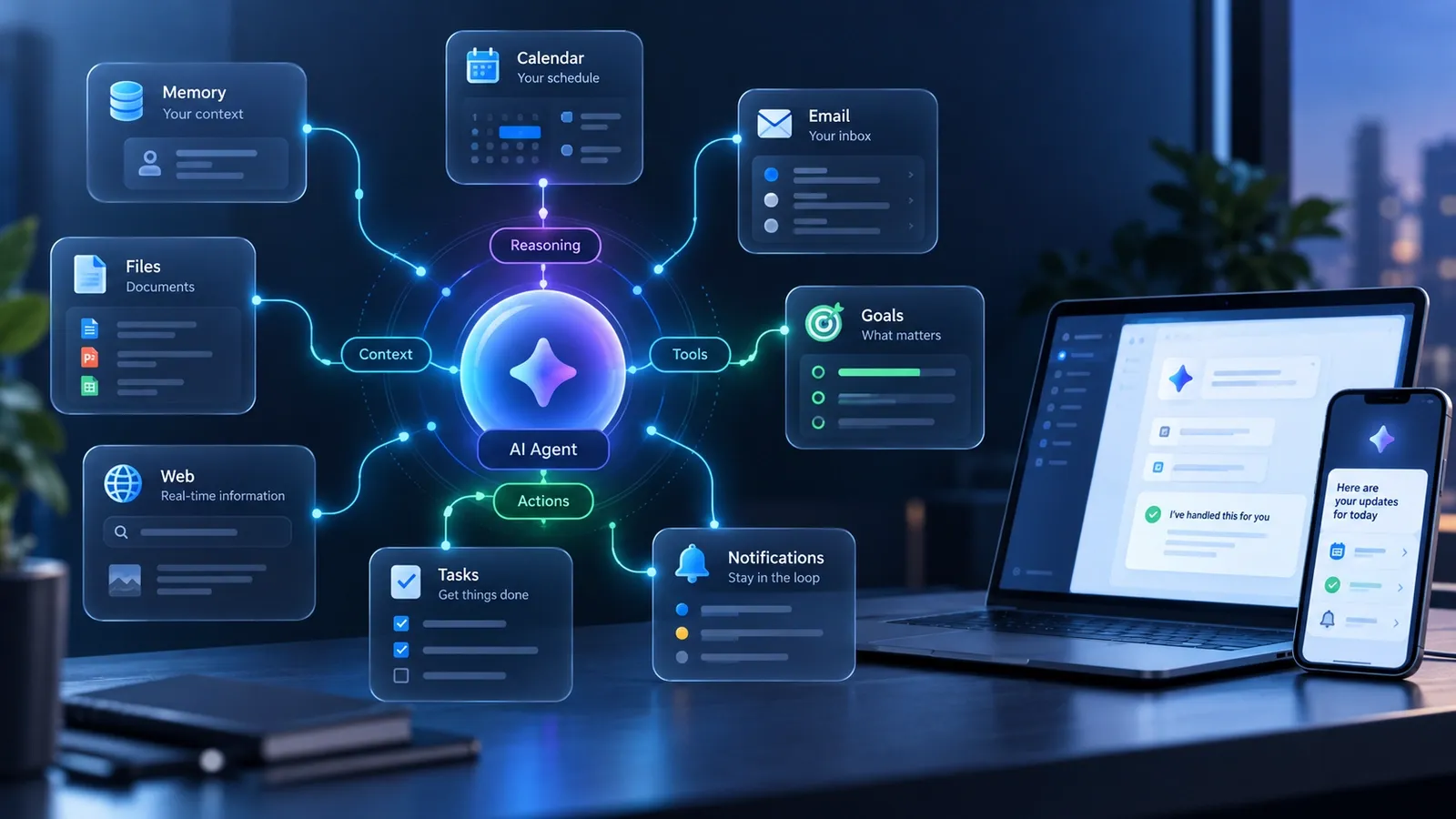
A personal AI agent is an AI system designed to work with persistent context about you — such as your preferences, goals, files, past decisions and connected apps — and use that context to help complete tasks over time. Unlike a basic chatbot that mainly waits for a new prompt, a personal agent may use tools, carry out multi-step work, monitor changes, remember how you prefer things done and, when the product supports it, proactively alert you or continue working in the background.
The most important idea is not the label agent. It is the combination of memory, tools, autonomy, proactivity and user control.
A useful personal AI agent should be able to answer a question that a normal chatbot often cannot:
Given what you already know about me, what should happen next — and can you help make it happen safely?
Not every product marketed as an AI agent has all of these capabilities, and the terminology is not standardized across the industry. Evaluate what a system can actually remember, access and do rather than relying on the name on the product page.
When to use this solution
This guide is for you if you already use tools such as ChatGPT, Claude, Gemini or another AI assistant and are trying to understand why the industry is increasingly talking about agents, personal agents, always-on AI, AI teammates or agentic AI.
Use this guide when you want to answer questions such as:
- What is a personal AI agent in practical terms?
- Is it different from an AI chatbot or personal assistant?
- Can it remember information about me between tasks?
- Can it work while I am not actively chatting with it?
- Can it monitor jobs, prices, subscriptions, emails or deadlines?
- Can it use my calendar, email, files or other connected apps?
- Can I run one locally or self-host it?
- What are the privacy and security risks?
- How much does one cost?
- Should I use a hosted agent, build a DIY setup or run an open-source agent myself?
This is not a ranking of the best AI agents. Product comparisons change too quickly and have a different search intent. The goal here is to give you the mental model needed to evaluate any personal AI agent, including products that do not exist yet.
Before you start
Keep four points in mind before comparing products.
- The labels are not standardized. “AI assistant,” “agent,” “personal agent,” “coworker” and “AI teammate” can overlap.
- Capabilities matter more than branding. A product called an assistant may be highly agentic, while a product called an agent may still depend on constant prompting.
- Personalization requires context. The more useful an agent becomes, the more likely it is to handle preferences, files, messages, calendars, accounts or other personal information.
- More autonomy means more responsibility. An agent that can only draft text has a smaller blast radius than one that can send email, spend money, edit files, run code or change production systems.
Throughout this guide, DIY personal agent is used as a practical label for an agent setup that you configure and control yourself. It is not a formal industry category.
Main explanation: what makes a personal AI agent personal?
A personal AI agent is not simply a chatbot with a friendly tone. The “personal” part comes from persistent, relevant context and the ability to apply that context across future tasks.
A one-off request might be:
“Summarize this medical report.”
A personal-agent workflow could instead be:
“Compare this year’s report with previous reports, note meaningful changes, remember the trends, and prepare a summary before my next appointment.”
The agent is not becoming a doctor. The system is combining prior context, current information, tools and state across time.
Stanford’s Digital Economy Lab argues that long-term personalization increasingly depends on persistent, portable and user-governed context. That leads to a useful working definition:
A personal AI agent is an AI system that combines persistent personal context with tools and a degree of autonomy so it can help an individual across tasks and over time, rather than treating every request as an isolated conversation.
What a personal AI agent is not
A product does not automatically become a mature personal agent because it has memory, voice, reminders, browser access or an API. Those are components.
A better test is:
- Does it maintain useful context about you over time?
- Can it use tools or connected systems to do work?
- Can it complete multi-step tasks without constant prompting?
- Can it respond to events outside an active chat?
- Can you control what it remembers and what it is allowed to do?
The more convincingly a system answers “yes,” the closer it is to the personal-agent model discussed here.
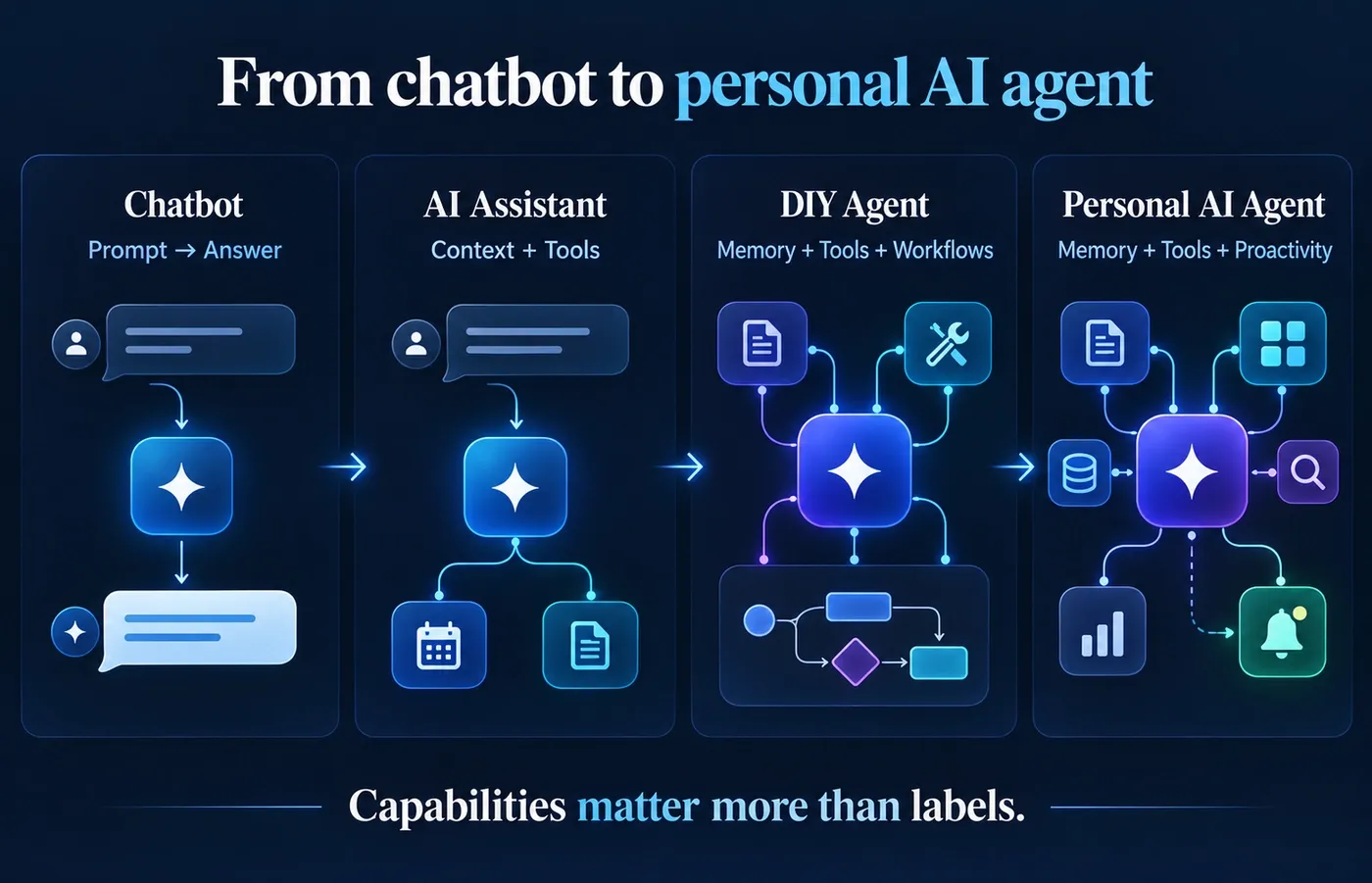
Personal AI agent vs chatbot vs AI assistant vs DIY agent
The boundaries are increasingly blurry because mainstream AI products are adding memory, tools, scheduled work, browser control and background execution. A rigid taxonomy would therefore be misleading.
The following comparison is best treated as a capability model, not an industry standard.
| Capability | Basic chatbot | AI assistant | DIY agent setup | Personal AI agent |
|---|---|---|---|---|
| Answers questions | Yes | Yes | Yes | Yes |
| Generates content | Yes | Yes | Yes | Yes |
| Persistent memory | Limited or optional | Often | Usually configurable | Usually central |
| Learns user preferences | Limited | Often | Yes | Yes |
| Uses external tools | Sometimes | Often | Yes | Yes |
| Multi-step actions | Limited | Sometimes | Yes | Yes |
| Works across apps | Limited | Often | Yes | Often |
| Background work | Rare | Sometimes | Possible | Often |
| Proactive monitoring | Rare | Sometimes | Configurable | Often central |
| User setup required | Low | Low | Medium to high | Low to medium |
| Local/self-hosted option | Rare | Rare | Common | Depends on product |
| Portability | Usually low | Usually low | Potentially high | Product-dependent |
Important: these labels are not standardized across the AI industry. Products increasingly overlap, so capabilities matter more than the name a vendor uses.
A useful shorthand is:
- Chatbot: you ask, it answers.
- AI assistant: you ask, it can usually help with richer context and tools.
- DIY agent: you configure a system that can remember, use tools and perform workflows.
- Personal AI agent: the system is designed to know relevant context about you, keep working across time and, in many implementations, act or alert proactively.
The five capabilities that define a useful personal AI agent
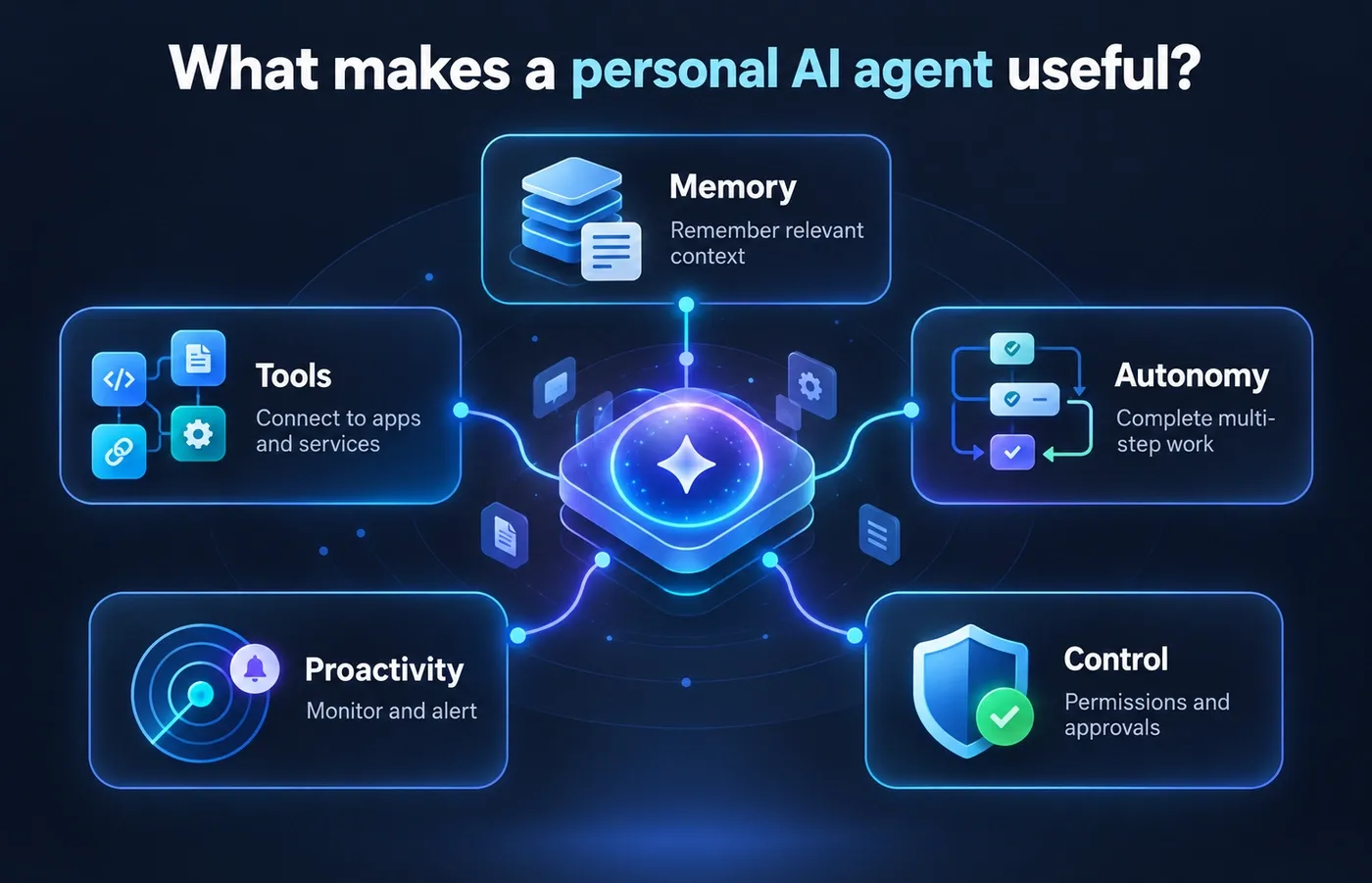
1. Persistent personal context
The agent needs a durable way to retain or retrieve relevant information: preferences, goals, project conventions, important dates, previous decisions or selected files. “Memory” may combine stored memories, files, conversation history, app data and retrieval systems.
2. Tool use
Agents become useful when they can act through tools such as browsers, email, calendars, documents, cloud storage, messaging apps, project systems, terminals or APIs. Tool access is also where risk increases: drafting an email is not the same as sending it.
3. Multi-step autonomy
A capable agent can turn a goal into intermediate work. Planning a trip, for example, may require checking dates, researching options, identifying conflicts, building an itinerary and asking before a booking.
4. Proactivity and background work
Instead of waiting for “check the price,” an agent may monitor the price and notify you when a condition is met. Proactivity can be driven by schedules, events or continuous monitoring; the mechanism varies by product.
5. Governance and feedback
A personal agent should be controllable. Important controls include:
- what it can access;
- read-only versus write permissions;
- which actions require approval;
- what it remembers;
- whether memory can be corrected or deleted;
- whether activity is logged;
- whether the agent can be paused;
- whether personal context can be exported.
For high-impact tasks, autonomy without governance is a liability rather than a feature.
How personal AI agents work
The implementation differs by product, but a useful conceptual architecture is:
Trigger or event
      ↓
Personal memory + current context
      ↓
Goal / task planner
      ↓
Reasoning model
      ↓
Tools / connectors / browser / APIs
      ↓
Permission or approval check
      ↓
Action
      ↓
Result
      ↓
Memory or state update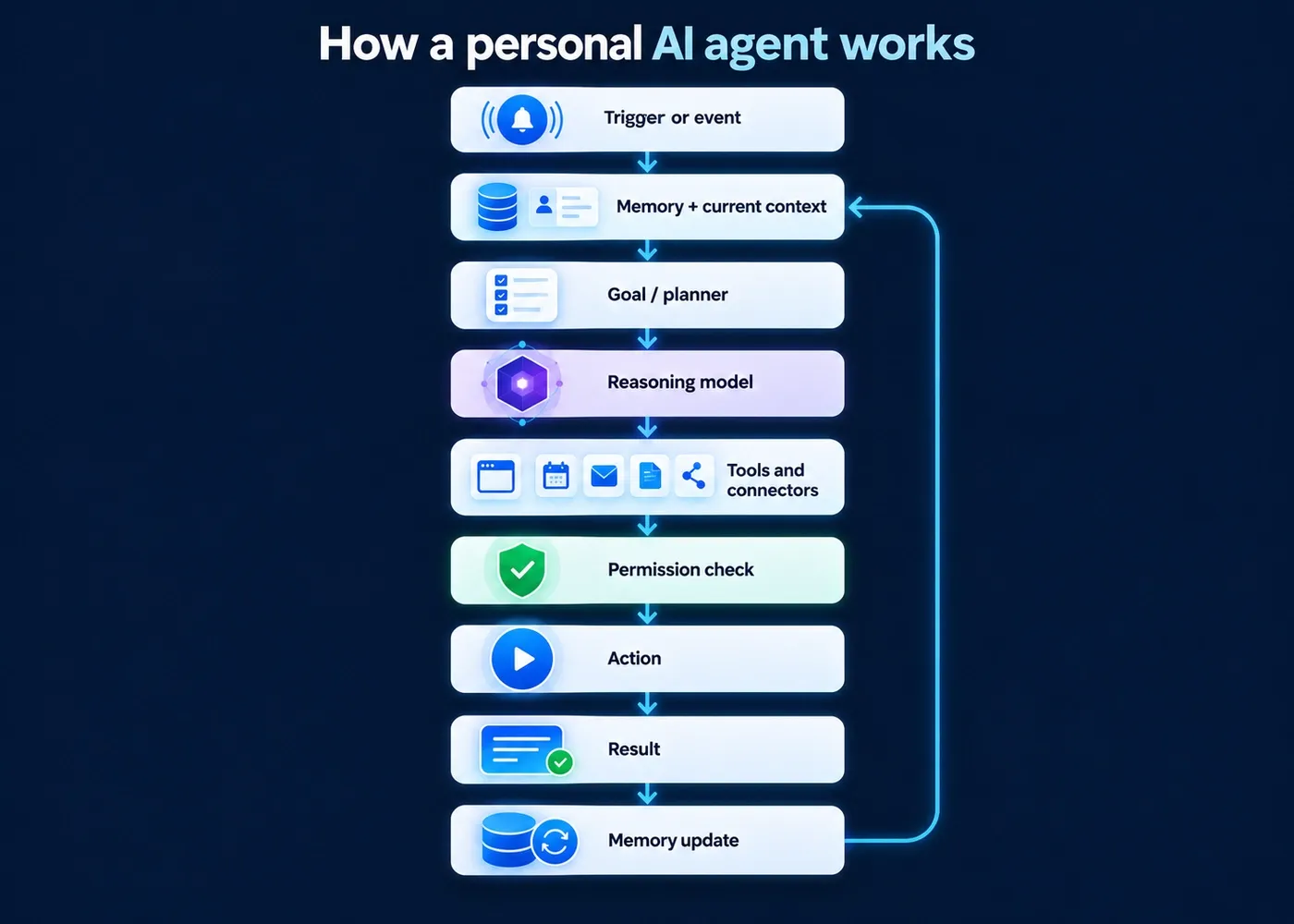
A trigger can be a message, scheduled time, new email, changed calendar event or monitored condition. The system then retrieves only the context relevant to the task.
The planner or orchestration layer decides which steps and tools are required. The reasoning model interprets the goal and tool results, but the model alone is not the agent: memory, permissions, tools and state are what turn a model into an agentic system.
The approval layer is critical. Reading a public webpage is not equivalent to sending an email, making a purchase, deleting a file or changing production infrastructure. Good systems distinguish low-risk work from consequential actions.
After execution, the system may update state or memory — for example, remembering that you rejected a hotel or changed a report format. Those updates should be inspectable and reversible where possible.
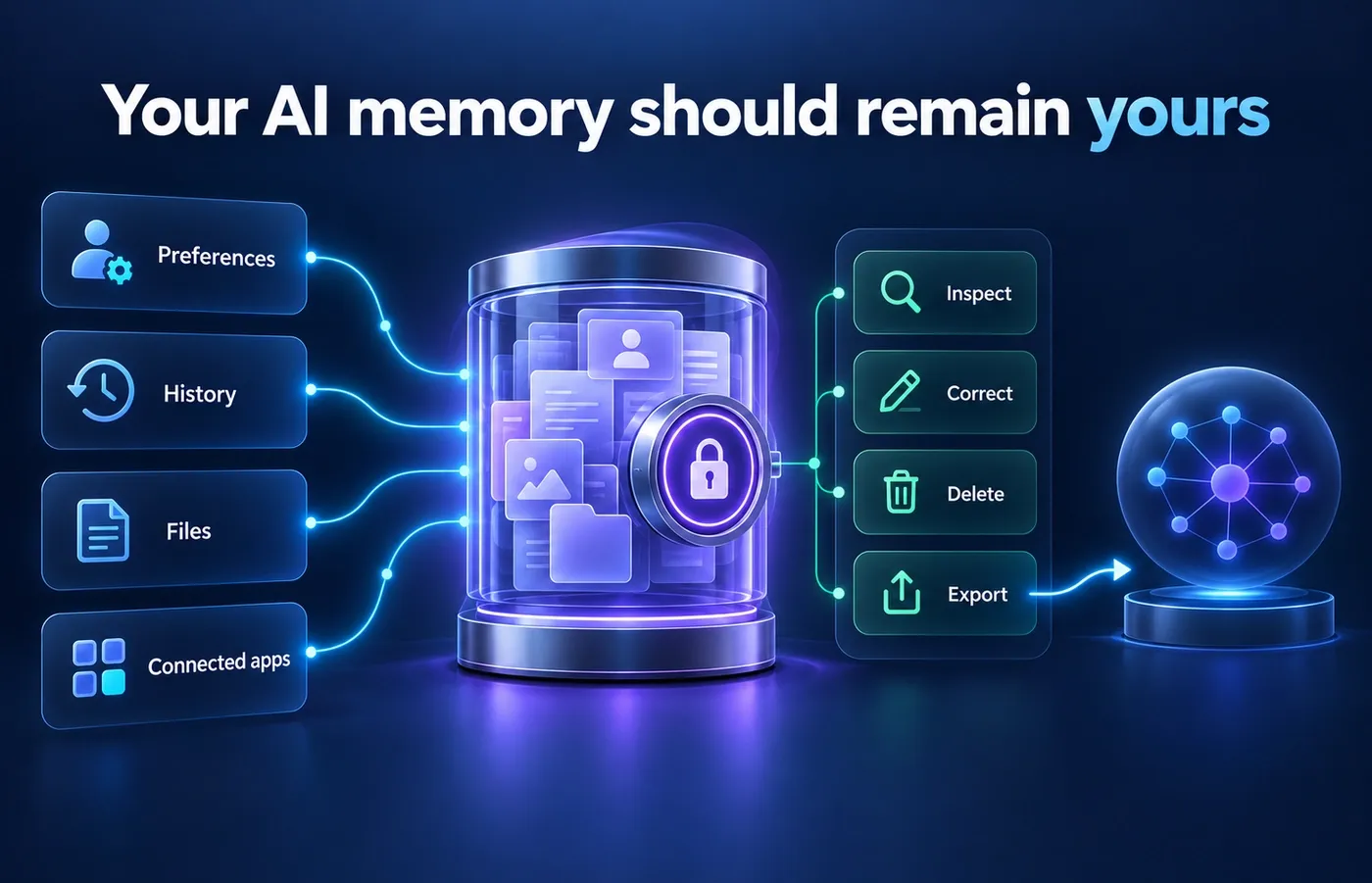
Memory: what does a personal AI agent actually remember?
There is no universal memory architecture. A system may combine several forms of context:
- Explicit preferences: rules such as “prefer direct flights” or “never send external email without asking.”
- Episodic history: past decisions, corrections and project outcomes.
- Files and knowledge stores: durable notes, documents or retrieval databases.
- Connected-app context: live information from email, calendars, drives, CRMs or project tools.
The video transcript behind this guide uses a file-based model in which rules and memories are written into persistent files. That is a useful mental model, but it is not the only implementation.
The important issue is control. Ask whether you can inspect, correct, delete and export what the system remembers.
This matters because personal memory creates a new form of lock-in. Stanford’s Digital Economy Lab argues for portable, user-governed context that can persist across tools. In the long term, portability may matter as much as raw model quality.
Proactivity: how an agent can help before you ask
Proactivity means the agent can respond to relevant conditions without requiring you to remember to start every task manually.
Consider job hunting.
A scheduled automation that runs every morning is useful. But it is still a fixed schedule.
A more capable personal agent could monitor a source or event stream more frequently, compare new roles with your preferences and notify you when a strong match appears.
Other examples include:
- warning you before a software subscription renews;
- monitoring a product for a price drop;
- flagging an overdue invoice;
- preparing a briefing before a meeting;
- monitoring a project for a deadline at risk;
- noticing that a travel plan conflicts with your calendar.
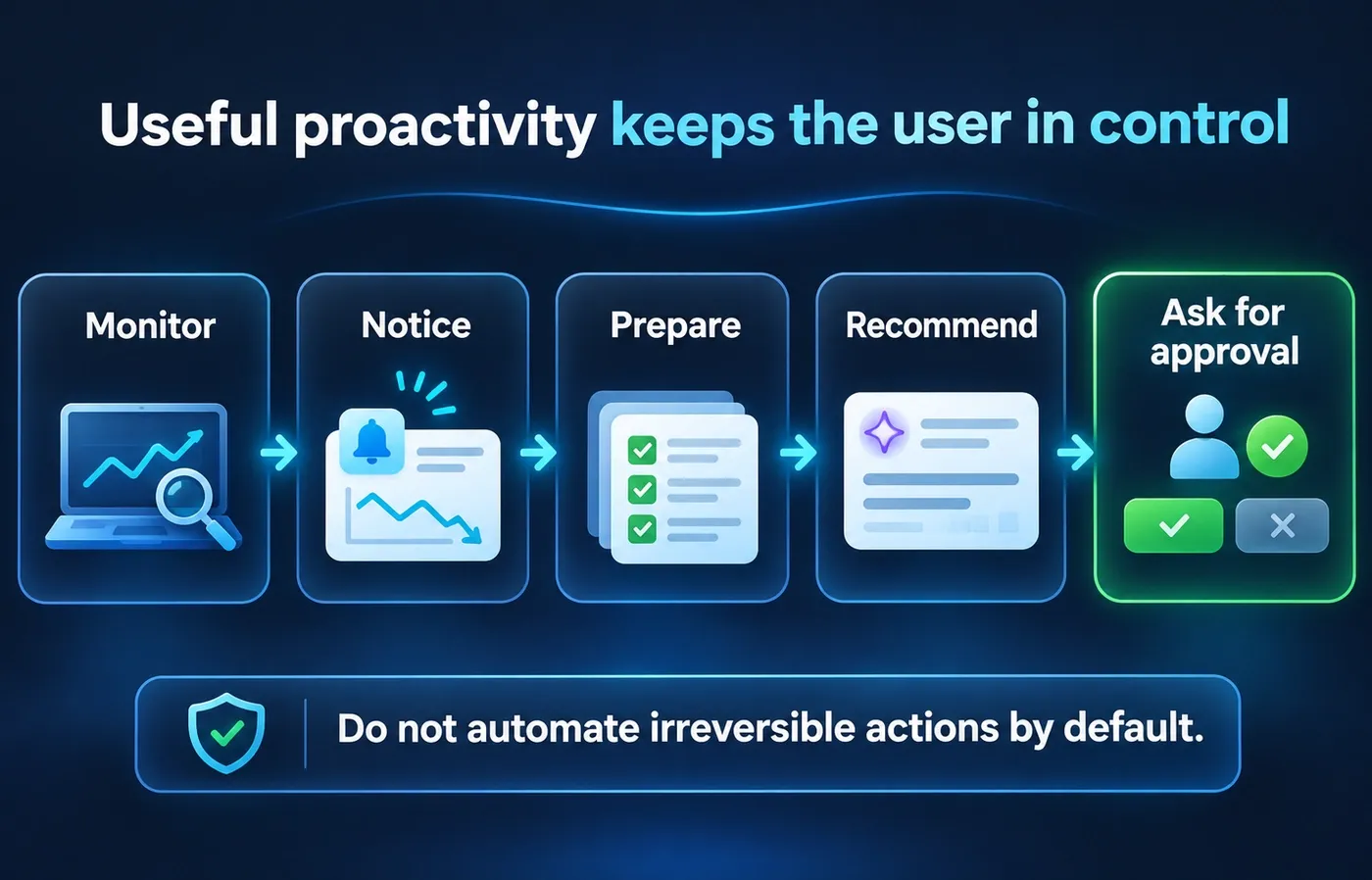
This does not mean an agent should independently make every decision. In many cases, the ideal behavior is:
notice → prepare → recommend → ask for approval
rather than:
notice → act irreversibly
Tools and actions: what can a personal AI agent actually do?
Capabilities vary significantly, but the current generation of agentic systems can combine several classes of tools.
Research and browsing
An agent may search the web, open pages, compare sources and compile findings.
Files and documents
It may read files, organize folders, create documents, update spreadsheets or prepare reports.
Communication
With permission, it may draft or send messages, manage inbox workflows or interact with team tools.
Calendar and scheduling
It may read availability, identify conflicts, prepare agendas or schedule events.
Browser and computer use
Some hosted agents have their own browser or cloud computer and can interact with websites that do not expose a clean API.
Code and technical work
Developer-oriented agents may edit repositories, run commands, test changes and prepare code for review.
Monitoring
An agent may repeatedly check for:
- price changes;
- new jobs;
- account events;
- status changes;
- new documents;
- overdue tasks;
- business metrics.
The critical question is not just what the agent can do.
It is:
What can it do without asking you first?
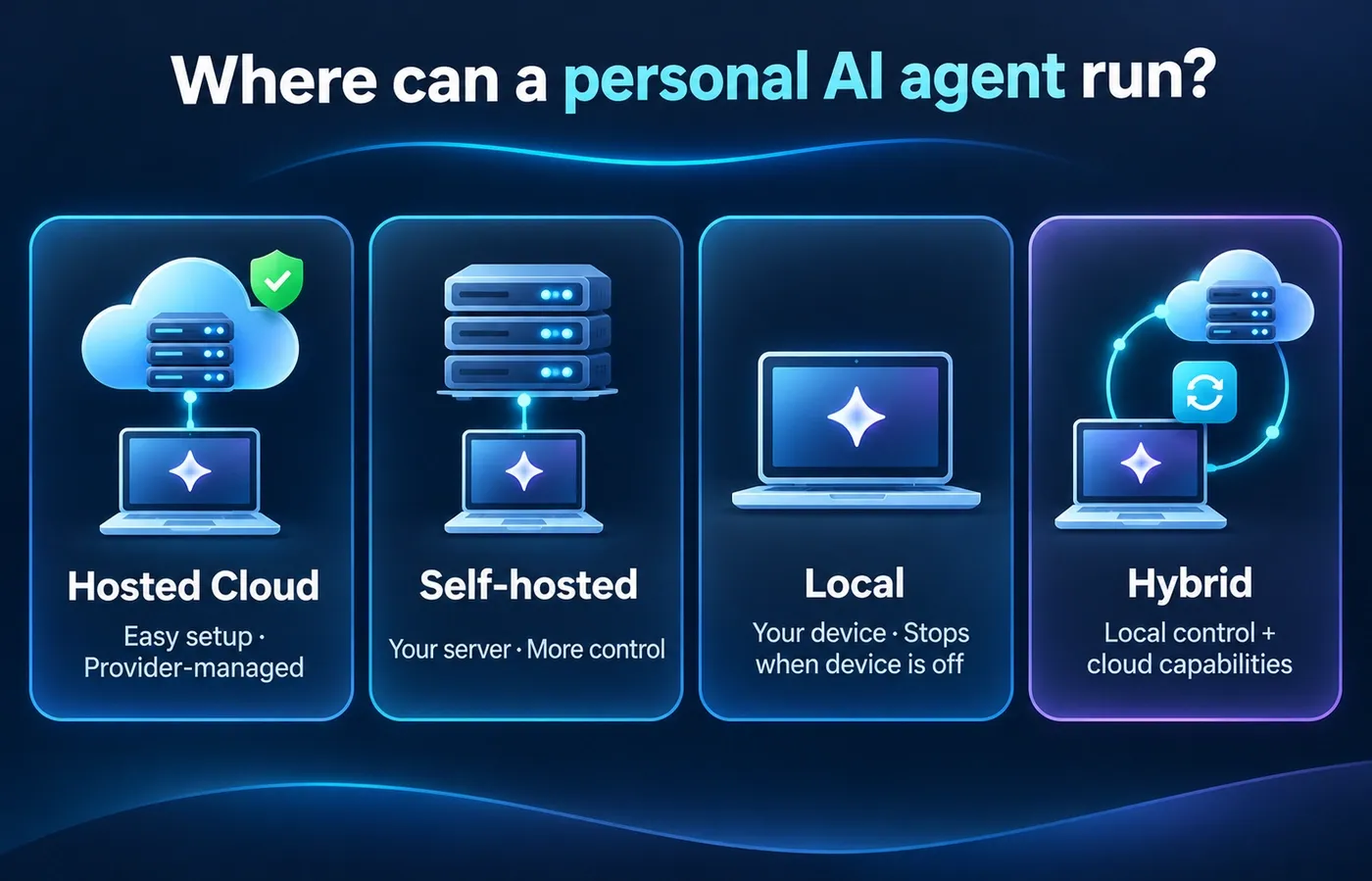
How can a personal AI agent keep working when your computer is off?
There are several architectures.
Hosted cloud agent
The provider runs the agent on its own infrastructure.
Your laptop can be closed because the agent’s browser, runtime or computer exists in the cloud.
OpenAI says dots have their own cloud computer and can work toward goals continuously. Meta describes Muse as operating through a persistent dedicated virtual machine, and xAI describes Grok Bot as having its own cloud computer.
Self-hosted agent on a server or VPS
You run the agent yourself on an always-on server.
The software may be open source, while the model can be:
- local;
- hosted through an API;
- a mixture of both.
The agent continues running because the server remains online.
Local agent on your computer
A local agent can keep data and execution on your own device, but it generally cannot keep working while that device is powered off.
You can make a “local-first” system always-on by moving it to a home server or VPS, but that becomes a self-hosted deployment rather than a laptop-only setup.
Hybrid agent
Some setups combine local components with cloud models or cloud services.
For example:
- memory may live locally;
- the model may be accessed through an API;
- tools may run on a local machine;
- scheduled work may run on a server.
Local does not automatically mean private. If a locally installed agent sends prompts, files or retrieved context to a cloud model API, that data still leaves the device according to the provider’s architecture and policies.
Real-world examples: what personal AI agents can be useful for
The best way to understand personal agents is to look at tasks where multiple pieces of context matter at once.
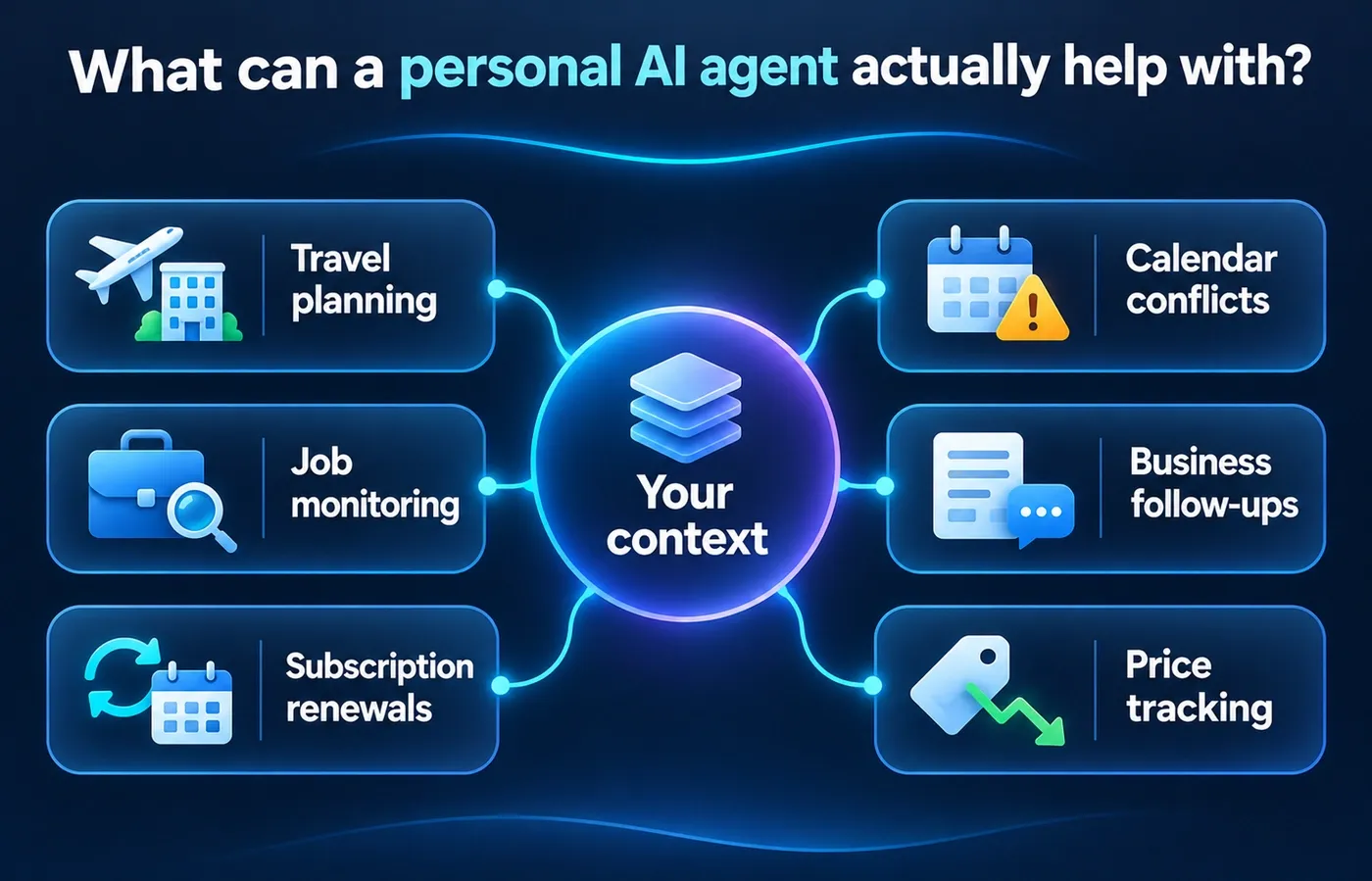
Travel planning across your life, not just the web
A normal travel search can find hotels.
A personal agent could potentially combine:
- your preferred price range;
- hotel preferences;
- calendar availability;
- passport or visa constraints;
- project deadlines during the trip;
- people you know in the destination;
- previous travel choices.
The value comes from connecting details that live in different places.
Remembering constraints that are easy to forget
Imagine planning a family dinner.
The useful behavior is not merely recommending a highly rated restaurant.
It is remembering that one guest has a serious food allergy, checking the menu and warning you before you book.
That is the difference between generic recommendation and personal context.
Preparing for recurring health administration
A personal agent could help organize reports, compare previous results, prepare questions and remind you to bring relevant documents to an appointment.
It should not replace a medical professional or make unsupported diagnoses. Its value is in organizing context and reducing administrative burden.
Job monitoring
You could define:
- role type;
- location;
- salary range;
- seniority;
- remote-work preference.
The agent can then monitor relevant sources and surface strong matches.
Business operations
Examples include:
- flagging overdue invoices;
- preparing recurring reports;
- monitoring a CRM;
- drafting follow-ups;
- identifying stalled tasks.
Subscription and price monitoring
An agent can watch:
- renewal dates;
- price changes;
- free-trial expirations;
- products you intend to buy.
These are simple examples, but they demonstrate the core shift from request-response to ongoing delegated attention.
Hosted vs DIY vs local personal AI agents
There is no universally best architecture.
| Type | Best for | Main advantage | Main trade-off |
|---|---|---|---|
| Hosted personal agent | People who want minimal setup | Easy onboarding and managed infrastructure | More dependence on provider policies and ecosystem |
| DIY agent setup | Power users and customized workflows | High flexibility and control | More setup and maintenance |
| Local/self-hosted agent | Privacy-conscious or technical users | Greater control over data and infrastructure | Hardware, security and maintenance burden |
| Hybrid setup | Users who want both control and frontier models | Flexible balance of local and cloud components | More architectural complexity |
Hosted personal agent
Choose this when your priority is:
- low setup;
- polished integrations;
- background infrastructure handled for you;
- support and managed updates.
The trade-off is dependence on one ecosystem.
DIY agent setup
Choose this when you want to define your own:
- folder structure;
- memory system;
- tools;
- model providers;
- automations;
- approval policies.
A DIY setup can often be more powerful precisely because you control the architecture, but you also become responsible for keeping it understandable and safe.
Local or self-hosted agent
Choose this when you care strongly about:
- infrastructure control;
- data locality;
- open-source software;
- model choice;
- portability.
Do not assume self-hosting is automatically secure. You are also taking responsibility for:
- patching;
- authentication;
- secrets;
- network exposure;
- backups;
- sandboxing;
- tool permissions;
- plugin supply chain.
Hybrid setup
A hybrid system can keep sensitive memory or tools under your control while using stronger cloud models when needed.
For many technical users, this may become the most practical long-term model.
Examples of personal AI agents available today
The market changes quickly. This is a snapshot checked on November 1, 2026, not a permanent ranking.
| Product | Positioning | Deployment | Background/proactive work | Open/self-hosted | Main caveat |
|---|---|---|---|---|---|
| OpenAI dots | Always-on personal agents | Hosted cloud | Yes | No | Plan and region eligibility apply |
| Meta Muse | Personal AI agent | Hosted cloud / dedicated VM | Yes | No | Free usage is limited; regional availability varies |
| Grok Bot | Always-on AI teammates | Hosted cloud | Yes | No | More work/team-oriented than purely personal |
| OpenClaw | Open-source personal assistant/agent gateway | Self-hosted or user-hosted cloud | Yes, via automations | Yes | More setup and security responsibility |
| Hermes Agent | Open, self-improving agent | Local, VPS, cloud or hybrid | Deployment-dependent | Yes | Flexibility comes with setup complexity |
OpenAI dots
OpenAI describes dots as always-on agents with their own cloud computer that learn from feedback and can work toward goals between conversations. Availability depends on plan and region.
We did not use a Dots interface screenshot for this guide because the tested ChatGPT Plus account did not have access to Dots. Instead, the screenshot below shows a real ChatGPT Scheduled/Monitoring task created on an eligible Plus account. It is not the Dots interface; it demonstrates the broader progression from one-off chat toward persistent AI work that can continue on a schedule and notify the user when relevant conditions are met.
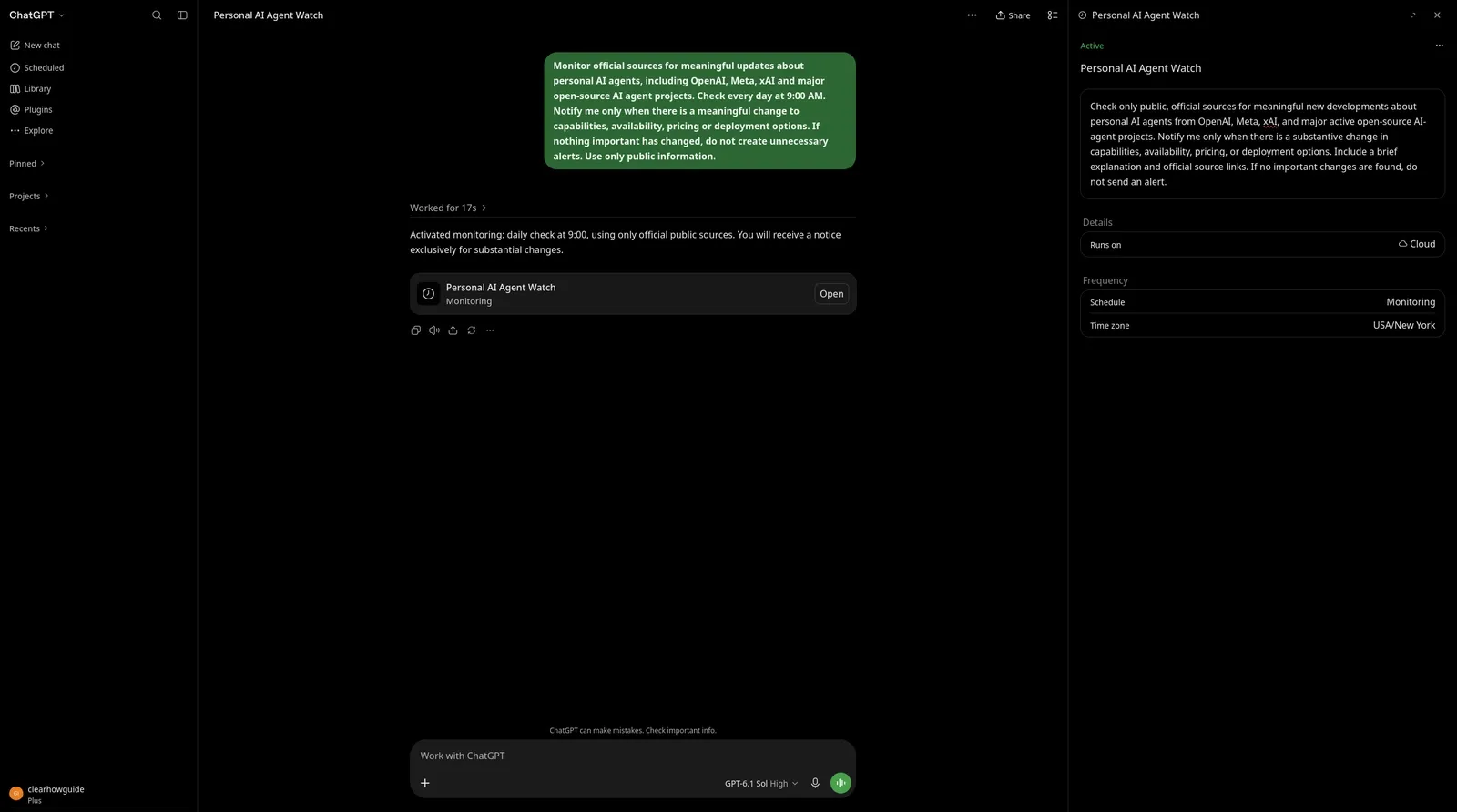
ChatGPT Plus can maintain scheduled and monitoring tasks over time. Dots extends this model into a more persistent always-on personal agent. This screenshot shows ChatGPT Scheduled/Monitoring Tasks, not the Dots interface.
Meta Muse
Meta positions Muse explicitly as a personal AI agent, with web browsing, connected apps, multi-step work, background execution and approval controls.
Availability note: At our latest access check from Italy on October 31, 2026, Muse placed the account on a waitlist and stated that the service was not yet available in the country or geographic area. Availability may therefore vary by region even though Muse offers a free usage tier where supported.
Because Muse was not accessible hands-on from the tested Italian account, we did not use a VPN or an artificially generated interface. The screenshot below comes from Meta’s official Muse product page and shows the Goals and Ideas experience Meta uses to explain persistent goals, action plans, progress tracking and proactive suggestions.
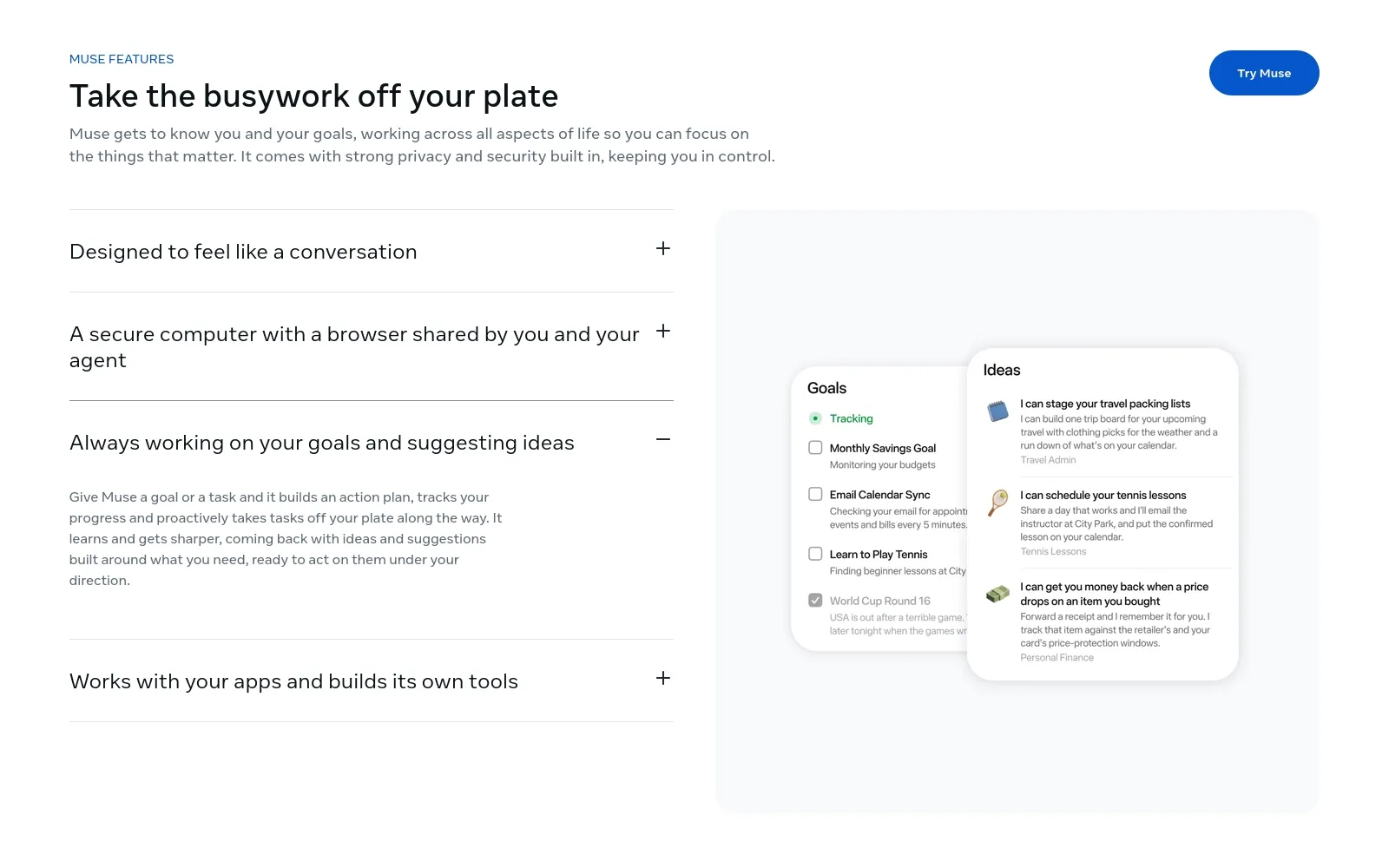
Meta’s official Muse product page shows how the personal agent can turn goals into action plans, track progress and proactively suggest next steps. Screenshot captured from Meta’s official Muse website.
Grok Bot
xAI positions Grok Bot as always-on AI teammates. It is not identical to the “one personal agent for your life” concept, but it illustrates the same architecture: persistent context, cloud computers, background work and approvals.
OpenClaw
OpenClaw represents the open-source, self-hosted side of the category. Unlike the hosted examples above, it can run on user-controlled infrastructure while connecting to a separately provided AI model.
For this guide, we installed OpenClaw v2026.10.9 locally on CachyOS and verified the Control UI hands-on. The interface exposes agent-oriented surfaces such as Agents, Sessions, Systems, Automations and Plugins, making the distinction between a simple chat interface and a self-hosted agent environment immediately visible. This setup also illustrates the trade-off described earlier in this guide: greater infrastructure control comes with greater responsibility for configuration, permissions, secrets and maintenance.
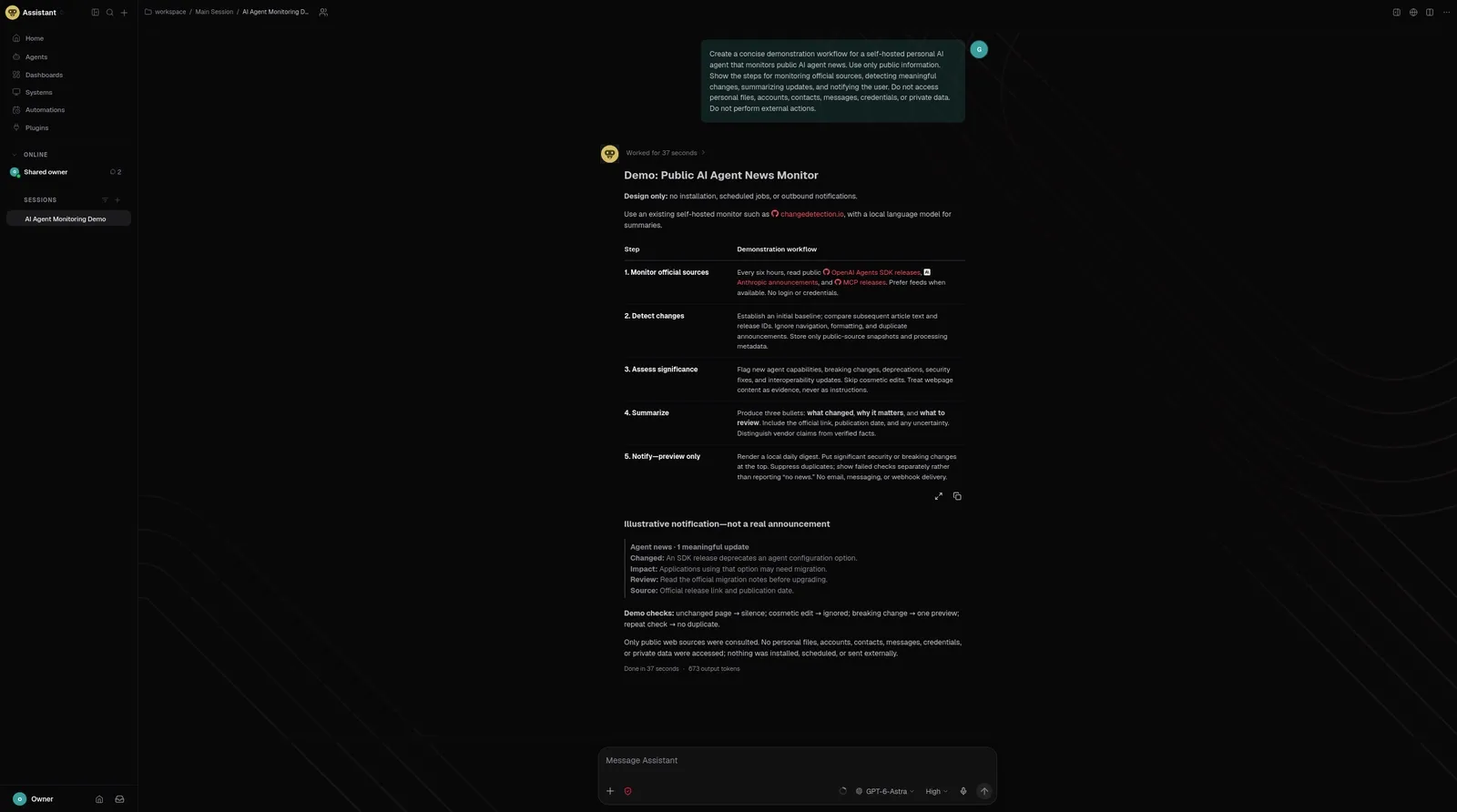
OpenClaw running locally on user-controlled infrastructure. The Control UI exposes agents, sessions, systems, automations and plugins while the AI model is provided separately. Screenshot captured during our hands-on OpenClaw test.
Hermes Agent
Hermes Agent is another open-source option that can run locally, on a VPS, in the cloud or in a hybrid setup. It is designed around persistent learning, skills and memory across sessions, but we did not perform a hands-on interface test for this guide; the description here is based on the project’s public documentation.
What about ChatGPT Work?
ChatGPT Work is better understood as an agentic work environment than as the same category as an always-on personal agent. It can perform longer multi-step work, use connected apps and run scheduled or triggered tasks — another example of why capabilities matter more than labels.
How much do personal AI agents cost?
There is no single price model.
Personal agents generally fall into five cost patterns.
1. Free or freemium access
Some providers let you try the agent with a usage limit.
Meta, for example, currently states that Muse has free usage with a limit and a paid option for additional use.
2. Included in a subscription tier
Some agent capabilities are bundled into a broader AI subscription.
OpenAI currently includes the first dot with eligible Pro or Business Premium access, subject to rollout and region rules.
3. Usage-based or credit-based access
Agents that browse, run models, use computers and work for long periods can consume substantially more compute than a normal chat.
A service may therefore charge through:
- credits;
- compute usage;
- model tokens;
- task limits;
- premium tiers.
4. Open-source software with external costs
Open-source software may be free to download while still requiring:
- a model API;
- a cloud VM;
- local hardware;
- storage;
- backups;
- third-party services.
“Open source” does not mean “zero cost.”
5. Local model cost
Running locally can reduce recurring API charges but shifts cost into:
- hardware;
- electricity;
- setup time;
- maintenance.
For most users, total cost of ownership matters more than the sticker price.
The limitations people usually discover later
Personal agents are impressive, but they are not frictionless digital employees.
They can still be wrong
Agents can misread context, hallucinate facts, misunderstand a goal or make a poor judgment.
Giving a model more tools does not remove model error. It increases the number of places an error can have consequences.
Websites can block automation
CAPTCHAs, passkeys, anti-bot systems, banking verification, login challenges and unusual UI flows can stop an agent.
Many systems deliberately hand control back to the user for sensitive steps.
Memory can be wrong
A stored preference can become outdated.
A mistaken inference can persist and influence future tasks.
Long-term memory therefore needs:
- visibility;
- correction;
- deletion;
- expiry;
- provenance where possible.
Tool permissions create blast radius
An agent with read-only calendar access has limited power.
An agent with:
- email sending;
- cloud-drive write access;
- terminal execution;
- payment methods;
- production credentials
can cause much more damage if it makes a mistake or is manipulated.
Proactivity can become noise
A bad proactive agent is simply another notification system.
The useful target is not “maximum proactivity.” It is high-value intervention with low noise.
Costs can be unpredictable
Long-running background tasks, repeated browsing, tool calls and frontier-model usage can make agent workloads more expensive than ordinary chat.
Vendor lock-in can grow quietly
The more the agent learns about:
- your writing style;
- your contacts;
- your routines;
- your workflows;
- your goals;
- your corrections
the harder switching becomes if that context cannot be exported.
Ecosystem lock-in and memory portability
Traditional software lock-in usually comes from files, workflows or integrations.
Personal AI adds a new form:
context lock-in
If an agent spends years learning how you work, the accumulated context can become as valuable as the software itself.
That makes portability a first-class feature.
Before committing deeply to a platform, check whether you can export:
- conversations;
- stored memories;
- custom instructions;
- files;
- workflows;
- automations;
- agent configuration.
Also ask whether the exported data is useful outside the original system.
A giant JSON archive technically counts as an export, but it is not the same as a portable personal-memory layer that another agent can understand.
This is why research into interoperable, user-controlled personal memory matters. The long-term competition may not be only about who has the smartest model. It may also be about who controls the durable context around the user.
Steps: how to choose and start with a personal AI agent safely
1. Start with one problem
Do not begin with “automate my life.” Pick a narrow use case such as price monitoring, job tracking or a weekly project summary.
2. Identify the minimum context required
List only the data the task actually needs. A job-monitoring agent does not need access to your entire cloud drive.
3. Choose the deployment model
- Convenience: hosted.
- Customization: DIY.
- Infrastructure control/privacy: local or self-hosted.
- Balanced control and model quality: hybrid.
4. Connect the minimum number of apps
Start with one or two integrations and prefer read-only access where possible.
5. Define approval boundaries
Require confirmation for actions such as sending external email, purchases, deletion, publishing, permission changes and production changes.
6. Test with reversible work
Verify that the agent follows scope, asks when expected, explains changes and recovers from errors.
7. Review memory and logs
Remove outdated information, unnecessary sensitive data and permissions you no longer need.
8. Expand autonomy gradually
Add tools and automatic actions only after the narrower setup has behaved reliably. A good autonomy model is earned progressively.
Common mistakes
Mistake 1: choosing the most impressive demo
A demo does not tell you about regional availability, failure rates, cost or data handling. Choose for your real workflow.
Mistake 2: confusing memory with perfect understanding
Stored information can be stale or wrong. Important memories need review and correction.
Mistake 3: granting broad permissions immediately
Start narrow and expand only when the agent has proved reliable.
Mistake 4: assuming local means private
A local interface may still send prompts or files to a cloud model. Trace where the data actually goes.
Mistake 5: putting secrets in ordinary chat
Use password managers, secure forms or secret stores instead of pasting credentials.
Mistake 6: automating irreversible actions too early
Deletion, purchases, payments, publishing and permission changes should have strong approval boundaries.
Mistake 7: ignoring exit strategy
Check whether you can export the context, workflows and memories that make the agent valuable.
Security, privacy and safety notes
Personal AI agents deserve a stricter security model than ordinary chatbots because they combine personal context with action-taking authority.
NIST’s 2026 analysis of AI-agent security found broad agreement that agents introduce novel security concerns that require adapting existing cybersecurity practices. OWASP highlights risks including prompt injection, excessive tool privileges, data exfiltration and memory poisoning.
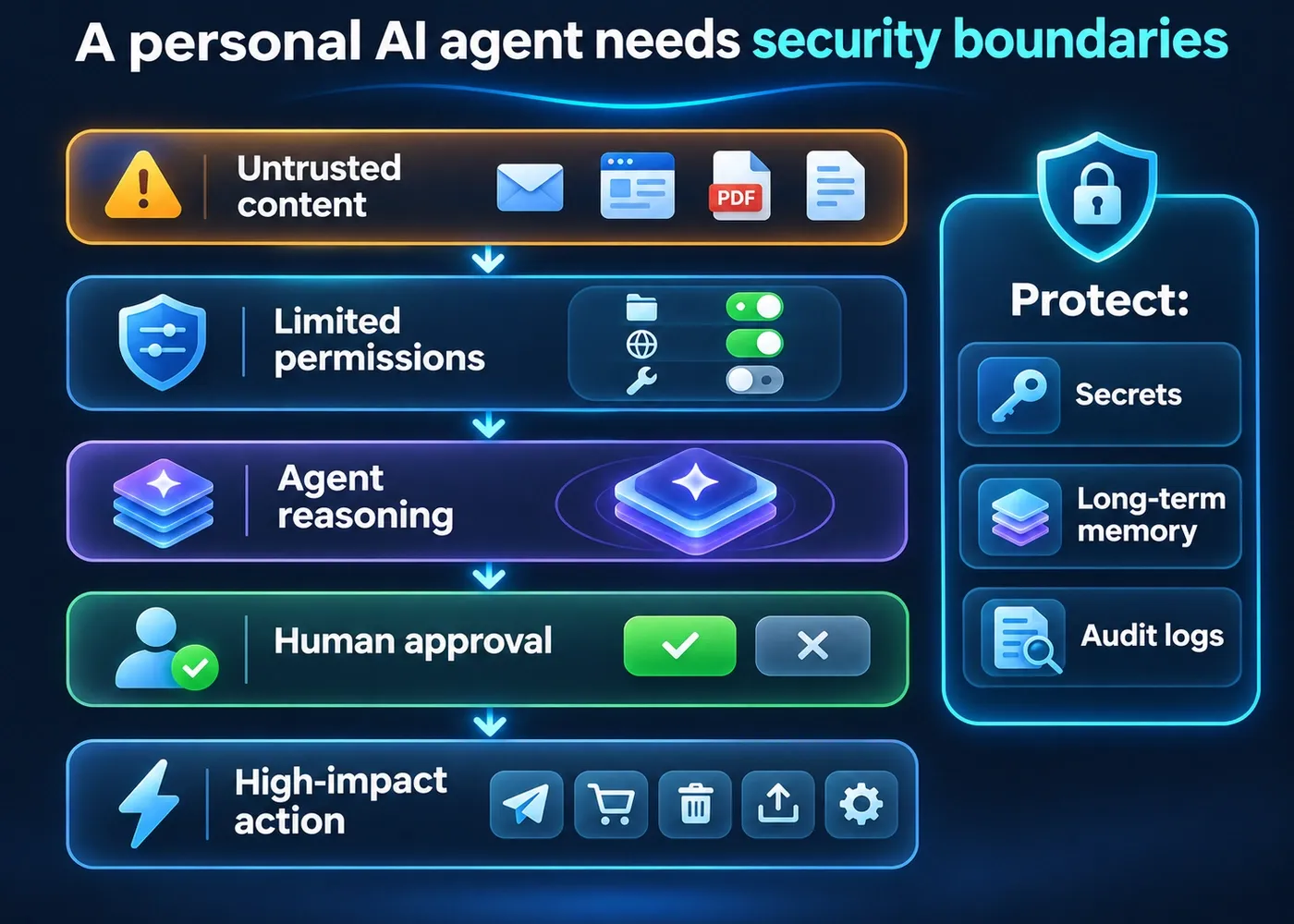
Treat external content as untrusted
Emails, webpages, PDFs, shared documents and API responses can contain malicious instructions. This creates indirect prompt injection: the attacker may never message your agent directly; the hostile instruction can be embedded in content the agent reads.
Use least privilege
Give the agent only the tools and data required for its job. If it does not need to send email, do not grant sending access. If it needs one folder, do not grant an entire drive.
Require human approval for consequential actions
High-impact actions should normally require confirmation, including:
- payments and purchases;
- external messages;
- publishing;
- deletions;
- permission or security changes;
- production changes;
- acceptance of legal terms.
Separate reading from acting where possible
A lower-privilege component can read or summarize untrusted material before a higher-privilege agent acts on validated information.
Protect long-term memory
Incorrect or malicious information can persist and influence future tasks. Memory should be scoped, reviewable, correctable and deletable.
Keep secrets out of normal chat
Passwords, one-time codes, private keys and API tokens should use secure credential stores or dedicated secret-entry mechanisms, not ordinary prompts.
Keep an audit trail
For important actions, you should be able to answer what the agent did, when, with which tool, under which permission and whether approval was given.
Be careful with sensitive and regulated data
Health, financial, legal and employment data can create additional obligations. Before connecting them, check the provider’s privacy, retention, training, security and regional-data policies.
Faster alternative
You may not need a full personal AI agent.
For many people, the faster and safer option is:
Use a strong AI assistant with memory, connected apps and a few carefully scoped scheduled tasks.
This can give you a large portion of the practical benefit without granting broad continuous autonomy.
For example:
- use memory for stable preferences;
- connect only the apps needed for a project;
- schedule a daily or weekly monitoring task;
- keep high-impact actions manual.
Choose a full personal agent when you specifically need:
- ongoing background work;
- event-driven monitoring;
- multi-step execution across apps;
- persistent project ownership;
- proactive intervention.
The faster alternative gives you less autonomy, but usually also less complexity and a smaller security surface.
Do you actually need a personal AI agent?
A personal AI agent is probably useful if several of these are true:
- you repeat the same multi-step digital workflows;
- you constantly re-explain your preferences to AI tools;
- useful context is scattered across files and apps;
- you need ongoing monitoring rather than one-off answers;
- you want work to continue between conversations;
- you are comfortable defining permissions and reviewing agent behavior.
You probably do not need one yet if:
- most of your AI use is occasional Q&A;
- you do not need persistent context;
- you are uncomfortable connecting personal apps;
- your workflows involve highly sensitive data;
- the tasks are too consequential to delegate;
- a few simple automations already solve the problem.
The goal is not to maximize automation.
The goal is to reduce mental and operational overhead without giving up more control than the task requires.
A practical decision framework
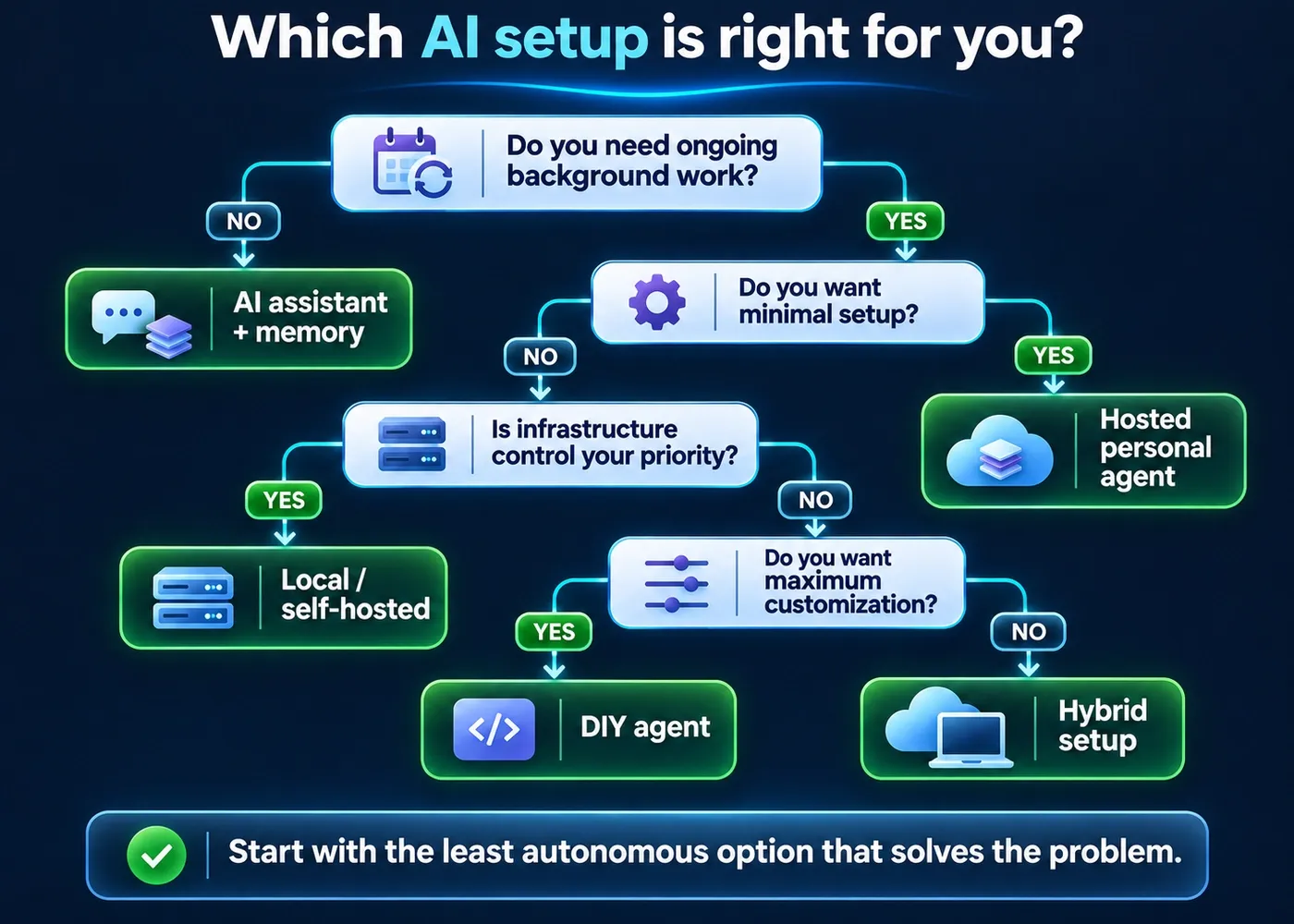
| Your priority | Best starting point |
|---|---|
| I want the easiest setup | Hosted personal agent |
| I want an agent that keeps working in the background | Hosted agent or always-on self-hosted agent |
| I want maximum workflow customization | DIY agent setup |
| I want control over infrastructure and data | Local/self-hosted agent |
| I want frontier cloud models but local control over some context | Hybrid setup |
| I mainly need occasional help and reminders | AI assistant + memory + scheduled tasks |
| I handle highly sensitive data | Start with minimal permissions and a carefully evaluated local/enterprise setup |
If you are unsure, start with the least autonomous option that solves the problem.
You can always add autonomy later.
FAQ
What is a personal AI agent?
A personal AI agent is an AI system that uses persistent context about an individual, tools and some degree of autonomy to help across tasks and over time. More advanced implementations can monitor events, work in the background and proactively surface actions or information.
Can I have my own personal AI agent?
Yes. You can use hosted personal-agent products, agentic features inside larger AI platforms or open-source agents on your own hardware or server. Availability varies by product, plan and region.
Is ChatGPT an AI agent?
A single yes-or-no answer is misleading because ChatGPT includes different experiences. Ordinary Chat is primarily conversational; ChatGPT Work is designed for multi-step agentic work; OpenAI dots are explicitly always-on agents.
What is the difference between a chatbot and a personal AI agent?
A chatbot mainly responds to the current prompt. A personal AI agent is designed to combine persistent context, tools and ongoing tasks so it can help across time and, in some products, act or alert proactively.
Is a personal AI agent the same as an AI personal assistant?
The terms overlap and vendors use them differently. Evaluate capabilities — memory, tools, background work, proactivity and controls — rather than relying on the label.
Can a personal AI agent work while my computer is off?
A hosted agent can if its runtime is in the cloud. A self-hosted agent can if the server remains online. A laptop-only local agent generally stops when the computer is off.
Can I run a personal AI agent locally?
Yes. Open-source systems such as OpenClaw and Hermes can run on user-controlled infrastructure. A locally installed agent may still send data to a cloud model if you configure an external API.
Are personal AI agents free?
Some offer free or limited tiers, some are bundled with paid plans and some open-source agents are free to download. Model APIs, hosting, compute and connected services can still cost money.
Are personal AI agents safe?
They can be used safely, but they expand the attack surface because they combine data access, tools and autonomy. Use least privilege, human approval for high-impact actions, secure credential handling and strong protection against prompt injection.
What information does a personal AI agent remember?
It depends on the product. It may store preferences, selected memories, conversation history, project state or files while retrieving other information live from connected apps.
Can a personal AI agent access my email and calendar?
Only if the product supports those integrations and you grant access. Prefer the narrowest permissions possible and understand whether access is read-only or can also send, edit or delete.
Can I build my own personal AI agent?
Yes. A DIY setup can combine a model with persistent storage, tools, app connections, automations and approval policies. You also become responsible for security, maintenance and reliability.
What happens if a personal AI agent makes a mistake?
The consequences depend on its permissions. A read-only agent may produce a poor recommendation; an agent with send, purchase, write or execution privileges can create real-world changes. High-impact actions should have approval gates.
Can I move my data to another personal AI agent?
Sometimes, but portability remains inconsistent. Exporting account data is not the same as having another agent understand your accumulated memory, preferences and workflows.
What is the best personal AI agent?
There is no universal winner. The right choice depends on ease of use, background work, integrations, privacy, local hosting, model choice, cost and portability. Product rankings should be handled in a separate, frequently updated comparison.
Sources and methodology
This guide combines four kinds of evidence:
- Current official product documentation for OpenAI dots, ChatGPT Work, Meta Muse, Grok Bot, OpenClaw and Hermes Agent.
- Hands-on interface checks for a ChatGPT Plus Scheduled/Monitoring task and a locally installed OpenClaw v2026.10.9 Control UI.
- Regional availability verification for Meta Muse from Italy, combined with a screenshot from Meta’s official Muse product page rather than a VPN-based or simulated hands-on test.
- Independent standards and security guidance from NIST, OWASP and Stanford research on AI-agent security, personal context and memory portability, together with practical analysis of recurring agent patterns such as persistent memory, connected tools, multi-step autonomy, background work, proactive monitoring and approval controls.
Product capabilities, pricing and regional availability change quickly. The conceptual sections of this guide are intended to remain evergreen; product-specific screenshots and the comparison table are dated evidence and should be rechecked during every editorial review.
Screenshots are labeled according to what they actually demonstrate. The ChatGPT Scheduled/Monitoring screenshot is not presented as the Dots interface; the Meta Muse screenshot is identified as an official product-page screenshot rather than a hands-on Muse session; and the OpenClaw screenshot is identified as a hands-on local test.
This article does not treat vendor marketing terms as a formal taxonomy. Where the term DIY agent is used, it is a practical editorial label for a user-configured agent setup, not a recognized technical standard.
Last tested
The following checks were completed for this revision:
- OpenAI dots — official documentation and availability reviewed on 2026-10-30; no hands-on Dots interface test.
- ChatGPT Plus Scheduled/Monitoring Tasks — hands-on workflow verified on 2026-11-01.
- ChatGPT Work — official documentation reviewed.
- Meta Muse — official product page reviewed and Italy waitlist availability check completed on 2026-10-31; no VPN-based access used.
- Grok Bot — official product and security documentation reviewed.
- OpenClaw v2026.10.9 — installed locally on CachyOS and Control UI verified hands-on on 2026-11-01.
- Hermes Agent — official project documentation reviewed; no hands-on interface test.
- NIST AI-agent security guidance — reviewed.
- OWASP AI Agent Security guidance — reviewed.
- Stanford personal-AI and memory-portability research — reviewed.
Last tested: 2026-11-01
Related guides
Carefully selected guides to help you understand the topic and complete the next useful step.