Affiliate disclosure: This article contains affiliate links. If you start a LearnWorlds trial or buy a plan through one of our links, ClearHowGuide may earn a commission at no extra cost to you. That does not change the strengths, weaknesses, or recommendations in this review.
Pricing and features checked: October 2, 2026.
Quick answer: 60-second verdict
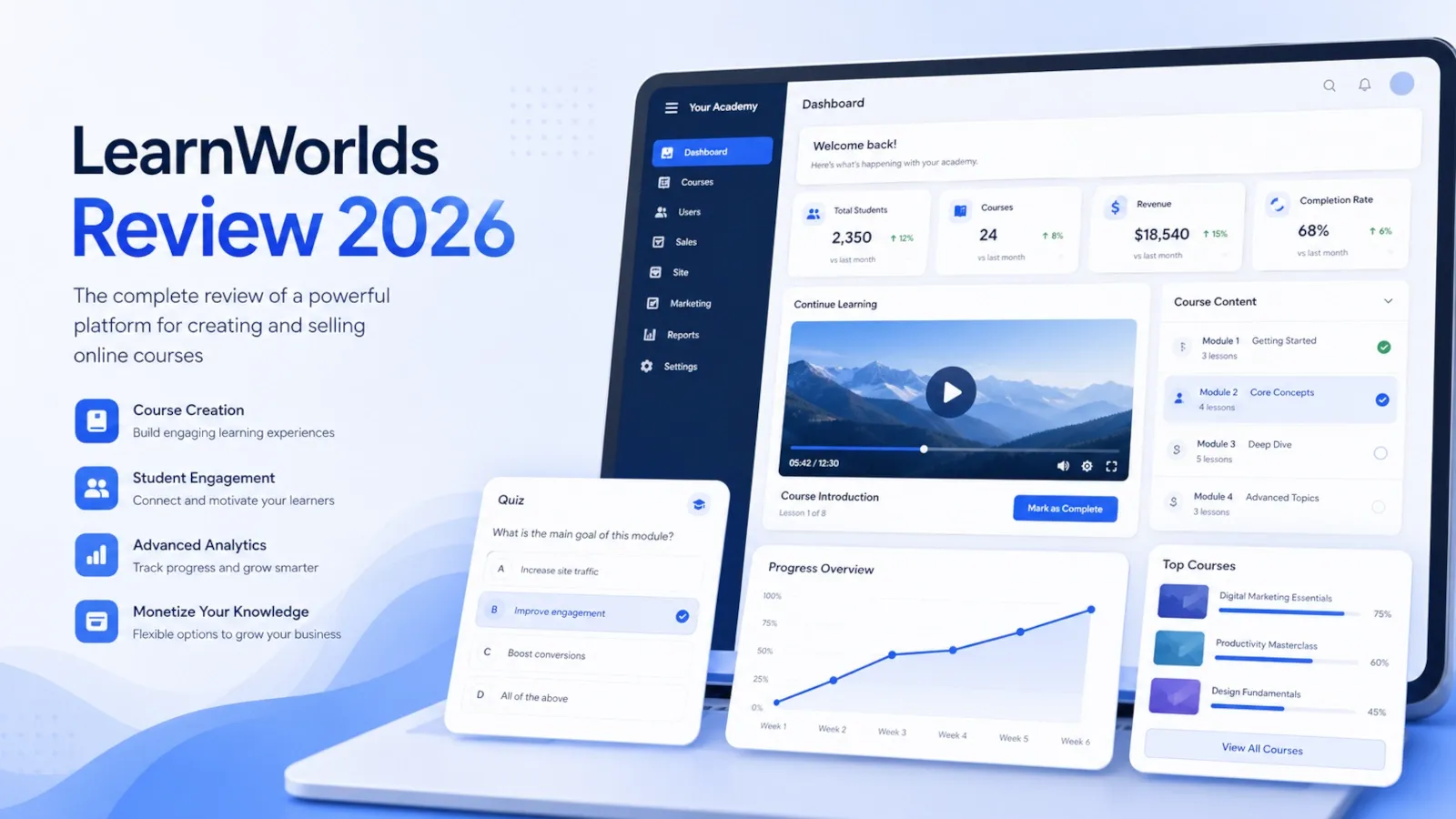
LearnWorlds is one of the more convincing options if the learning experience itself matters as much as selling the course. Its strongest case is not “upload videos and take payments.” It is building a structured academy with assessments, certificates, interactive learning, reporting, branded pages, communities, and more advanced training workflows.
That strength is also the reason LearnWorlds can be a poor fit for a very simple project. If all you need is a lightweight way to sell one video course, a downloadable product, or a basic membership, you may end up paying for an LMS that is more capable than your business needs.
Our current view is:
| Decision point | ClearHowGuide view |
|---|---|
| Best for | Serious course creators, branded academies, customer education, professional training, and learning-focused businesses |
| Less suitable for | Very simple digital products, creators who mainly need marketing automation, or teams that will not use advanced learning features |
| Biggest strength | Learning-first tools: structured courses, assessments, certificates, interactive learning, SCORM on eligible plans, and reporting |
| Biggest weakness | Cost rises quickly when you need the features that make LearnWorlds most distinctive |
| Learning curve | Manageable at the start, but the back end becomes more involved as your school grows |
| Trial | 30 days, with no credit card required at the time of this review |
| Our practical starting point | Test the platform first; compare Starter with Pro Trainer before paying |
LearnWorlds makes the most sense when you will actually use the capabilities that separate it from a simpler course seller. If those capabilities are central to your product, the higher price can be easier to justify. If they are not, the platform can feel expensive.
Start a 30-day LearnWorlds trial — no credit card required
Build one small test course before choosing a paid plan.
How we reviewed LearnWorlds
This update uses three layers of evidence rather than relying on the marketing page alone.
First, we reviewed the LearnWorlds product areas already documented in our own screenshots and article assets, including the admin dashboard, course builder, website builder, interactive video tools, assessments, AI-assisted course creation, reporting, pricing, and plan comparison.
Second, we re-checked current plan information, trial conditions, feature availability, and product documentation against official LearnWorlds sources on October 2, 2026.
Third, we compared those product checks with experience reports supplied for this review. They include feedback from a reviewer who described about six months of use, an implementation-focused reviewer who described LearnWorlds across dozens of client projects, and another review focused on recurring strengths and complaints from users.
That distinction matters. We do not present somebody else’s six-month experience as our own. When a point comes from long-term user feedback rather than something we independently reproduced, we label it as reviewer-reported.
We also do not assign an arbitrary numerical score. A 9.2/10 looks precise, but it is meaningless unless the scoring methodology is defined and repeatable.
When this review is useful
This review is for you if you are deciding whether LearnWorlds deserves a place on your shortlist and you care about the actual learning product, not only the checkout page.
It is especially relevant if you want to build:
- a paid online course business;
- a branded multi-course academy;
- customer education or product training;
- certification-style learning;
- professional or compliance-oriented training;
- a course business that may later need B2B sales, multiple administrators, deeper reporting, or SCORM;
- a blended learning offer with self-paced content and live sessions.
If you are already certain that LearnWorlds is the platform you want and only need a full plan-by-plan cost analysis, that is a separate decision from this review. The purpose here is to decide whether LearnWorlds itself fits your model before you optimize the plan.
Before you choose LearnWorlds
Do not start with the feature list. Start with the learning experience you are trying to create.
Ask four questions:
- Are people paying for education, or are you using education to support another product or service?
- Do learners need more than video and text?
- Will assessments, certificates, interactive activities, learning paths, reporting, or SCORM materially improve the outcome?
- Is your priority teaching quality, or is it marketing automation and funnel sophistication?
LearnWorlds becomes more compelling as your answer moves toward structured learning, measurable learner progress, certification, customer education, and training.
It becomes less compelling when the real requirement is simply “sell a small digital product as cheaply as possible.”
How to decide if LearnWorlds fits you in 4 steps
1. Define the learner outcome
Write down what a learner should be able to do after completing your course or program. If the outcome requires assessment, practice, feedback, certification, structured progression, or measurable completion, LearnWorlds becomes more relevant.
2. Identify the features that actually change that outcome
Separate must-have learning features from features that simply look impressive in a demo. If interactive video, assessments, certificates, SCORM, reporting, or learning programs do not improve the outcome, do not use them to justify a more expensive plan.
3. Estimate the real monthly cost
Include the LearnWorlds subscription, Starter enrollment fees where applicable, payment processing, add-ons, and any external CRM, email, support, webinar, or marketing tools you still need. The break-even calculator later in this review helps with the Starter-versus-Pro enrollment-fee comparison.
4. Rebuild one real use case during the trial
Do not evaluate LearnWorlds by browsing menus. Recreate one small version of the product you intend to sell or deliver. If the workflow feels sustainable and the learner experience is strong, the platform has passed a much more useful test than a feature checklist.
What LearnWorlds is — in practical terms
LearnWorlds is a hosted learning management system for creating, delivering, selling, and managing online learning.
That sounds similar to many course platforms, but the important difference is emphasis. LearnWorlds is built around the idea that the learning experience itself should be a product feature.
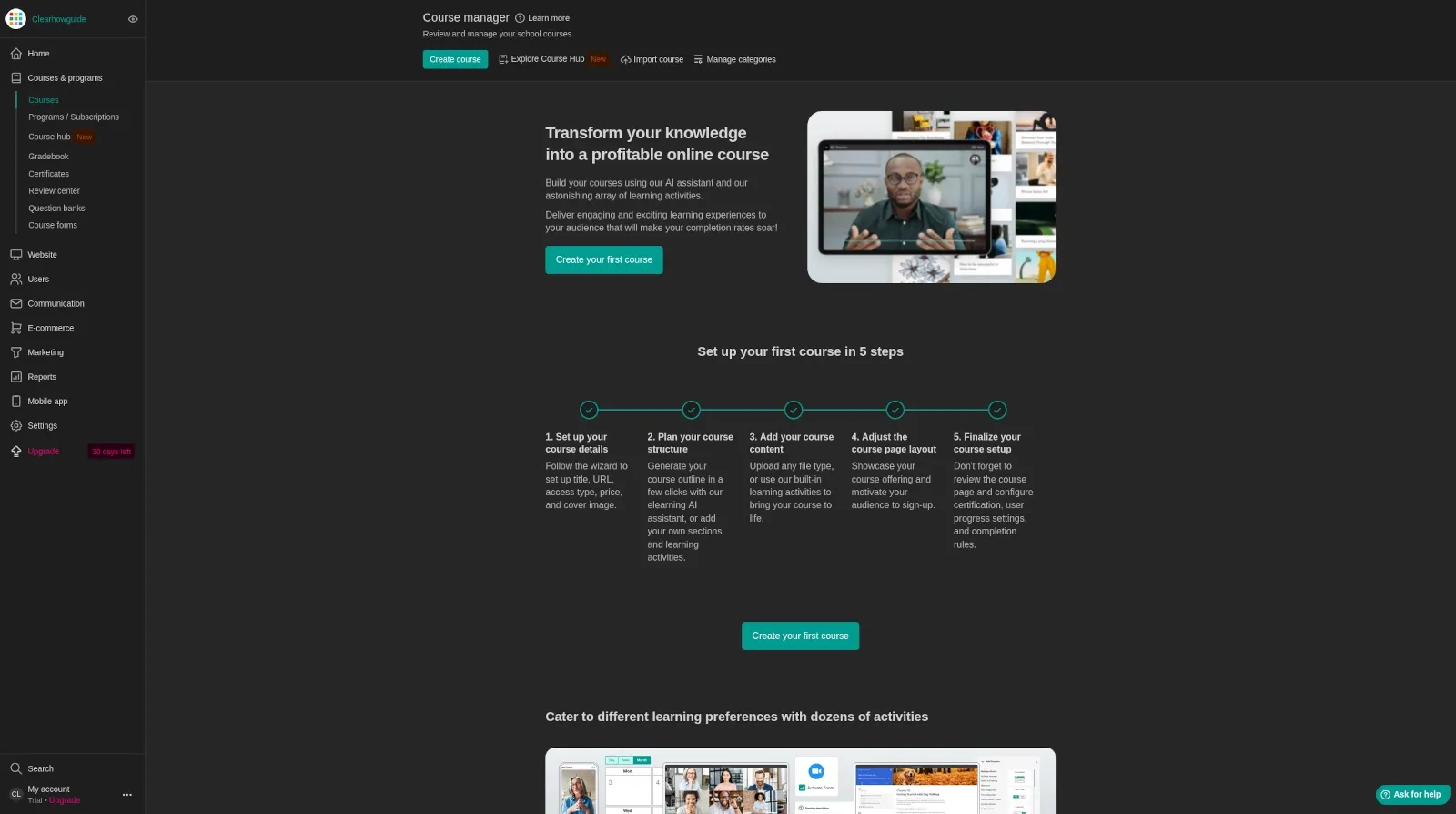
You can structure courses and programs, combine multiple learning activities, create assessments, award certificates, track progress, build a branded learning website, sell access, run communities, and use live sessions and integrations.
That makes it closer to an online academy platform than a simple video-hosting checkout tool.
This distinction is the central theme that also appeared in the experience reports we reviewed: people who use LearnWorlds’ learning features tend to see more value in the platform than people who mainly need a basic way to host and sell content.
What we liked most
1. The platform is genuinely learning-first
The strongest reason to choose LearnWorlds is the depth of the learning experience.
A course can go beyond a playlist of videos and include:
- structured sections and learning paths;
- quizzes and exams;
- assignments and self-assessments;
- certificates;
- interactive video;
- live sessions;
- communities;
- progress tracking;
- SCORM content on eligible plans;
- AI-assisted learning and assessment features.
This matters for professional education, customer training, certification, and any product where completion and understanding matter more than simple content access.
2. Interactive video is a meaningful differentiator
Interactive video is one of the features that repeatedly stands out when LearnWorlds is compared with simpler course platforms.
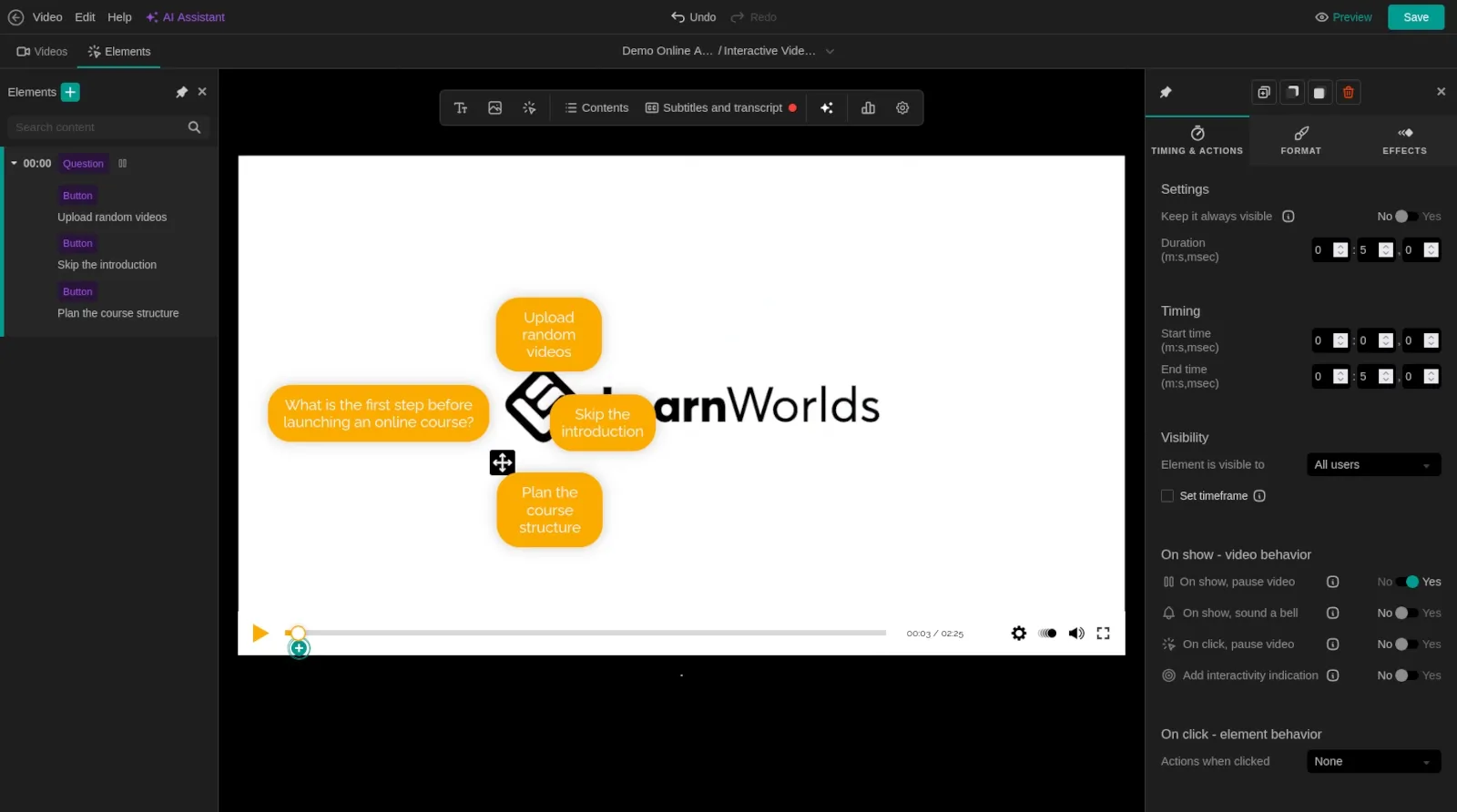
Instead of treating video as a passive asset, LearnWorlds can turn it into part of the learning flow. Depending on plan and configuration, interactive elements can be used to increase participation and make long lessons less passive.
The key point is not that every course needs interactive video. It is that LearnWorlds gives learning-focused creators tools that many marketing-first platforms treat as secondary.
3. Assessments, certificates, and SCORM make it more credible for serious training
For a hobby course, certificates and SCORM may not matter.
For training businesses, institutions, professional education, and some B2B programs, they can be decisive.
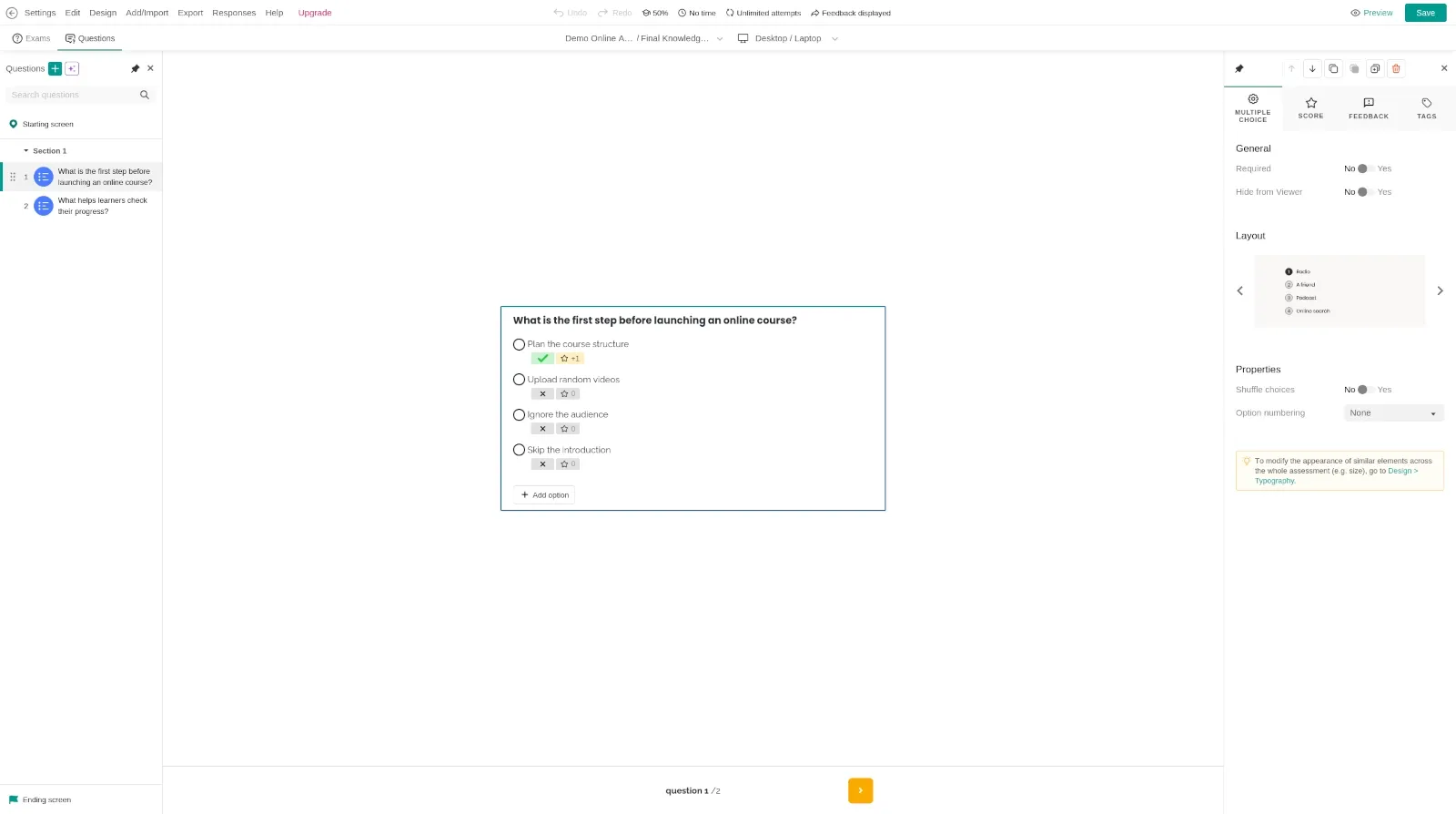
Pro Trainer currently includes course certificates and up to 20 SCORM uploads according to the official pricing page, while higher plans expand the training stack further.
This is one of the clearest reasons to consider LearnWorlds over a platform designed mainly around creator marketing.
4. The website builder can keep the academy under one brand
LearnWorlds includes a no-code website builder and branded school pages.
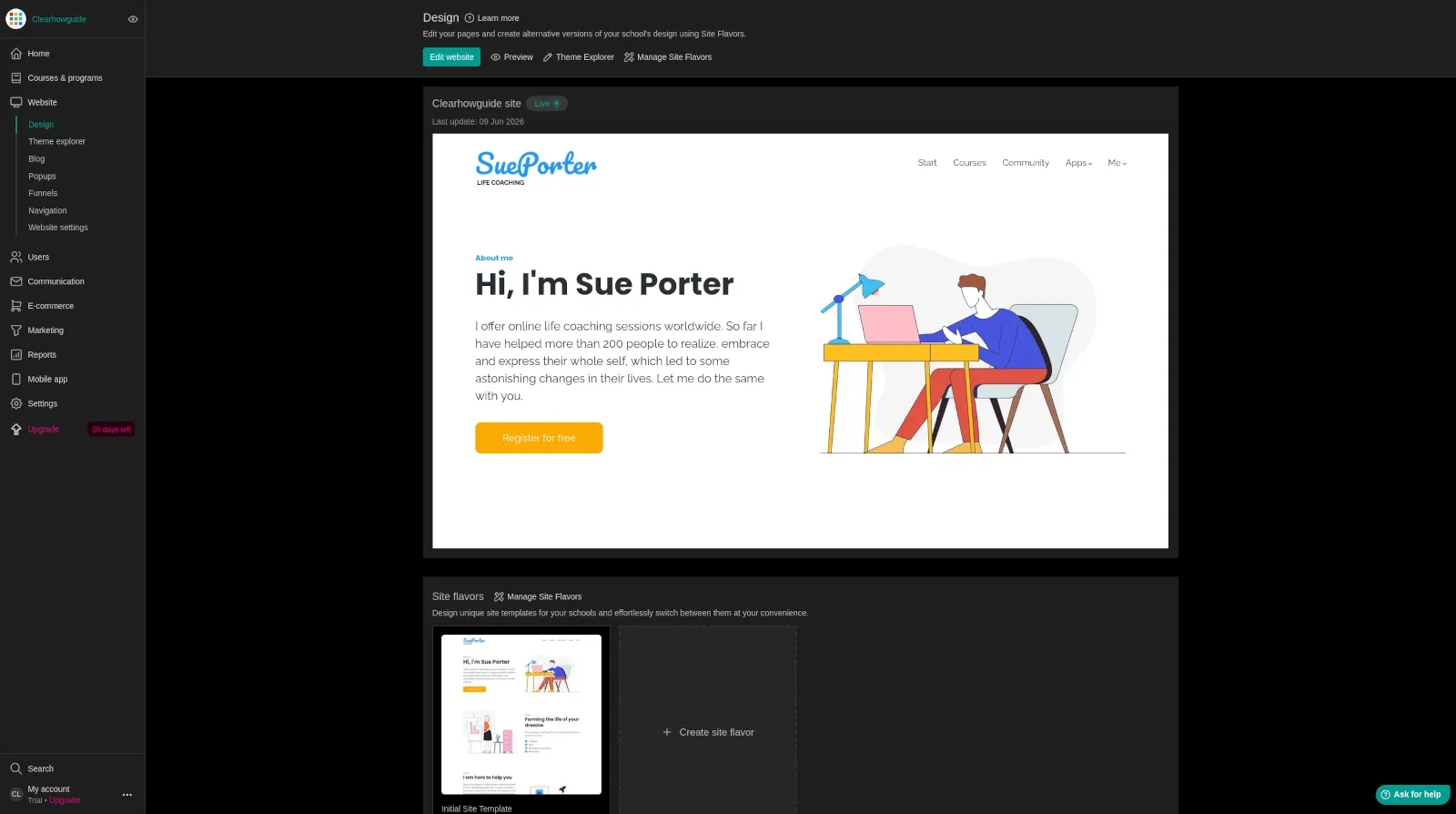
You can use LearnWorlds as a dedicated learning site even if your main business website lives somewhere else. That can be a clean model for customer academies, certification portals, and branded training environments.
One implementation-focused reviewer in the material we analyzed described this as a practical strength: businesses can keep their existing company website and use LearnWorlds as the branded education layer on a domain or subdomain.
5. It can support both direct sales and more complex training models
LearnWorlds is not limited to selling one course to one person.
Depending on plan and setup, the platform supports offers, bundles, subscriptions, learning programs, licenses, gifts, custom deals, and B2B-style training structures.
This is important if your business may evolve from direct-to-consumer course sales into customer education, bulk licensing, partner training, or a multi-program academy.
We would not buy LearnWorlds only because those possibilities exist. But it is useful to know that the platform has room to grow beyond a first course.
Where LearnWorlds is weaker
1. The attractive entry price can hide the real cost of growing
The most consistent weakness across the experience reports we analyzed is cost scaling.
Starter looks inexpensive, but it charges a fee for each paid enrollment. The plans above Starter remove that fee, but the monthly subscription rises.
A reviewer with roughly six months of use summarized the trade-off well: LearnWorlds can justify its price when you use the advanced learning ecosystem, but the value is harder to defend if you are not using assessments, interactivity, reporting, or the other features you are paying for.
That is why we would evaluate LearnWorlds by cost per useful capability, not by the cheapest headline price.
2. The back end gets more complex as the school grows
LearnWorlds can be approachable for a first course, but it is not a deliberately minimal product.
Once you add programs, pages, assessments, communities, automations, integrations, offers, and more advanced reporting, there is more to learn and more to organize.
This is not necessarily a flaw: depth creates complexity. But creators expecting the simplicity of a lightweight checkout tool should plan for a real setup period.
3. You may still need other business tools
LearnWorlds covers more than course hosting, but it does not automatically replace every part of your business stack.
Depending on your operation, you may still prefer dedicated tools for CRM, advanced email marketing, sales automation, analytics, customer support, or complex funnels.
This point came up in long-term user feedback: the total monthly cost should include the tools you still need around LearnWorlds, not just the LMS subscription.
4. Save carefully when building important pages
One reviewer in the source material specifically reported frustration with page-builder work not being auto-saved in their experience.
We did not independently reproduce that behavior during this update, so we are not presenting it as a universal current bug.
Our practical advice is simple: when building long or business-critical pages, save deliberately and verify how the editor behaves in your current account before trusting a long editing session to recover automatically.
That is the kind of operational detail worth testing during the free trial.
AI tools: useful, but not the main reason we would buy LearnWorlds
LearnWorlds now integrates AI into several parts of the platform.
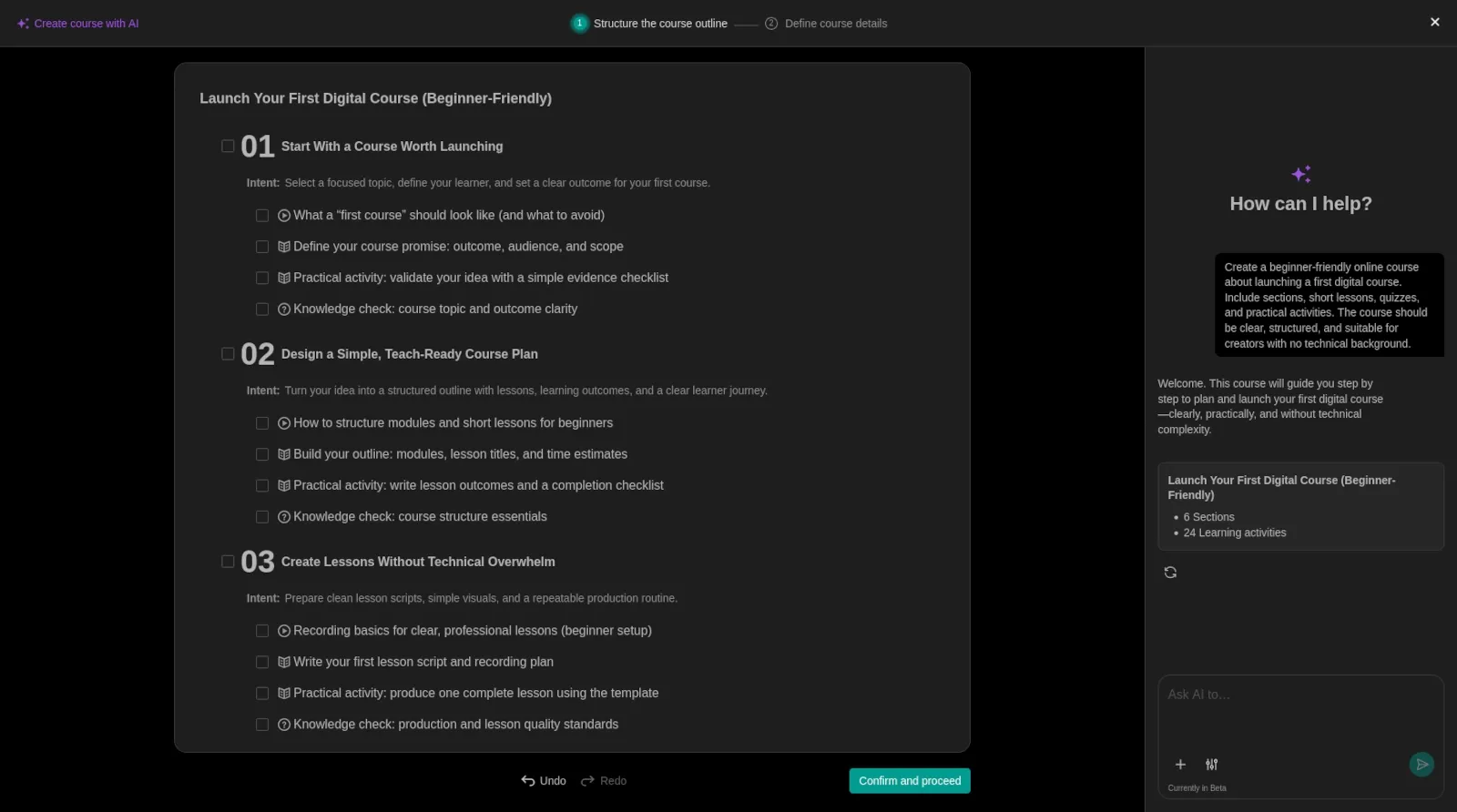
Current capabilities include AI-assisted course creation and assessment workflows, while LearnWorlds also documents an AI Feedback Assistant that can explain assessment results to learners.
Our view is more nuanced than “AI makes course creation easy.”
AI is most valuable here when it reduces repetitive work after you already know what you want learners to achieve. It can help with outlines, drafts, assessments, and feedback. It cannot decide whether your course solves the right problem or whether your instructional design is sound.
An experienced reviewer in the source material made a useful distinction: some competing platforms may feel stronger on AI tools for the administrator or marketer, while LearnWorlds’ more interesting AI work is increasingly tied to the learner experience and feedback.
That is a promising direction, but we would not choose the entire LMS based on AI alone.
Analytics and reporting: more important as the academy grows
Reporting is easy to underestimate when you have ten learners.
It becomes much more important when you need to understand who is progressing, who is disengaging, what courses are completed, and whether a training program is actually working.
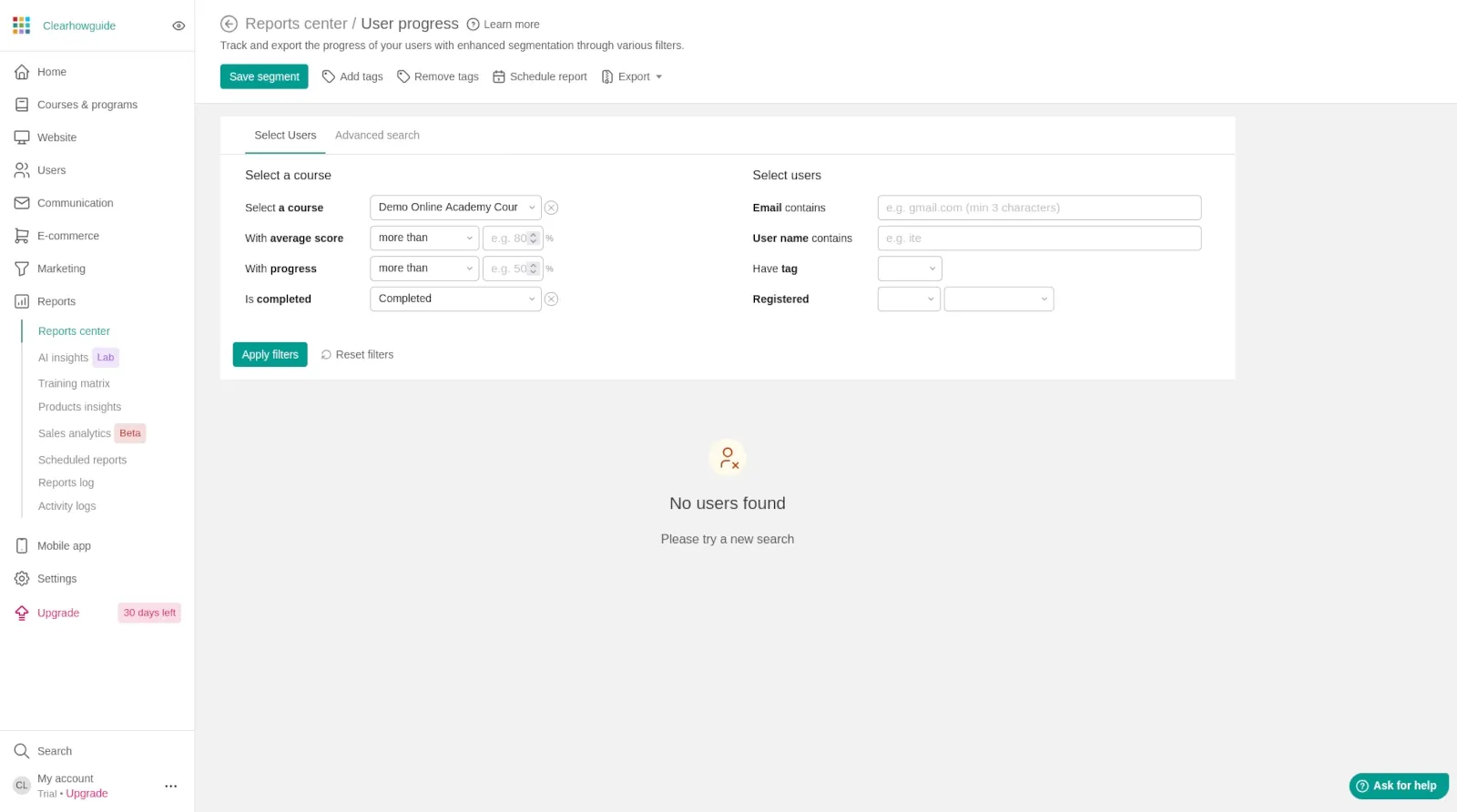
LearnWorlds’ current plan structure gives more reporting capability as you move up the tiers. Learning Center is positioned for branded academies and training teams and includes scheduled course reporting among its listed features.
For a serious academy, we would treat reporting as part of the product decision, not an optional extra.
Is LearnWorlds good for coaches?
Potentially, yes — especially if the offer combines self-paced learning with live sessions, structured programs, reflection, assessments, progress tracking, and community.
LearnWorlds currently supports live 1:1 and group sessions and markets dedicated coaching workflows. That makes it more relevant to coaching businesses than a simple video-course host.
But “good for coaches” is too broad to settle in one paragraph. A solo coach selling occasional sessions has very different needs from a coaching academy running cohorts, subscriptions, assignments, and hundreds of clients.
For that reason, this review keeps coaching at the fit level rather than turning into a full coaching-platform guide.
Explore LearnWorlds for creators and coaching businesses
LearnWorlds pricing: the context you need for this review
This review intentionally does not reproduce every limit and feature in every plan. The purpose of this section is to answer one question: does the pricing structure make sense for the kind of product LearnWorlds is?
Prices checked on October 2, 2026:
| Plan | Monthly list price | Annual billing equivalent | Enrollment fee | Practical positioning |
|---|---|---|---|---|
| Starter | $29/month | $24/month | $5 per paid enrollment | Testing a first paid course |
| Pro Trainer | $99/month | $79/month | None | Solo trainers and small course businesses |
| Learning Center | $299/month | $249/month | None | Branded academies and training teams |
| Corporate | Custom | Custom | None | Multi-school and high-volume operations |
Temporary promotions can change what you pay today. Payment-processor fees, taxes, optional add-ons, and other business costs are separate from this comparison.
The important structural difference is the Starter enrollment fee.
If you are validating an idea, Starter can keep the subscription low.
If paid enrollments become regular, Pro Trainer deserves a closer look because it removes the fee and unlocks more serious selling and training capabilities.
Starter vs Pro Trainer break-even calculator
The simplest cost comparison is:
Monthly billing
- Starter estimated platform cost = $29 + ($5 × paid enrollments)
- Pro Trainer = $99
- The two are equal at 14 paid enrollments in a month
Annual billing equivalent
- Starter estimated platform cost = $24 + ($5 × paid enrollments)
- Pro Trainer = $79
- The two are equal at 11 paid enrollments in a month
This is a fee comparison, not a complete recommendation. Pro Trainer can be worth choosing earlier because of features. Starter can still be the better decision at a higher enrollment count if a promotion or other business factor changes the economics.
Enter your expected paid enrollments per month. This compares LearnWorlds subscription + Starter enrollment fees only.
Starter: $79.00/month estimated
Pro Trainer: $99.00/month
At 10 paid enrollments, Starter is $20.00 cheaper on subscription + enrollment fees.
Excludes payment processing, taxes, promotions, add-ons, refunds, and the value of plan-specific features.
Check today’s LearnWorlds pricing
Which plan would we shortlist?
For this review, the decision is simpler than a full feature matrix.
Starter
Shortlist Starter if you are validating a first paid course and want the lowest fixed subscription.
The main warning is the $5 paid-enrollment fee. It is easy to ignore when sales are low and much harder to ignore once volume grows.
Pro Trainer
Pro Trainer is the first plan we would examine for a serious small course business.
It removes the paid-enrollment fee and currently includes features such as subscriptions, memberships, payment plans, certificates, learning paths, integrations, and SCORM allowances that make the platform more useful as a real education business.
Learning Center
Learning Center makes more sense when the school is becoming an academy: more administrators, stronger reporting, deeper branding, automation, client-group training, and more operational complexity.
Corporate
Corporate is a custom-price tier for higher-scale and multi-school operations.
If you are already at this stage, the buying process should be based on requirements, support, security, service levels, limits, and implementation — not on a generic review article.
Who should choose LearnWorlds?
Serious course creators
LearnWorlds fits creators who want the course experience to feel like a structured product rather than a collection of files.
If assessments, certificates, interactivity, learner progress, or branded learning paths are part of what people are buying, the platform has a strong case.
Customer-education teams
This is one of the more interesting LearnWorlds use cases.
An implementation-focused reviewer in the source material described LearnWorlds as particularly strong when the primary goal is serving customers externally: product education, adoption, retention, certification, or paid education.
That is an experienced practitioner’s opinion, not a hard product limitation. LearnWorlds also markets employee training. But the underlying decision framework is useful: choose the platform around the audience that matters most.
Training businesses and academies
LearnWorlds becomes more attractive when you need multiple programs, reporting, certification, B2B delivery, or a branded academy.
This is also where its complexity becomes easier to justify because you are using more of the system.
Coaches building a scalable education product
LearnWorlds can fit coaches who are moving beyond one-to-one sessions and want courses, live sessions, learning activities, community, subscriptions, and a branded academy.
The fit is strongest when coaching is becoming a structured learning business, not merely calendar booking plus video calls.
Who should probably choose something else?
You only need to sell one simple digital product
A full LMS may be unnecessary overhead.
If the buyer needs a checkout, a download, and a few videos, a simpler platform may cost less and be easier to operate.
Marketing automation is your first priority
LearnWorlds has selling and marketing tools, but its strongest identity is still learning-first.
If sophisticated funnels, CRM workflows, campaign automation, and marketing operations matter more than instructional depth, a marketing-first platform may fit your priorities better.
You will not use the advanced learning tools
This is the most important budget test.
If you do not need assessments, certificates, interactive content, structured learning paths, reporting, or advanced training functionality, you should question whether the higher LearnWorlds tiers are creating value for you.
You need an employee-only LMS for a very large internal workforce
LearnWorlds can train employees, but one experienced implementation reviewer in the material we analyzed recommended comparing dedicated internal LMS products when employee training is the sole mission.
That is a use-case judgment rather than a claim that LearnWorlds cannot do internal training.
LearnWorlds alternatives: the short version
This section is intentionally brief. A real head-to-head comparison needs its own methodology and article.
| Platform | Consider it when… |
|---|---|
| Teachable | You want a simpler creator-focused course-selling experience and lower-friction entry is more important than advanced instructional depth |
| Thinkific | You want a broadly capable course platform with a somewhat simpler philosophy |
| Kajabi | Marketing, funnels, CRM-style workflows, and sales automation are more central to your business than learning-specific depth |
| LearnWorlds | Interactive learning, assessments, certificates, branded academies, SCORM, reporting, and the learner experience are central |
There is no universal winner. The right choice depends on what the learner must be able to do after buying your product.
Common mistakes before buying LearnWorlds
Choosing Starter only because it has the lowest subscription
Always include the paid-enrollment fee in the decision.
The break-even calculator above is a quick way to see when the fee alone closes the subscription-price gap with Pro Trainer.
Buying Learning Center for features you are not ready to use
A bigger plan does not automatically create a better school.
Upgrade when the missing capability has a clear operational or learner benefit.
Evaluating the admin dashboard but not the student experience
Your buyers do not care how impressive the settings page looks.
During the trial, enroll yourself as a student. Complete a lesson, take a quiz, test navigation, open the school on a phone, and look at the experience from the learner side.
Assuming the LMS will create demand
LearnWorlds can deliver and sell education. It cannot make an unwanted course valuable.
Validate the audience, offer, learning outcome, and price before spending months building.
Ignoring the tools around the LMS
Calculate the full stack.
If you still need external email marketing, CRM, support, analytics, webinar, or funnel tools, include those in your real monthly cost.
Security, privacy, and operational notes
LearnWorlds handles learner accounts, course activity, and integrations with payment systems and business tools. Treat the school as production software, not a hobby website.
At minimum:
- use a unique administrator password;
- enable available account-protection features;
- create separate administrator accounts instead of sharing one login;
- give team members only the permissions they need;
- review your privacy policy, refund terms, and data-handling obligations;
- test payment and enrollment flows before launching;
- keep offline copies of important course source files and business assets;
- verify what is included in your plan before promising a learner-facing feature.
For regulated, medical, financial, or enterprise training, do a separate compliance and data-processing review. A course-platform feature list is not a substitute for legal, security, or regulatory due diligence.
Faster alternative: use the 30-day trial as a decision test
LearnWorlds currently offers a 30-day trial with no credit card required.
That is long enough to run a useful evaluation if you treat the trial as a project instead of clicking around randomly.
During the trial, build only this:
- one short course with three to five lessons;
- one assessment;
- one interactive learning element;
- one branded landing page;
- one test enrollment from the learner side;
- one checkout or offer flow if selling is part of your model;
- one report or learner-progress check.
Then answer:
- Was building the learning experience intuitive enough?
- Did you use the features that justify LearnWorlds over a simpler platform?
- Which plan contains the capabilities you actually touched?
- What still requires another tool?
- Would you be comfortable maintaining this system every week?
That test is more useful than choosing from a comparison table alone.
Build a test school free for 30 days
No credit card is required to start the trial according to LearnWorlds’ current help documentation. Re-check the offer before signing up because trial terms can change.
Final verdict: is LearnWorlds worth it?
LearnWorlds is worth serious consideration when your competitive advantage is the quality of the learning experience.
That is the simplest conclusion after comparing the platform itself, current documentation, and the experienced-user feedback supplied for this review.
Its best features are not cosmetic. Structured learning, assessments, certificates, interactive video, SCORM, reporting, branded academy tools, and more advanced training workflows can materially change what you are able to deliver.
But LearnWorlds is not automatically good value because it has many features.
The real question is:
Will your learners and your business actually benefit from the features that make LearnWorlds more expensive than a simpler platform?
If the answer is yes, LearnWorlds belongs on the shortlist.
If the answer is no, paying for a more advanced LMS can become complexity without return.
For most serious small course businesses, we would compare Pro Trainer carefully against Starter rather than defaulting to the cheapest plan. For advanced academies and training teams, Learning Center is where more of the platform’s higher-end value becomes relevant.
And before paying for any of them, use the 30-day trial to build something real.
FAQ
Is LearnWorlds good for beginners?
Yes, but it depends on the beginner.
A first-time creator can build a course without coding, but LearnWorlds has more depth than a very simple course seller. A beginner who wants to build a serious academy may appreciate that room to grow. A beginner selling one small digital product may prefer something simpler.
Is LearnWorlds expensive?
It can be.
Starter has a low fixed subscription but adds a $5 fee per paid enrollment. Pro Trainer and Learning Center remove enrollment fees but increase the subscription cost.
The more useful question is whether you use the advanced learning features enough to justify the total cost.
Does LearnWorlds have a free trial?
Yes. At the time of this review, LearnWorlds offers a 30-day free trial and says no credit card is required to start it.
Trial terms can change, so verify the current offer before signing up.
Does LearnWorlds charge transaction or enrollment fees?
Starter currently charges $5 per paid enrollment.
Pro Trainer, Learning Center, and Corporate are listed without LearnWorlds enrollment fees on the current pricing page.
Payment processors can still charge their own fees.
Which LearnWorlds plan should I start with?
Use Starter if you are testing demand and want the lowest subscription commitment.
Compare Pro Trainer carefully if you expect regular paid enrollments or need the capabilities it adds.
Learning Center is aimed at more developed academies and training teams.
A future detailed pricing analysis should consider exact limits and features, not only subscription price.
Is LearnWorlds good for coaching?
It can be a strong fit for structured coaching businesses that combine learning content, live sessions, programs, assessments, community, and progress tracking.
A coach who only needs scheduling and video calls may not need a full LMS.
Is LearnWorlds better than Teachable?
Not in every situation.
LearnWorlds has a stronger learning-experience case when interactive learning, assessments, certificates, SCORM, and academy features matter.
Teachable may be more attractive when a simpler creator selling experience is the priority.
A detailed head-to-head comparison should be treated as a separate buying decision.
Is LearnWorlds good for employee training?
It can be used for employee training, and LearnWorlds actively supports business training use cases.
However, if your only requirement is large-scale internal employee learning, compare dedicated internal LMS products as well.
Does LearnWorlds include AI tools?
Yes. LearnWorlds currently integrates AI into course creation and assessment-related workflows, and it documents an AI Feedback Assistant for learner assessment feedback.
We would treat AI as a productivity layer, not the main reason to choose the platform.
Does LearnWorlds have a mobile app?
LearnWorlds offers a branded mobile app as an add-on on eligible paid plans.
Whether the add-on makes financial sense depends on your audience and mobile-learning requirements, so the app deserves its own evaluation rather than being treated as a checkbox in this review.
Last tested
Tested on:
- LearnWorlds web app areas documented in this review;
- LearnWorlds public pricing page;
- LearnWorlds Help Center documentation.
Last reviewed: October 2, 2026.
Pricing, trial terms, plan names, limits, features, and add-ons can change. Check the current official LearnWorlds pricing and help documentation before purchasing.
Related guides
Carefully selected guides to help you understand the topic and complete the next useful step.