Quick answer
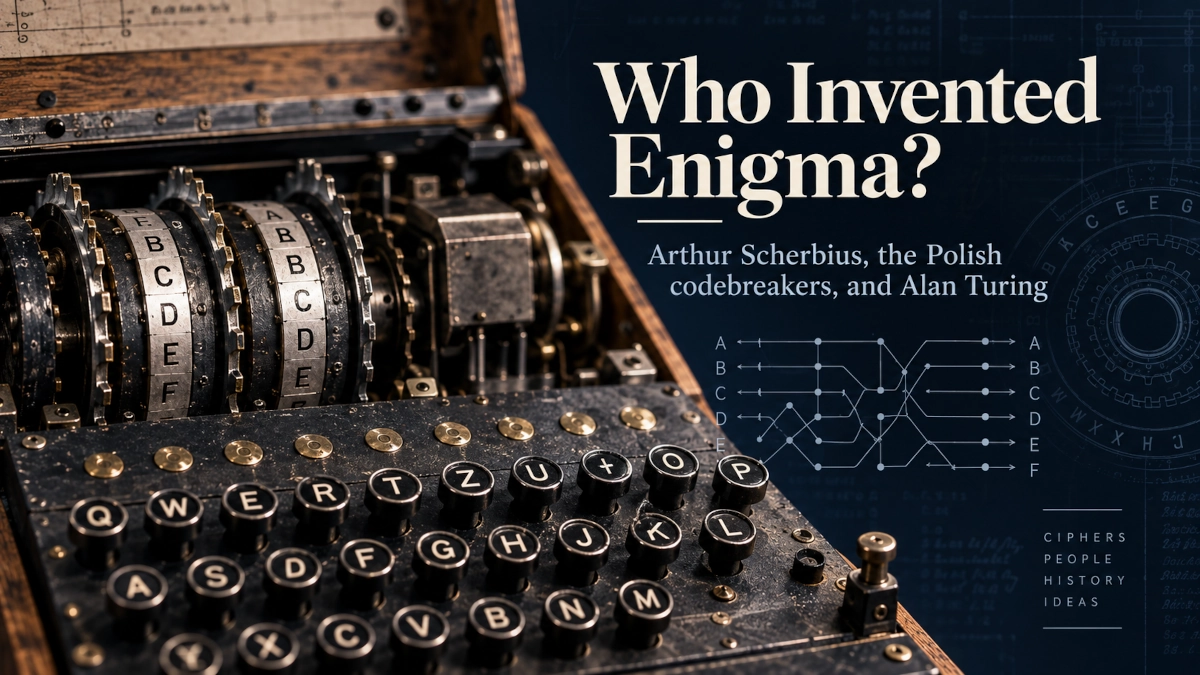
The Enigma Machine Simulator is an educational, browser-based laboratory for exploring the operating principles of a three-rotor Enigma I machine. Instead of simply turning plaintext into ciphertext, it is designed to show why the output changes.
Use it to type a letter or message, watch the rotors step, follow the signal through the plugboard, rotors and reflector, compare different starting positions, and see how the same machine settings can be used for both encryption and decryption.
The simulator is designed for learning. It models the core behaviour of a three-rotor Enigma I configuration, including historical rotor wiring, rotor stepping, ring settings, plugboard connections and reflector behaviour. It does not attempt to reproduce every Enigma model, wartime operating procedure, codebook or cryptanalytic attack.
Educational historical cipher: Enigma is historically important, but it is not secure for modern communication. Do not use this simulator to protect passwords, private messages, financial information or other sensitive data.
When to use this simulator
Use this page when you want to understand how Enigma encryption behaves, not just read about it.
It is especially useful for students, teachers, computing-history learners and anyone studying introductory cryptography who wants to see how several mechanical ideas work together:
| Concept | What the simulator helps you observe |
|---|---|
| Rotor substitution | Each rotor transforms the electrical path through a fixed internal wiring |
| Rotor stepping | The machine state changes as letters are processed |
| Reflector behaviour | The signal is redirected back through the rotor stack |
| Plugboard swaps | Selected letter pairs are exchanged before and after the rotors |
| Reciprocal encryption | The same configuration can encrypt and decrypt |
| Key dependence | A small change in the starting settings can change the entire ciphertext |
If your main question is historical — who invented Enigma, who first broke it, or what Alan Turing, Gordon Welchman and the Polish cryptanalysts actually contributed — read the companion guide: Who Invented the Enigma Machine? Arthur Scherbius, How It Worked, and Who Broke It.
Before you start
You do not need previous knowledge of cryptography.
The simulator is intended to make the machine understandable by experimentation, but three ideas are useful before you begin:
- Enigma works with the letters A–Z. Spaces and punctuation are not part of the historical electrical alphabet used by the machine.
- The machine changes state as it processes letters because its rotors step.
- Encryption depends on the complete starting configuration. To reproduce or decrypt a message, the relevant starting settings must be restored.
The default learning configuration uses three rotors in a simple starting state so you can begin immediately. Advanced controls are intended for readers who want to explore rotor order, ring settings, the reflector and plugboard connections in more detail.
Interactive Enigma Machine Simulator
The interactive simulator belongs here, before the longer explanation sections. The page is designed so that a reader can experiment first and use the sections below to explain what they observed.
Initial settings
- Rotors
- I — II — III
- Ring
- A — A — A
- Position
- A — A — A
- Reflector
- B
- Plugboard
- None
Current state
- Position
- A — A — A
- Letters processed
- 0
- Last input
- —
- Last output
- —
ConfigurationSettingsShow or hide
No connections
0 / 10 pairs
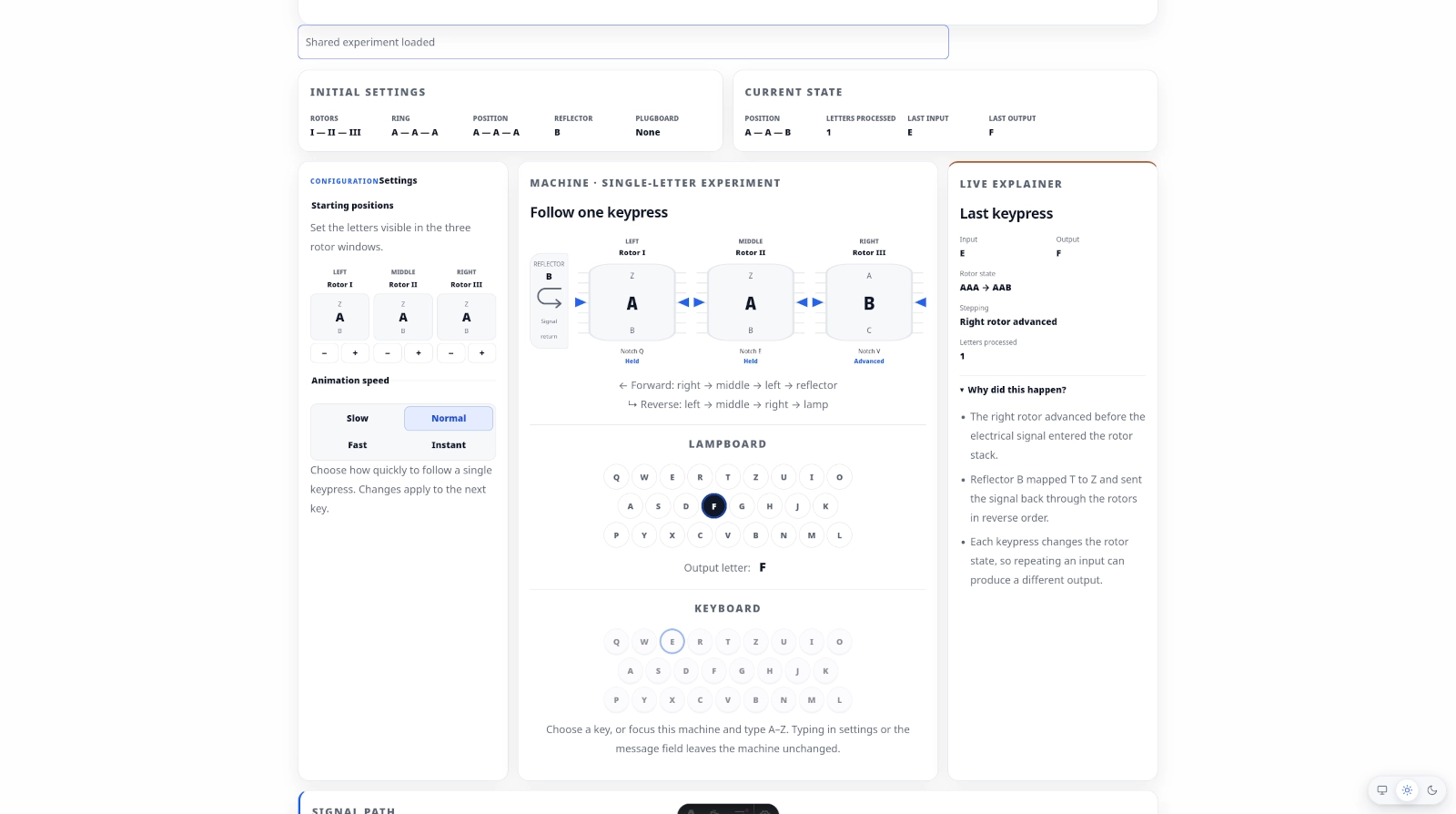
Machine · single-letter experiment
Follow one keypress
← Forward: right → middle → left → reflector
↳ Reverse: left → middle → right → lamp
Lampboard
Output letter: —
Keyboard
Choose a key, or focus this machine and type A–Z. Typing in settings or the message field leaves the machine unchanged.
Signal path
Inside the last keypress
Press a key to trace its path through the machine.
Message workspace
Process a message
Only A–Z enters the machine. Spaces, punctuation, digits and other characters do not advance the rotors.
Message controls
Playback
Step processes one normalized letter. Play processes one complete key animation at a time.
Letter history
Processed message letters
No message letters processed yet.
| # | Input | Output | Rotor state |
|---|
Try an experiment
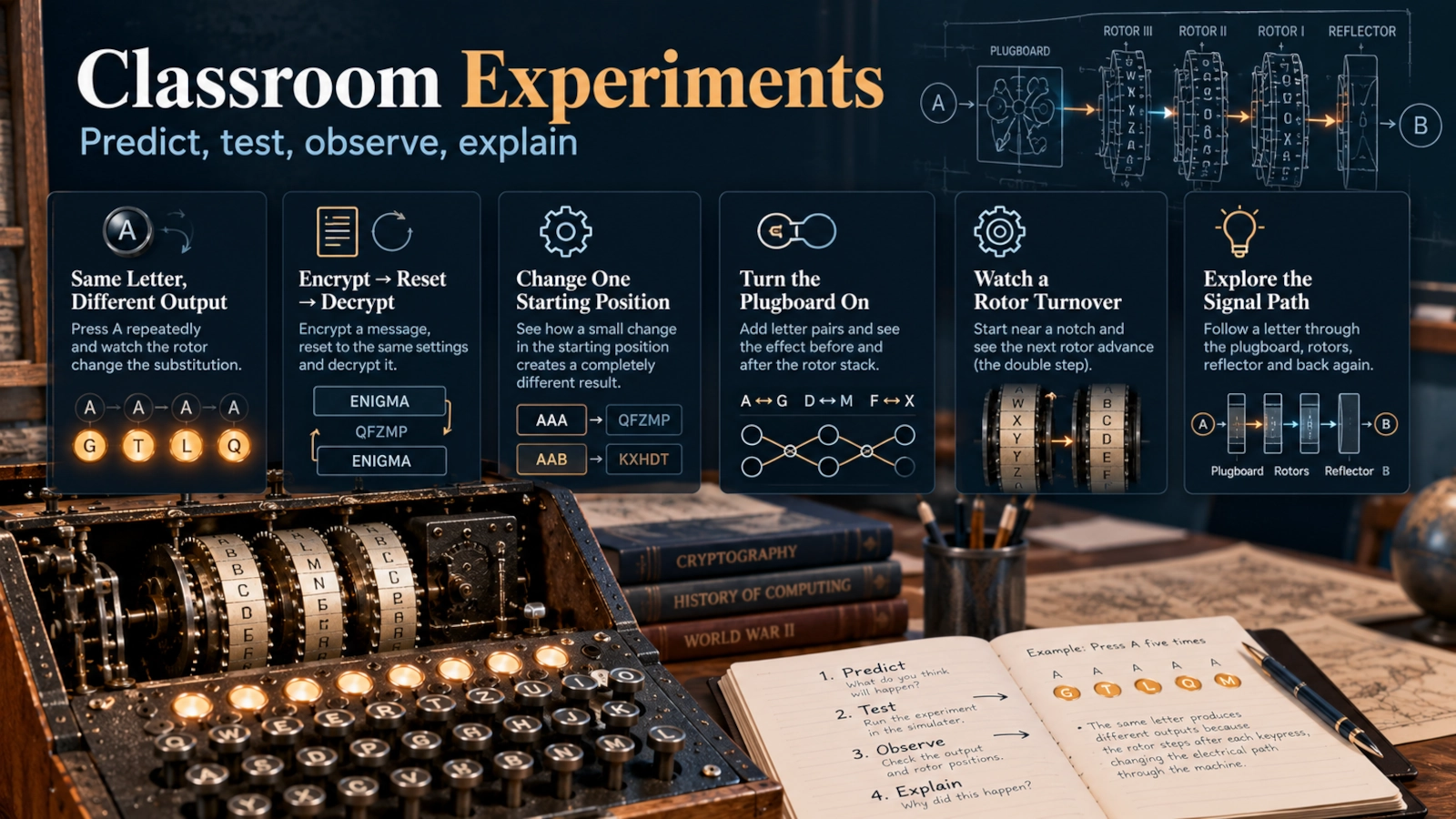
Six guided experiments
Each experiment loads a real machine configuration and message. Outputs are calculated only when you run the machine.
Same Letter, Different Output
Repeat one key and watch the substitution change as the right rotor advances.
Encrypt ENIGMA
Follow a short word through every electrical stage.
Encrypt → Reset → Decrypt
Prepare a deterministic example, then prove recovery in the Reciprocity Lab.
Change One Starting Position
Compare the same message with only the right rotor position changed.
Turn the Plugboard On
See a real A ↔ G swap before and after the rotor stack.
Watch a Rotor Turnover
Begin just before Rotor III reaches its V turnover notch.
Classroom experiment
Will the same letter encrypt to the same output twice?
Experiment
Press A five times using message Step.
Observation
- Run the experiment to collect real results.
Takeaway: Rotor stepping changes the substitution after every keypress.
Learning lab
Isolated machine experiments
These calculations use independent machine states and leave the active simulator unchanged.
Reciprocity
- Ciphertext
- —
- Recovered plaintext
- —
Compare Starting Settings
- Ciphertext A
- —
- Ciphertext B
- —
What the simulator should show while you experiment
The machine is designed to make its internal state visible rather than hiding everything behind an Encrypt button.
For each processed letter, the interface should show the starting rotor state, the state after stepping, the input letter, the final output letter and the complete signal path. In Basic mode, the configuration remains deliberately simple. Advanced mode exposes rotor order, ring settings, reflector selection and the plugboard.
The important idea is that the visualisation is not decorative. Every intermediate letter shown in the signal path should come from the actual simulator engine.
Try an experiment
The quickest way to learn Enigma is to load a controlled experiment and observe one concept at a time.
Same Letter, Different Output
Load a short sequence such as:
AAAAAA
Then process one letter at a time.
Watch the right-hand rotor advance before each encryption step. The input letter remains the same, but the electrical mapping changes as the rotor moves. The resulting output therefore changes as well.
What this teaches: Enigma is not a fixed substitution cipher. The substitution evolves as the machine state changes.
Encrypt ENIGMA
Load:
ENIGMA
Use Step instead of processing the whole word instantly.
For every letter, follow the signal from the keyboard through the machine and back to the lampboard.
What this teaches: one output letter is the result of several transformations working together, not a single lookup.
Encrypt → Reset → Decrypt
Encrypt a short message, record the ciphertext, then reset the machine to the original configuration and enter the ciphertext.
With the same starting configuration, the original plaintext should reappear.
What this teaches: Enigma’s electrical design is reciprocal. The same machine configuration can be used in both directions.
Change One Starting Position
Encrypt the same message twice:
- first with starting positions
AAA; - then with
AAB.
Compare the two ciphertexts.
What this teaches: changing only one rotor position changes the subsequent encryption sequence.
Turn the Plugboard On
Start with the plugboard disabled. Process a short message, then create several plugboard pairs and repeat the experiment from the same rotor settings.
What this teaches: the plugboard transforms selected letters before the signal enters the rotor stack and again after it returns.
Watch a Rotor Turnover
Load a preset that begins near a rotor turnover position and process letters one at a time.
Watch the next rotor advance when the active rotor reaches its turnover condition.
What this teaches: Enigma’s stepping mechanism is more subtle than a simple counter that advances the next wheel after exactly 26 ordinary steps.
Classroom experiment: predict before you press
A simulator becomes more useful educationally when the learner makes a prediction before seeing the answer.
Try this short investigation:
Question: Will the same input letter always produce the same encrypted output?
Prediction: Choose Yes or No before running the experiment.
Experiment: Reset the simulator to its default state and press A five times.
Observation: Record each output letter and the rotor position after every keypress.
Explanation: The right-hand rotor advances as letters are processed. Because the rotor position is part of the electrical mapping, the substitution changes.
Takeaway: Enigma behaves as a changing polyalphabetic rotor cipher rather than a fixed letter-for-letter substitution.
A teacher can extend the same structure to other questions: What changes if the starting position moves by one letter? What changes when the plugboard is activated? Can the ciphertext be turned back into plaintext after restoring the original configuration?
How to use the simulator
1. Start in Basic mode
Basic mode should open with a straightforward configuration:
- three rotors;
- default ring settings;
- default starting positions;
- Reflector B;
- plugboard disabled.
This removes unnecessary setup and lets you observe the central mechanism immediately.
2. Choose the starting rotor positions
Set a visible starting position for each rotor.
A configuration such as AAA is easy to remember for a first experiment. The starting position is part of the machine state and must be restored if you want to reproduce the same encryption later.
3. Type a letter or enter a message
You can experiment with a single virtual key or enter a short message.
For message input, the simulator should normalise the text to the machine alphabet. For example:
Hello, world!
becomes:
HELLOWORLD
Spaces and punctuation can be retained for display if useful, but only A–Z characters should advance the Enigma mechanism.
4. Use Step when you want to learn what happened
Step should process one character at a time.
For every character, watch:
- the rotor state before encryption;
- which rotors moved;
- the forward signal path;
- the reflector stage;
- the reverse path;
- the output letter.
Use Play when you want to watch a complete message automatically, and Instant when you only need the final result.
5. Open the signal-path explanation
After a keypress, inspect the complete route through the machine.
A conceptual path is:
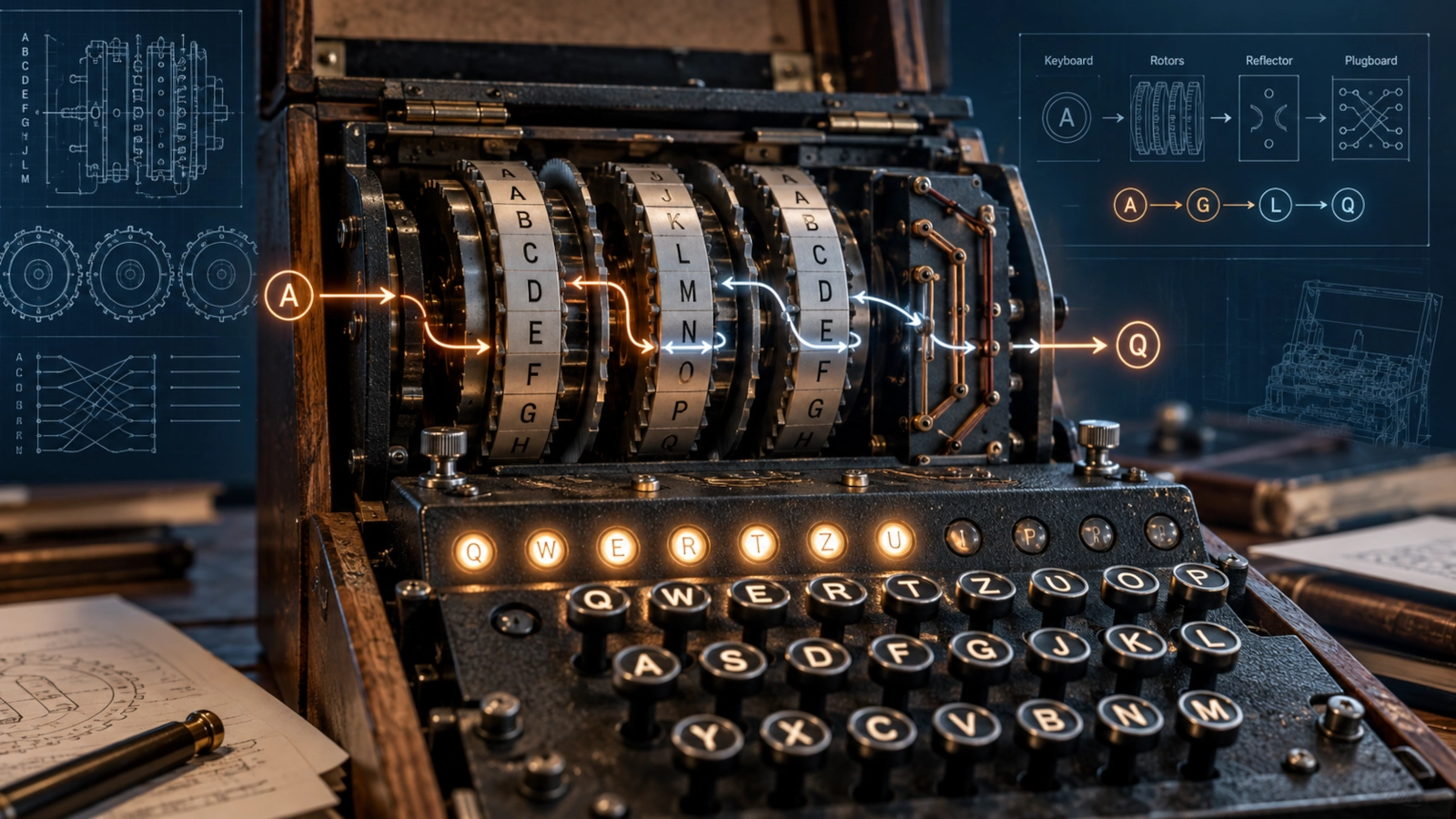
Keyboard → Plugboard → Right rotor → Middle rotor → Left rotor → Reflector → Left rotor reverse → Middle rotor reverse → Right rotor reverse → Plugboard → Lampboard
The exact letters at each stage depend on the current configuration.
6. Reset to the original state before reproducing or decrypting a message
A reset must restore the machine’s starting configuration, not merely clear the visible text.
If the rotors have already moved and you enter the ciphertext without restoring the original state, you should not expect to recover the plaintext.
What happens when you press a key?
An Enigma keypress combines a mechanical state change with an electrical transformation.
The rotor mechanism steps, changing the machine state. The electrical signal then enters the configurable substitution system. On a plugboard-equipped military Enigma, the signal can first be swapped by the plugboard before entering the rotor stack.
It then travels through the active rotors in one direction, reaches the reflector and returns through the rotors by the reverse electrical mappings. Finally, it passes through the plugboard again and illuminates an output letter on the lampboard.
That is why the simulator’s Signal Path view is central to the page. The final ciphertext letter is much easier to understand when you can see the transformations that produced it.
Understanding the rotors
A rotor contains 26 electrical contacts and an internal permutation connecting one side to the other.
You can think of it as a scrambled electrical alphabet. A signal entering one position leaves through another according to the rotor’s fixed internal wiring.
Three different ideas are easy to confuse:
Rotor selection and order
The machine can use different rotors, and their order matters.
Rotor I followed by Rotor II followed by Rotor III does not behave like the same three rotors arranged in another order.
Starting position
The visible rotor position determines where the rotor is currently aligned when processing begins.
Starting at AAA and starting at AAB therefore represent different machine states.
Ring setting
The ring setting changes the relationship between a rotor’s alphabet ring, turnover position and internal wiring reference.
It is not simply another name for the visible starting position. Advanced mode should expose ring settings separately so learners can see that these are distinct configuration variables.
Stepping and turnover
The right-hand rotor normally advances as a key is processed. At turnover conditions, motion can propagate to another rotor.
A historically faithful educational simulator should also model the characteristic double-stepping behaviour of the common three-rotor mechanism rather than treating the machine as a perfect odometer.
What does the reflector do?
After travelling through the rotor stack, the signal reaches the reflector.
The reflector connects contacts in pairs and sends the current back through the rotor stack by another route. This makes the electrical transformation reciprocal: with the same machine configuration, typing ciphertext can recover the corresponding plaintext.
The reflector also creates a famous structural property of Enigma:
a letter cannot encrypt to itself at a given machine state.
That property later became useful to cryptanalysts when they tested possible plaintext guesses, but it did not make Enigma automatically easy to break.
Use the Encrypt → Reset → Decrypt experiment to observe the reciprocal behaviour directly.
How does the plugboard change the signal?
The plugboard, or Steckerbrett, adds another substitution layer.
Selected letters are paired. If A is connected to G, a signal arriving as A is changed to G before it reaches the rotor stack. On the return journey, the signal passes through the plugboard again.
A good educational interface should let you create pairs visually instead of requiring you to type cryptic configuration strings.
It should also prevent impossible settings:
- a letter cannot be paired with itself;
- one letter cannot belong to two plugboard pairs at the same time;
- the learning model should allow no more than ten pairs.
The Plugboard Lab is useful for comparing an otherwise identical machine with the plugboard disabled and enabled.
Why can the same letter encrypt differently each time?
This is the most important behaviour to observe.
Suppose you press A. The machine steps and produces one output letter.
Press A again. The right-hand rotor has moved, so the electrical mapping through the machine is now different.
The input has not changed. The machine state has.
That distinction is the key to understanding why rotor machines were more powerful than ordinary monoalphabetic substitution ciphers. Enigma continually changes the substitution as the rotors move.
The simulator should therefore display both:
Input: A
and:
Rotor state: AAA → AAB
before showing the output.
A learner can then connect the changing result to an observable mechanical cause.
How can the same settings encrypt and decrypt?
Enigma does not need separate encryption and decryption modes in the way modern software often presents them.
The reflector and reciprocal electrical path mean that the same configuration performs the reverse transformation when the ciphertext is entered from the same initial state.
The important condition is same initial state.
For example:
- configure the machine;
- encrypt
ENIGMA; - save the resulting ciphertext;
- reset to the exact original settings;
- enter the ciphertext.
The output should reproduce:
ENIGMA
If you forget to reset the machine, the rotors begin from the wrong state and the result will not match.
Compare two starting settings
One of the most instructive experiments is also one of the simplest.
Keep everything identical:
- same rotors;
- same order;
- same ring settings;
- same reflector;
- same plugboard;
- same plaintext.
Change only:
AAA
to:
AAB
Then encrypt the same message.
The resulting ciphertext sequence changes because the right-hand rotor begins from a different position, which changes the signal path from the first processed letter onward.
This is a practical demonstration of a general cryptographic idea: small changes to key material can produce very different outputs.
The simulator’s comparison mode should place the two results side by side so students do not need to remember or copy one result manually.
What this simulator models — and what it does not
Historical Enigma is not one universal machine. Different commercial, military and naval versions existed, and operating procedures changed over time.
For that reason, this simulator should make its scope explicit.
What it models
The first version is designed around the operating principles of a three-rotor Enigma I-style machine, including:
- the A–Z electrical alphabet;
- historical rotor wirings for the supported rotors;
- three active rotors;
- configurable rotor order;
- rotor starting positions;
- ring settings;
- Reflector B;
- plugboard connections;
- rotor stepping and turnover;
- double-stepping behaviour;
- reciprocal encryption.
What it does not model
The first version does not claim to reproduce:
- every commercial Enigma variant;
- the four-rotor Naval Enigma M4;
- every German service or network procedure;
- wartime key sheets and codebooks;
- radio transmission procedures;
- the Bombe or other cryptanalytic machines;
- Banburismus;
- Polish or British codebreaking workflows;
- the complete historical operator experience.
Those subjects belong to the broader history of Enigma rather than to the core educational simulator.
Common mistakes
Treating the visible rotor position and ring setting as the same thing
They are related configuration variables, but they are not interchangeable.
The visible starting position describes the rotor’s current rotational state. The ring setting changes the relationship between the alphabet ring and the rotor’s internal reference.
Advanced mode should keep them visually separate.
Encrypting a message and then trying to decrypt it without resetting
After encryption, the rotors have moved.
If you immediately enter the ciphertext from that later state, you are no longer using the original configuration. Reset the machine to the exact starting state first.
Assuming spaces and punctuation are encrypted like letters
The educational engine should process A–Z letters. Other characters can be preserved for readable display, but they should not advance the historical rotor mechanism.
Thinking the same input must always produce the same output
That would be true for a fixed substitution cipher, not for a stepping rotor machine.
Rotor movement changes the electrical mapping as the message progresses.
Assuming this simulator represents every historical Enigma
It does not.
The first version deliberately focuses on the three-rotor mechanism so the learning model remains accurate and understandable.
Using Enigma as modern encryption
Do not.
Historical rotor ciphers are valuable for education and the history of computing, not for protecting present-day secrets.
Security, privacy and safety notes
Your input should stay in your browser
The simulator is designed to perform its calculations locally in the browser.
It should not require a backend, user account, external encryption service or AI model to process the message you enter.
The implementation should not send simulator plaintext or ciphertext to PocketBase or another database.
Do not enter sensitive information
Even when processing is local, use the simulator only with educational text.
Do not enter real passwords, authentication secrets, banking information, private correspondence, medical information or other confidential material.
Enigma is not secure modern cryptography
A historically faithful Enigma simulation remains a simulation of an obsolete cipher system.
Modern secure communication uses entirely different cryptographic designs, key sizes, protocols and authentication mechanisms.
Scientific and historical limitation
The simulator is a teaching model.
Where historical variants differ, the interface should prefer clarity and explicitly state which machine configuration is being modelled instead of suggesting that one setup represents all Enigma machines.
Faster alternative
If you only want to understand the central idea, you do not need Advanced mode.
Use the default Basic configuration and run Same Letter, Different Output:
- reset the machine;
- press
Aseveral times; - watch the right-hand rotor advance;
- compare the output letters.
That single experiment demonstrates the most important mechanical idea: the machine’s substitution changes as the rotors step.
You gain speed and simplicity, but you will not explore ring settings, rotor order, plugboard configuration or the full signal path in as much detail.
Use this simulator in a classroom
The simulator is designed to support demonstration-based learning rather than passive reading.
A teacher can use it to ask students to make a prediction, run the same reproducible configuration and discuss the result.
Useful lesson prompts include:
Prediction: Will five presses of A produce five identical ciphertext letters?
Comparison: What changes when the starting state moves from AAA to AAB?
Reciprocity: Why does resetting the machine allow ciphertext to recover the original plaintext?
Plugboard: How does adding a single pair change the path before and after the rotors?
Turnover: What happens when a rotor reaches its turnover position?
Shared experiment URLs should preserve the relevant configuration so a teacher can give every student the same starting state.
The simulator is intended for demonstrations, lessons, coursework and independent study. When the public repository is available, teachers and developers will also be able to inspect the implementation and methodology.
Read the complete history of Enigma
The simulator focuses on mechanism.
For the historical story — Arthur Scherbius, the Polish Cipher Bureau, Marian Rejewski, Jerzy Różycki, Henryk Zygalski, Alan Turing, Gordon Welchman, the Bombe and Naval Enigma — read:
Who Invented the Enigma Machine? Arthur Scherbius, How It Worked, and Who Broke It →
The two pages are designed to complement each other:
history article → understand who created and broke Enigma
simulator → understand what the machine actually does
Open source and methodology
The Enigma Machine Simulator is planned as an open-source ClearHowGuide educational project.
The public repository will document the engine, historical scope, test strategy and embedding approach so that students, teachers and developers can inspect how the simulation works.
View the Enigma Machine Simulator source on GitHubThe implementation should keep the cryptographic engine independent from the interface. That separation makes it easier to verify rotor behaviour, stepping, reciprocity and plugboard rules without relying on visual animations as evidence that the engine is correct.
Before publication, the engine should be checked against independent historical reference data and test vectors for supported configurations.
FAQ
Is this an exact simulation of every Enigma machine?
No. The first version focuses on the operating principles of a three-rotor Enigma I-style machine. Historical Enigma families differed in rotors, reflectors, procedures and service-specific configurations.
Which rotors does the simulator use?
The planned Advanced mode supports the historically documented rotor set I–V, with three rotors active at a time. Basic mode uses a fixed learning configuration so beginners can start without configuring the entire machine.
Does the simulator include Naval Enigma M4?
Not in the first version.
The four-rotor Naval M4 is historically important, but it adds complexity that is better introduced after the three-rotor mechanism is clear.
Why does the same letter produce different results?
Because the rotors move.
The machine state changes as letters are processed, so the electrical path for the next A is usually different from the path used for the previous A.
Can an Enigma letter encrypt to itself?
In the reflector-based Enigma design modelled here, no. At a given machine state, the electrical structure prevents a letter from being returned as itself.
Why do I have to reset before decrypting?
Because encryption moved the rotors away from their original positions.
Reciprocal decryption works only when the ciphertext is processed from the same initial configuration that was used for encryption.
What is the difference between a starting position and a ring setting?
The starting position is the rotor’s visible rotational state when processing begins. The ring setting changes the alignment relationship between the alphabet ring and the rotor’s internal reference. They influence the machine differently and should be configured separately.
Does the plugboard change the rotors?
No.
The plugboard swaps selected letter pairs before the signal enters the rotor stack and again after the signal returns. The rotor wiring itself remains unchanged.
Does the simulator upload my message?
The planned implementation performs simulation locally in the browser and does not require message text to be sent to a backend or external encryption service.
Can I use this to protect a real secret?
No.
Enigma is historically significant but cryptographically obsolete. Use this simulator only for education, demonstrations and historical study.
Can I share an experiment with students?
Yes. The simulator is designed to support shareable URLs that encode the relevant experiment state, such as rotor order, ring settings, starting positions, reflector, plugboard and example text.
Will the simulator be available on GitHub?
Yes. The project is planned as an open-source educational tool with source code, tests, methodology notes and a citation file.
Last tested
Tested on:
- Simulator implementation: pending
- Historical scope and page specification reviewed against the ClearHowGuide Enigma project requirements
Last tested: 2026-09-24
Related guides
Carefully selected guides to help you understand the topic and complete the next useful step.